UMN:CLI User Manual
V8102
790
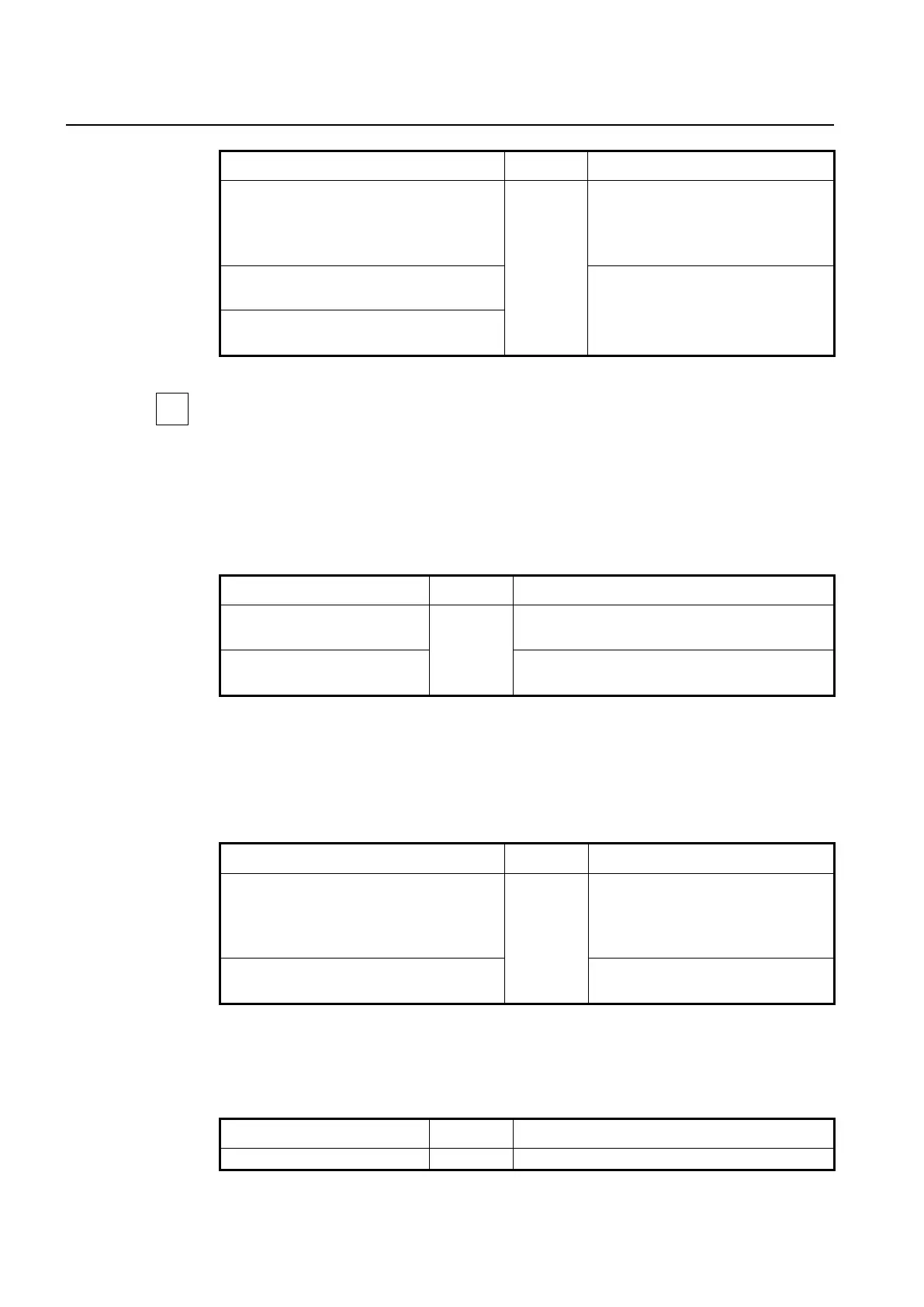
onu auto-upgrade model-name NAME start-
time <0-23> end-time <0-23>
Specifies the time to start auto upgrade of
ONU.
NAME: ONU model name
0-23: start/end time (unit: o’clock)
onu auto-upgrade model-name NAME start-
time disable
Deletes the specified time.
no onu auto-upgrade model-name NAME
start-time
To see the ONU model name, use show onu model-name command. (See 13.2.22 Dis-
playing ONU Information)
• Retry Count for Auto Upgrade
The retry count argument specifies how many times to retry the auto upgrading of ONU if
the first attempt fails. To specify the retry count of auto upgrade, use the following com-
mand.
onu auto-upgrade retry-count
<3-10>
Specifies the retry count of auto upgrade.
3-10 : retry count (default: 3)
no onu auto-upgrade retry-
count
Deletes the configured retry count.
(4) Configuration of ONU Restart
To use the upgraded ONU firmware, the ONU must restart.
You can configure the upgrade-completed ONU to restart at specified time. To specify the
time that the upgrade-completed ONU restarts, use the following command.
onu auto-upgrade reboot-time [NAME] {<0-
23> | immediately}
Specifies the time that the upgrade-
completed ONU restarts.
NAME: ONU model name
0-23: restart time (unit: o’clock)
onu auto-upgrade reboot-time [NAME] disa-
ble
Deletes the specified time.
(5) Enabling Auto Upgrade (on GPON Interface Configuration mode)
To enable/disable ONU auto upgrade on the specific OLT port, use the following com-
mand.
onu auto-upgrade {enable | dis-
Enables/disables ONU auto upgrade configuration on


 To Next Page