EasyManua.ls Logo

Dexcom G5 - Receiver Task Bar

Dexcom G5
410 pages
Print Icon
To Next Page IconTo Next Page
To Previous Page IconTo Previous Page
Loading...
Dexcom G5 Mobile System User Guide
167Home Screen, Rate of Change Arrows, and Errors
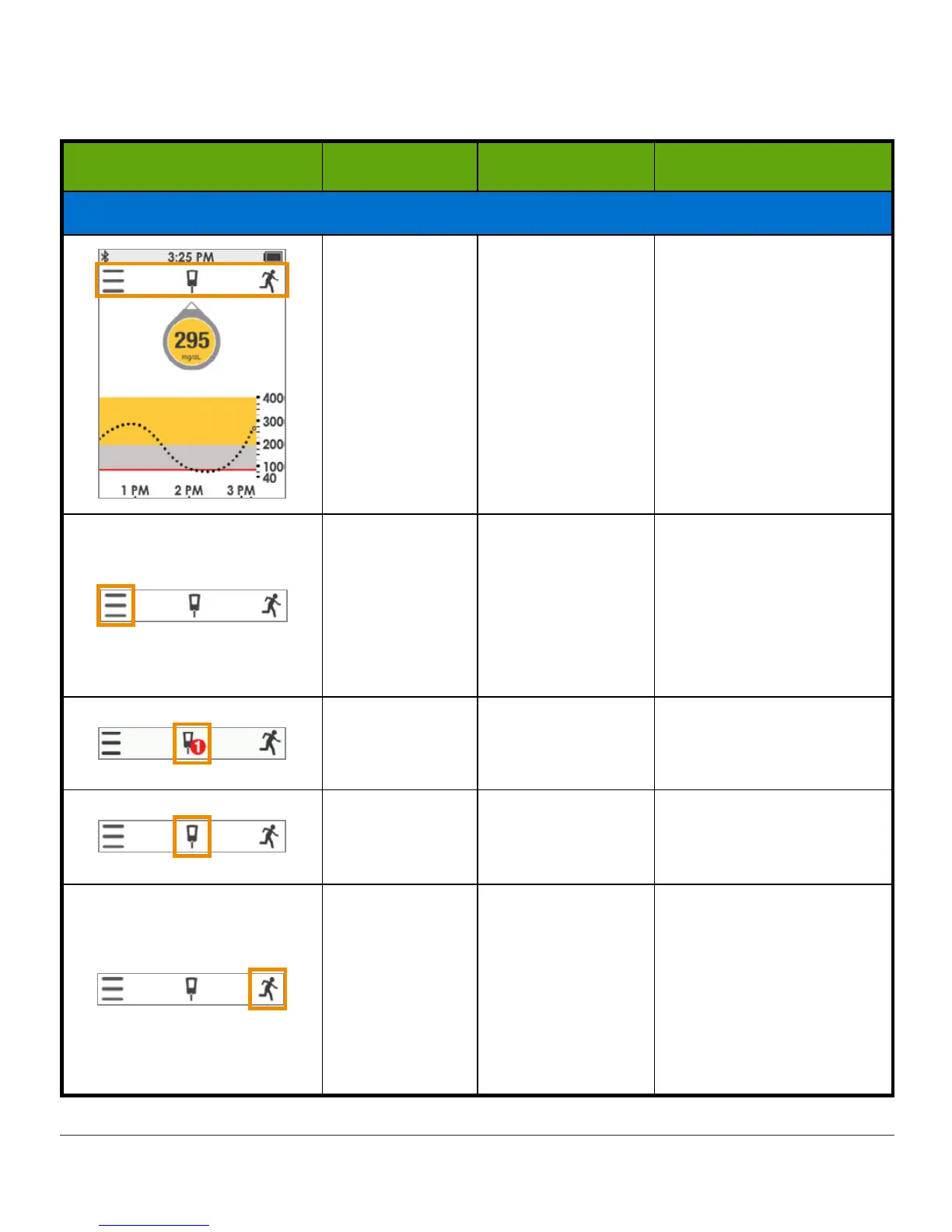
Receiver Task Bar
Receiver Name What it does What you do
Task Bar: System Information
Task Bar
Goes to the Main
Menu, enter BG
meter values,
and record
Events.
Tap applicable
icon
.
Main Menu
Goes to other
options.
Tap
Menu
to access:
Alerts
Settings
Sounds
Shutdown
Start/Stop Sensor
BG Meter with
red circle and
number
Calibration
Prompt.
Tap
icon
and enter
fingerstick BG value (see
Chapter 7).
BG Meter
without red
circle
No need to
calibrate.
Do nothing.
Events
Enter different
events, capturing
activities
affecting your
glucose.
Tap
icon
to enter data
for:
Carbs
Insulin
Exercise
Health
(See Chapter 10).

Table of Contents

Related product manuals