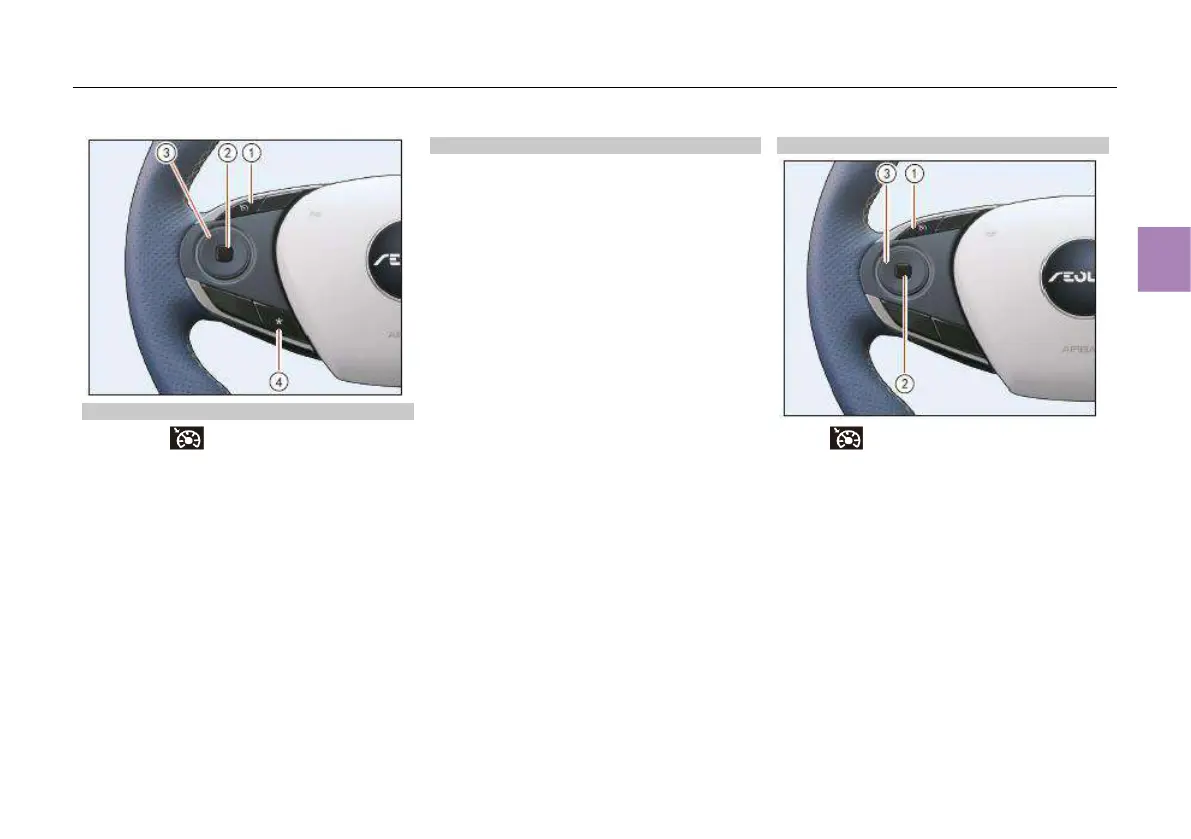
Adaptive cruise control button*
Press the button ① to activate the
adaptive cruise control if the activation
conditions are met; Press the button ② to
temporarily cancel the adaptive cruise control;
Press the right side of round switch ③ to adjust
the set following distance.
Press the left side of round switch ③ to switch
between adaptive cruise control (ACC) and
intelligent cruise assist (ICA).
Press the upper part of round switch ③ to
resume the ACC or increase the cruising speed;
press the lower part of round switch ③ to
activate the ACC or decrease the cruising
speed.
(See page 147 for details)
Custom function buttons
Through “CarCenter” – “Body settings” –
“Convenient” – “Steering wheel * button settings”
in MP5, you can set custom button functions,
including LKA*, IHBC*, AVM* and parking SayHi.
After the setting is completed, press the button
④ to perform the defined functions.
Cruise control buttons
Press button ① to activate the cruise
control.
Press button ② to temporarily cancel the cruise
control.
Press the upper part of round switch ③ to
resume the cruise control or increase the
cruising speed; press the lower part of round
switch ③ to set the cruise control or decrease
the cruising speed; press the left part of round
switch ③ to deactivate the cruise control.
(See page 145 for details)



 To Next Page