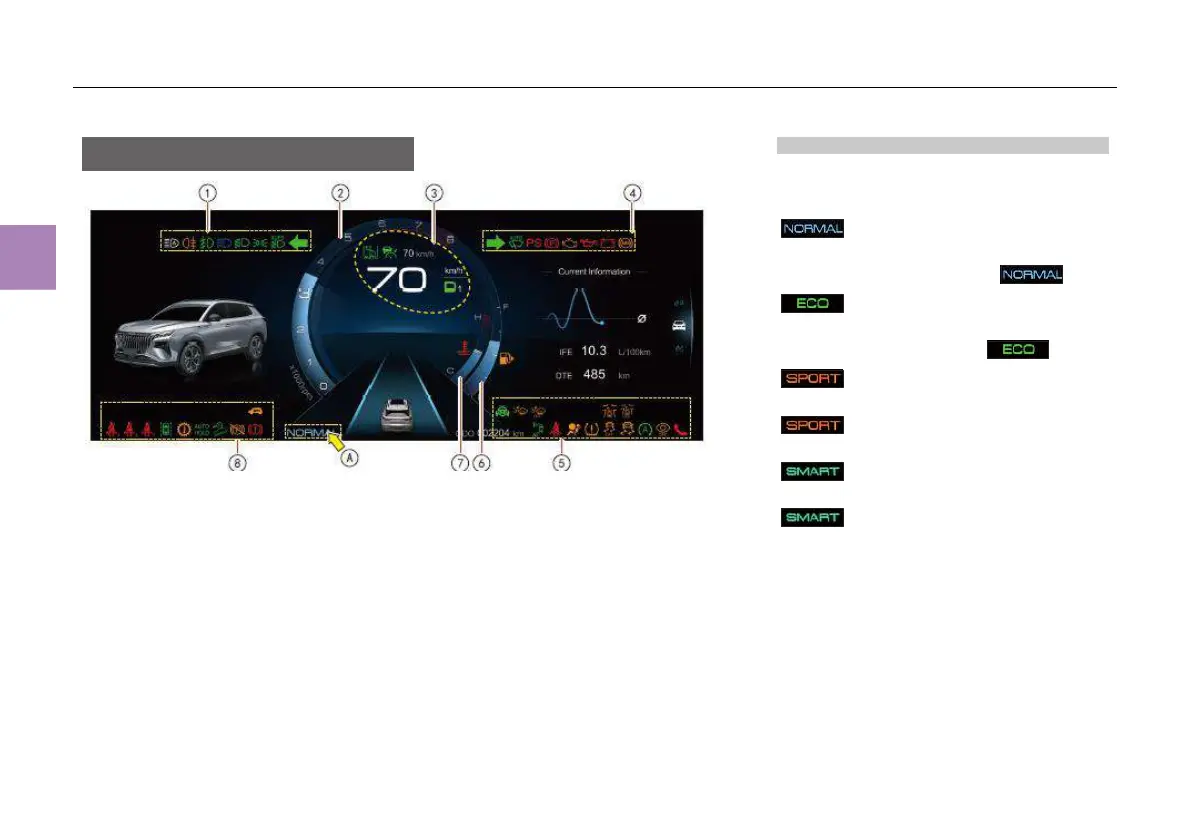
Driving mode display
A driving mode indicator lamp is displayed in the
area○
A
, and the driving mode can be switched by
operating the driving mode knob on the console.
Normal mode ON indicator lamp*
The vehicle is running in normal mode with the
normal mode ON indicator lamp on.
ECO mode ON indicator lamp*
The vehicle is running in ECO mode with the
ECO mode ON indicator lamp on.
Sport mode ON indicator lamp*
When the sport mode ON indicator lamp
comes on, the vehicle is operating in
the sport mode.
Intelligent mode ON indicator lamp*
When the intelligent mode ON indicator lamp
comes on, the vehicle is operating in
the intelligent mode.
(See page 132 for details)
● With the Engine start/stop button in “OFF”
position, the instrument cluster display will be
on for 10s and then go out if no other
information is displayed.
① Vehicle running indicator lamp
② Tachometer
③ Vehicle running indicator lamp, speedometer and
gear position
④ Vehicle running indicator lamp
⑤ Vehicle running indicator lamp
⑥ Fuel gauge
⑦ Coolant temperature gauge
⑧ Vehicle running indicator lamp
NOTE
This instrument cluster is of full LCD type, for which personal display can be set through “Settings” in the instrument
cluster and MP5 system.
● The above figure shows the default instrument display of instrument cluster.
● Depending on the vehicle configuration, a single-lane or three-lane screen will be displayed in the ADAS
interface:
- For models displaying the single-lane screen, the vehicle ahead (only car) will be displayed after the ACC is
activated.
- For models displaying the three-lane screen, the vehicle ahead (car, truck or motorcycle) will be displayed just
after the ADAS interface is turned on.



 To Next Page