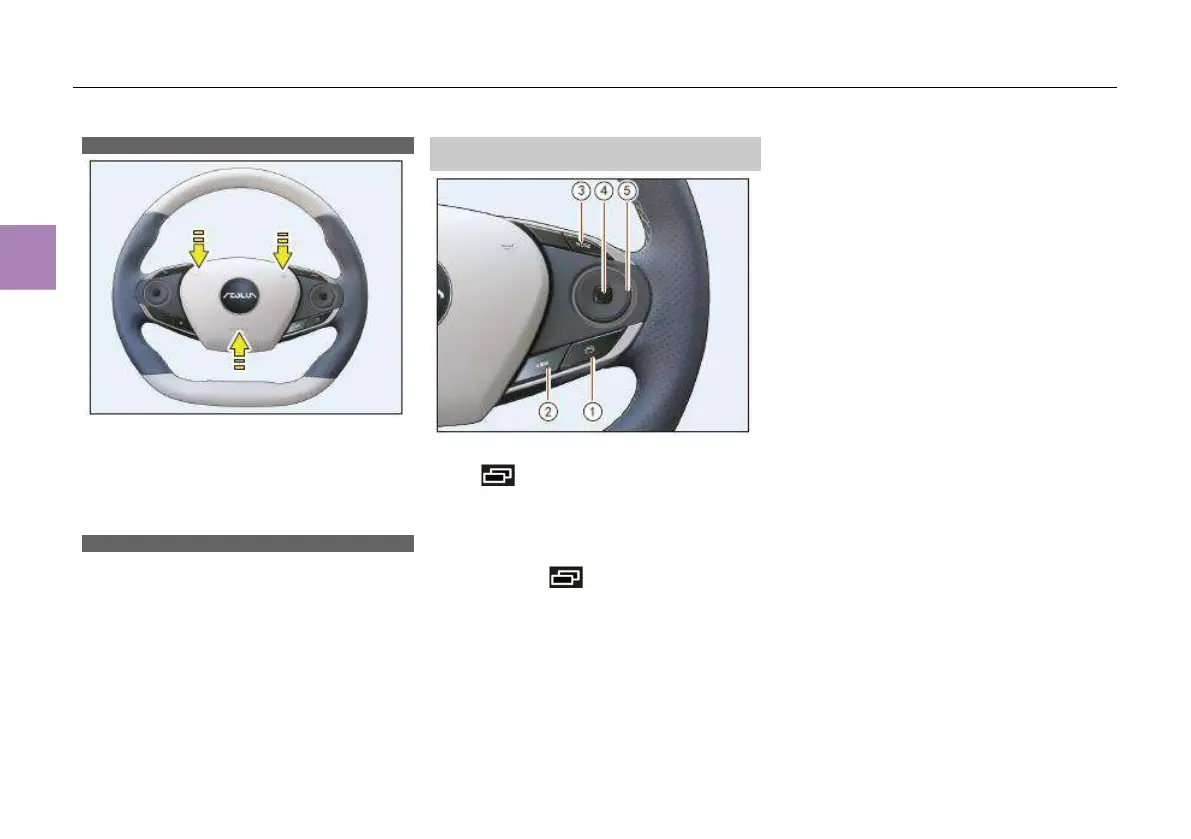
Horn switch
Press and hold any one of the 3 positions as
shown in the figure to sound the horn, and
release it to stop sounding.
The horn works all the time provided that the
battery has power, regardless of the position of
the ENGINE START/STOP button.
Steering wheel buttons
The steering wheel buttons applies smart TV
remote control logic. If the round switch on the
steering wheel is pressed, the corresponding
button function name will be displayed on the
instrument cluster.
Instrument cluster/MP5 system control
button
Instrument cluster control buttons
Press switching button ① for switching
between different driving information, including
trip A, trip B, maintenance mileage, music play,
instantaneous fuel consumption and range,
energy flow display (HEV model).
Press and hold page scrolling button ①
to reset trip A or B.
Press the “VIEW” button ② to confirm the
selection.
MP5 system/call control buttons
Press the upper part of the round switch ⑤ to
increase the volume; Press the lower part of the
round switch ⑤ to reduce the volume.
When playing media music such as USB music,
Bluetooth music, press the left side of round
switch ⑤ to play the previous track; press the
right side of round switch⑤ to play the next
track.
In case of incoming call, press the right side of
round switch ⑤; in case of incoming call/call,
press the left side of round switch ⑤ to
reject/hang up the call.
Press the “MODE” button ③ to switch between
“Call - Music- Radio”.
Press button ④ for playback or pause.



 To Next Page