When refueling, ensure that the vehicle is on
a flat road and the filling volume is more than
8L; otherwise the fuel gauge cannot detect
the change in fuel level.
Instrument cluster operation button
Press page scrolling button ① for
switching between different driving information,
including instantaneous fuel consumption and
range, trip A, trip B, maintenance mileage,
multimedia information.
Press and hold page scrolling button ①
to reset trip A or B.
Press “VIEW” button ② to switch the instrument
style (standard, panoramic navigation, AR
navigation*).
Driving information display
The vehicle information will be automatically
displayed when the ENGINE START/STOP
button is set in “ON” position. Common
information displayed includes gear information,
odometer, and vehicle speed.
After entering the driving information submenu,
press page scrolling button to view the
driving information, including trip A, trip B,
maintenance mileage, multimedia information,
instantaneous fuel consumption and range. If no
operation is performed within 5s during the
viewing of information, the system will return to
the interface originally entered.
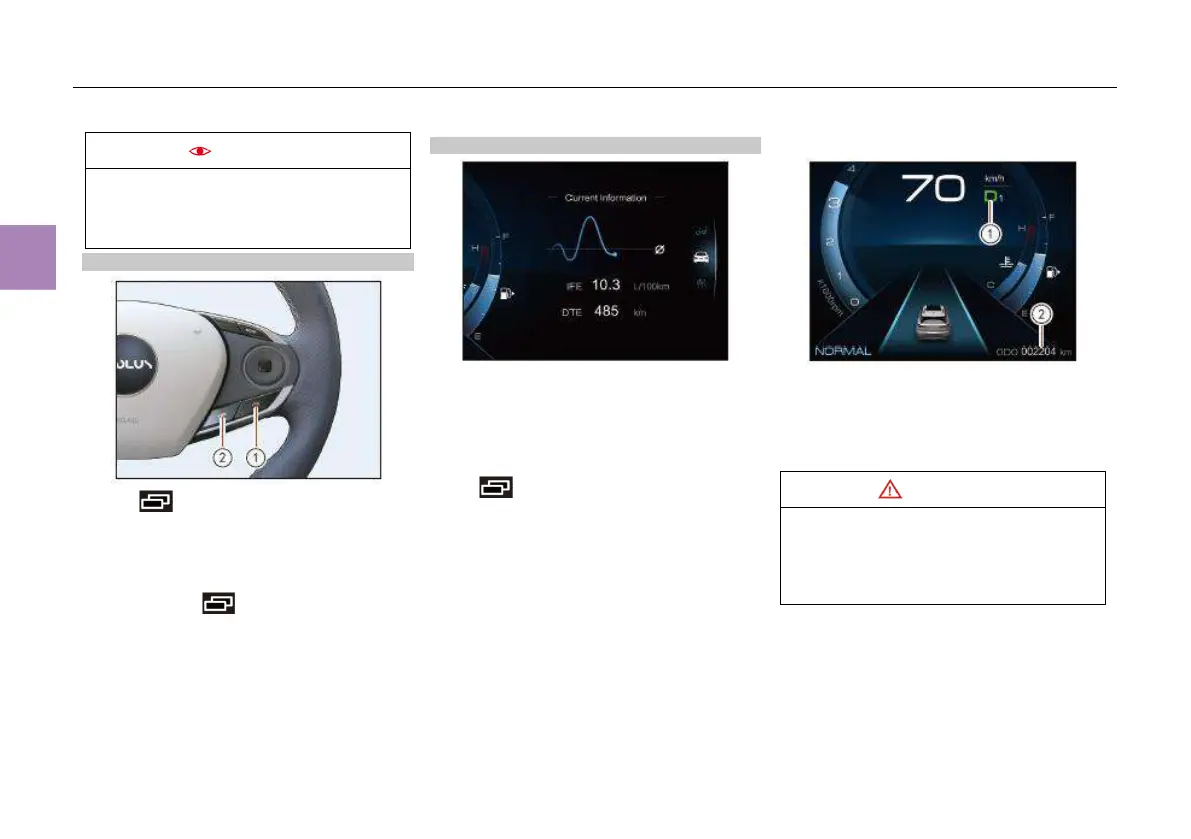
Gear position information and total mileage
① Gear position information: current gear
position “P”, “R”, “N”, “D1”, “D2”, “D3”, “D4”,
“D5”, “D6”, “D7”.
② Total mileage: the total mileage since the
vehicle left the factory, ranging 0km~999999km.
When the gear position displayed on the gear
position indicator flashes, the dual clutch
transmission is malfunctioning. Pull over
safely and contact the authorized dealer for
inspection.



 To Next Page