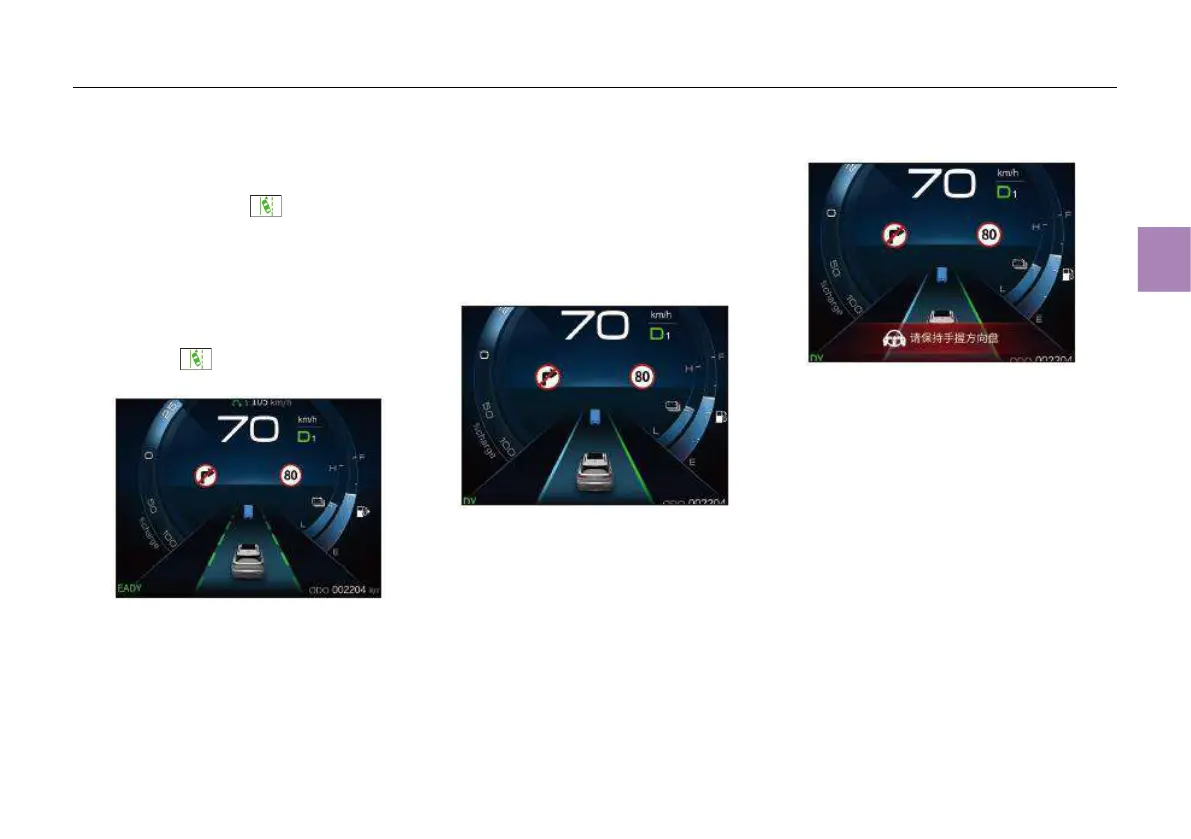
Function status description
When the ELK is enabled through MP5 and the
related system has no fault, the ELK status
indicator lamp (green) comes on. When
the above use conditions are met, the lane
markings displayed on the instrument cluster
changes from gray to green.
When the activation conditions are met and the
ELK function is enabled without inhibiting
conditions, the lane markings will be highlighted
in green. At this time, the ELK status indicator
lamp (green) on the instrument cluster will
go on:
When the activation conditions are met and the
ELK function is activated, the lane markings on
the activated side will change from green to blue,
and the steering wheel will have reverse torque
(for example, if the vehicle moves to the left lane
marking, it will change from green to blue, and
the steering wheel will deflect the vehicle to the
right):
To cancel the ELK function, turn off the ELK via
MP5.
When the driver does not apply a certain torque
to the steering wheel in a certain period of
time, the system will determine that the
driver’s hands have been off the steering
wheel, and the message “Please hold the
steering wheel by your hands” will appear
on the instrument panel, accompanied by a
beep. At this time, if the driver still does not
hold the steering wheel by hands, the system
will be deactivated.



 To Next Page