M2-22 031914
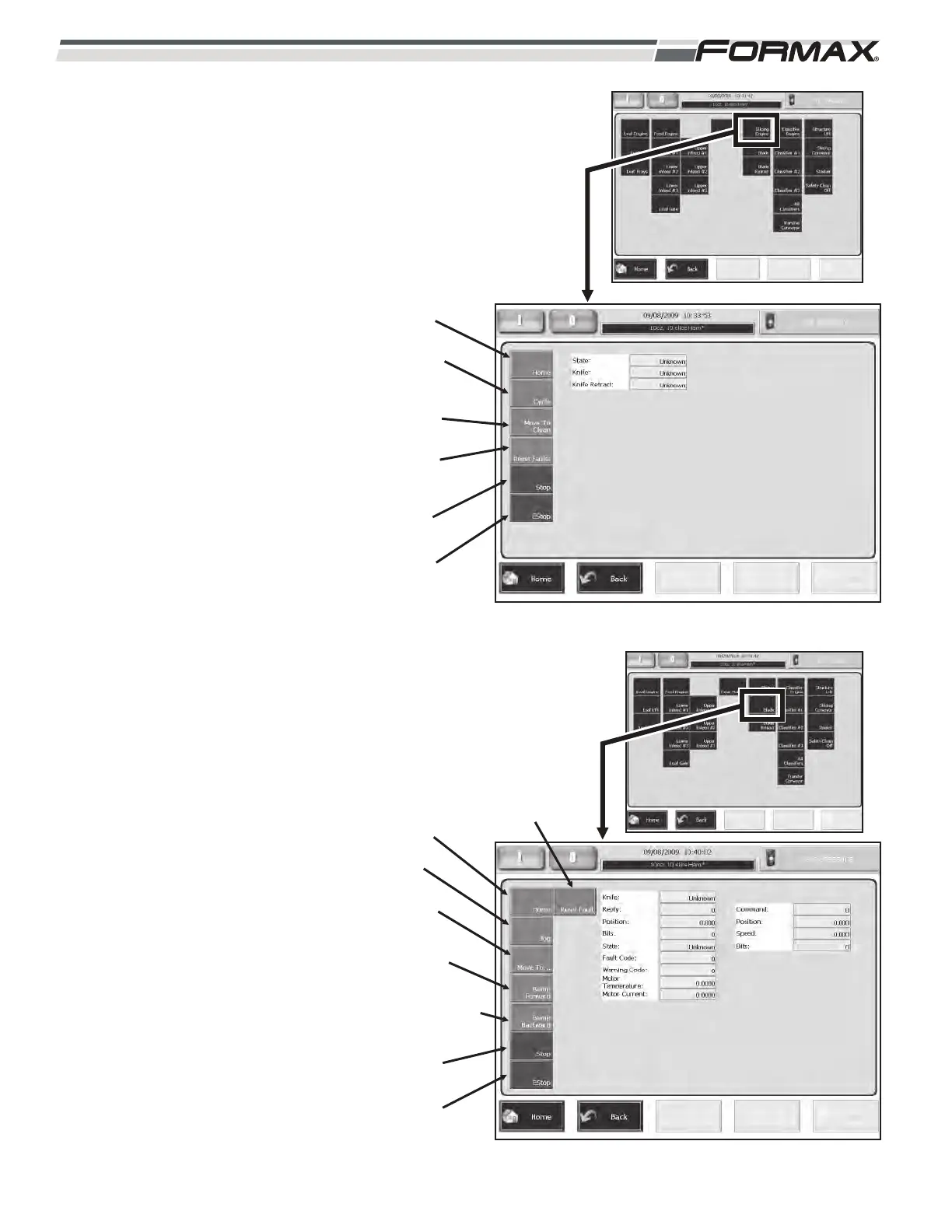
Slicing Engine: The Slicing Engine
screen allows you to check the
“operational” functions of the Knife
Blade. (Illustration 34)
Home: “Homes” the Knife Blade.
Cycle: “Cycles” the Knife Blade.
Move to Clean: Moves the Knife
Blade to the “Clean” position.
Reset Faults: Resets Faults.
Stop: Stops the “cycle” of the Knife
Blade.
EStop: Stops the movement of the
Knife Blade.
Blade: The Blade screen allows you to
check the operation of the Knife Blade.
(Illustration 35)
Home: “Homes” the Knife Blade.
Bump Forward: Moves the Knife
Blade forward in one degree
increments.
Bump Backwards: Moves the Knife
Blade backward in one degree
increments.
Reset Fault: Resets Faults.
Stop: Stops the “cycle” of the Knife
Blade.
E-Stop: Stops the movement of the
Knife Blade.
ILLUSTRATION 34
HOME
CYCLE
MOVE TO
CLEAN
RESET
FAULTS
STOP
ESTOP
ILLUSTRATION 35
HOME
BUMP
BACKWARDS
RESET
FAULT
STOP
ESTOP
BUMP
FORWARD
JOG
MOVE TO



 To Next Page