031914 M2-25
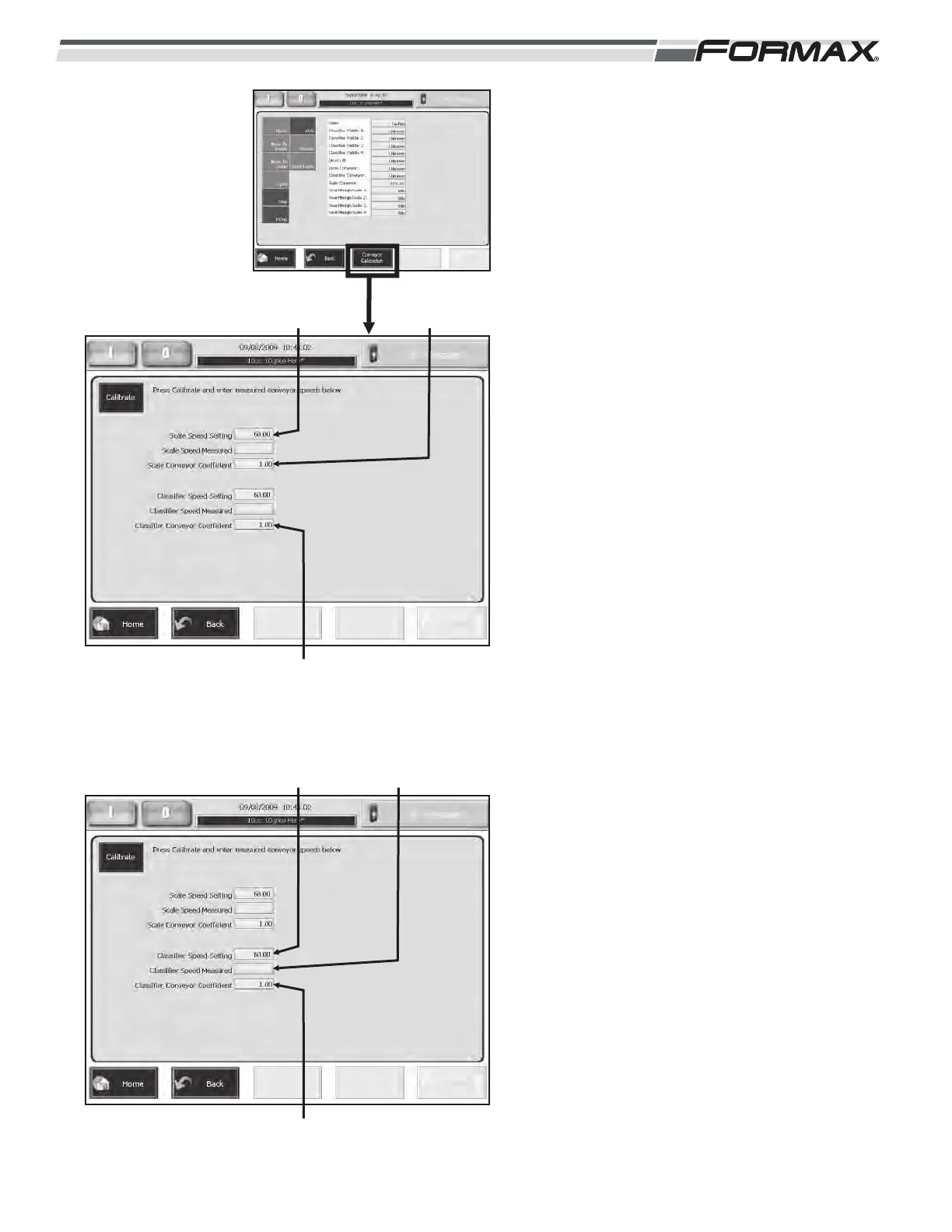
Conveyor Calibration: The Conveyor
Calibration screen allows you to fine-tune the
speed of the Scale Conveyors and the
Classifiers Conveyors. (Illustration 38) The
Calibration screen displays the speed that the
Scale Conveyor Belts and the Classifier
Conveyor Belts should be turning. To check and
calibrate the speed of the Conveyor Belts:
Calibrate the Scale Conveyors:
1. Measure the speed of the Scale
Conveyor belts with a Tachometer. If the
speed of the belts matches the speed in
the “Scale Speed Setting” window, the
conveyors are already calibrated.
2. If the speeds do not match, touch the
“Scale Speed Measured” button.
(Illustration 38)
3. Enter the “Measured Speed” in the
keypad and touch the “OK” button.
4. The Slicer Computer will create an Offset
Coefficient for the Conveyors to ensure
they run at the correct speed. This will
display in the “Classifier Conveyor
Coefficient” window.
Calibrate the Classifier Conveyors:
1. Measure the speed of the Classifier
Conveyor belts with a Tachometer. If the
speed of the belts matches the speed in
the “Classifier Speed Setting” window,
the conveyors are already calibrated.
2. If the speeds do not match, touch the
“Classifier Speed Measured” button.
(Illustration 39)
3. Enter the “Measured Speed” in the
keypad and touch the “OK” button.
4. The Slicer Computer will create an Offset
Coefficient for the Conveyors to ensure
they run at the correct speed. This will
display in the “Classifier Conveyor
Coefficient” window.
ILLUSTRATION 38
SCALE SPEED
SETTING
SCALE SPEED
MEASURED
CLASSIFIER CONVEYOR
COEFFICIENT
ILLUSTRATION 39
CLASSIFIER
SPEED SETTING
CLASSIFIER SPEED
MEASURED
CLASSIFIER CONVEYOR
COEFFICIENT



 To Next Page