031914 M4-49
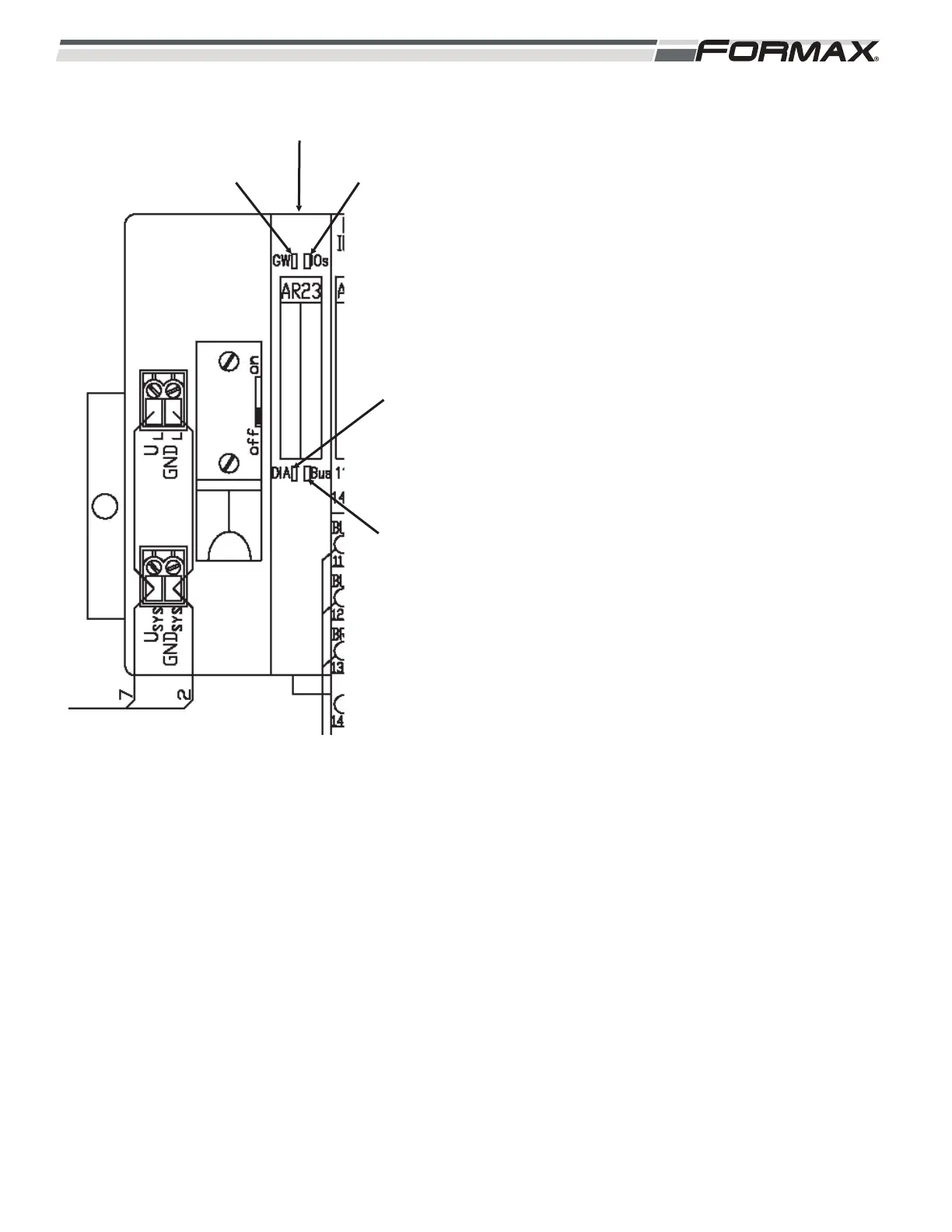
AR23 Gateway Module: The AR23 Gateway Module
transfers “Output” signals from the Computer to the
Output Modules and sends Input signals from the
“Input” Modules to the Computer. There are 4 “Status”
LED’s on the AR23 Module. (Illustration 120) The
LED’s are “GW,” IOs,” “DIA” and “Bus.”
GW LED: Reports the status of the “Control”
voltage operating the AR23 Node.
LED is Green: AR23 Module is operational.
LED is Flashing Green: Control Voltage is
present, but the Node is not ready for operation.
IOs LED: Reports the status of the Supply voltage
used to operate the components controlled by the
AR23 Node.
LED is Green: Supply Voltage is “On.”
LED is “Off”: No Power. Check Guards and
“Master Off” Buttons.
DIA LED: Reports Diagnostic “Fault” Status.
LED is “Off”: No “Faults” are present.
LED is Flashing Red: Fault has occurred.
Check Supply Voltage and DIA LED’s on the
rest of the modules.
BUS LED: Reports Status of the Profibus
Communication.
LED is Green: Good Communication.
LED is Red: No Profibus Communication.
ILLUSTRATION 120
DIA LED
IOs LED
BUS LED
GW LED
AR23 GATEWAY MODULE



 To Next Page