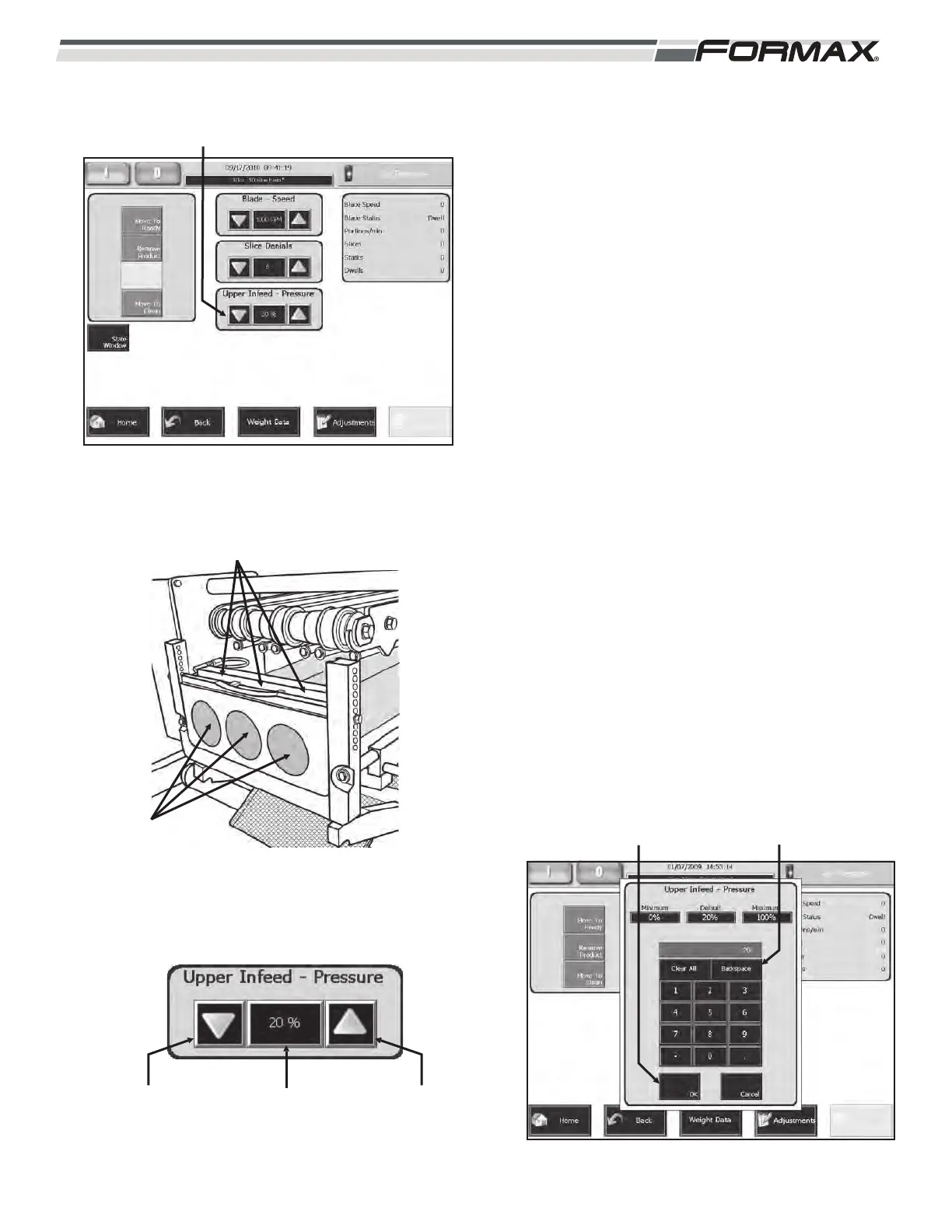
UPPER INFEED PRESSURE: The “Upper
Infeed Pressure” adjustment controls the amount
of air pressure that pushes down on the Product
Holddown Arms that hold the product near the
Shear Bar. (Illustration 37) This pressure helps
hold the product still, while the Blade slices the
product. The “Upper Infeed Pressure” is set as a
percentage of the available air pressure supplied
to the Slicer. (Illustration 36)
To adjust the Upper Infeed Pressure:
1. For small “pressure” adjustments, use
the “up/down” arrows next to the “Upper
Infeed Pressure” display window to
adjust the “percentage of air pressure.”
(Illustration 38)
2. For large pressure adjustments, touching
the “Upper Infeed Pressure” window will
display an adjustment keypad.
(Illustration 39) Enter the new setting on
the keypad and touch the “OK” button.
The new setting will take effect
immediately.
031914 6-15
ILLUSTRATION 36
“UPPER INFEED PRESSURE”
ADJUSTMENT
ILLUSTRATION 37
PRODUCT
PRODUCT HOLDDOWN ARMS
“INFEED TILT
PRESSURE”
WINDOW
“DOWN”
ARROW
“UP”
ARROW
ILLUSTRATION 38
ILLUSTRATION 39
ADJUSTMENT KEYPAD“OK” BUTTON



 To Next Page