CR Console Operation Manual
4 - 2 2008. 09 897N0519F
4.1 Operation Outline
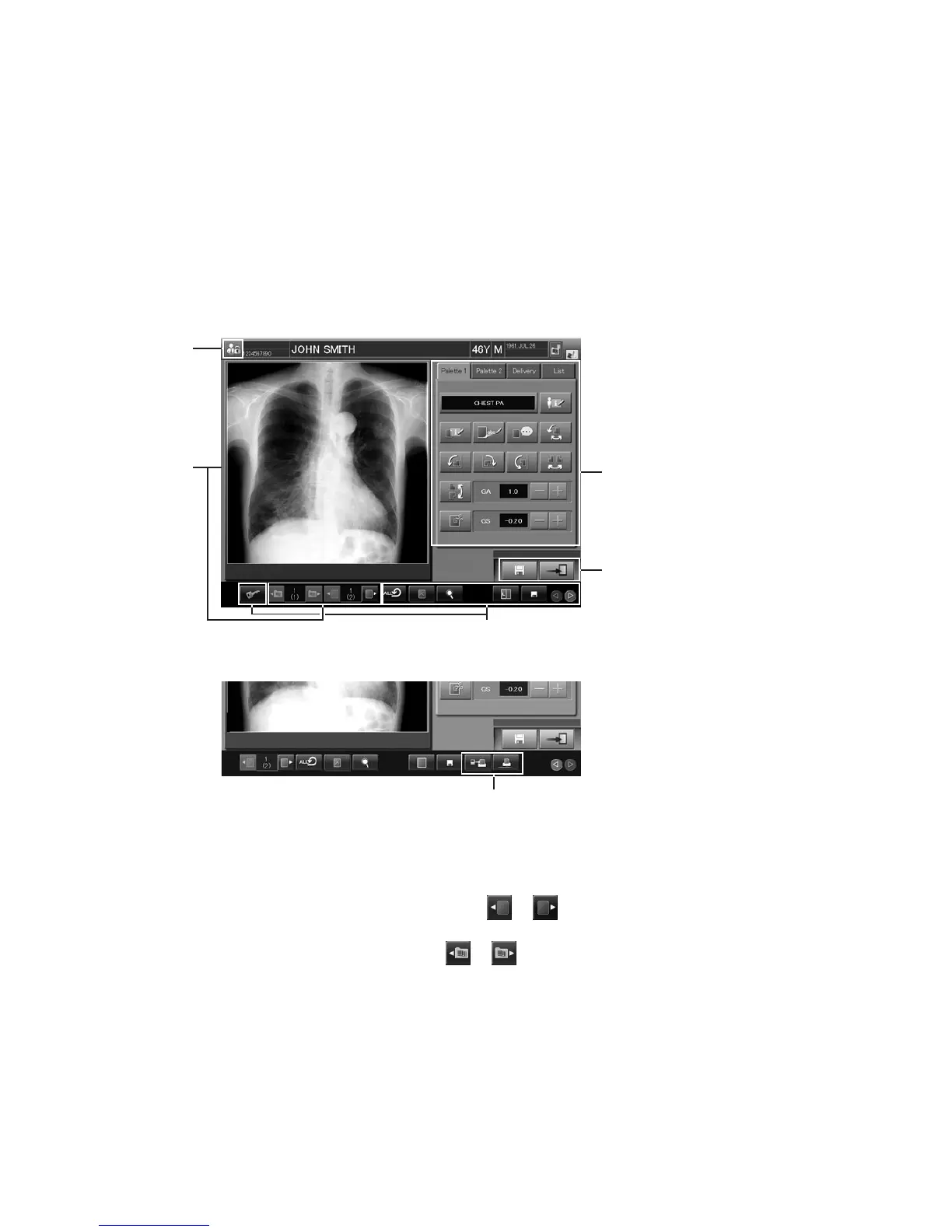
At the Image Edit Screen, the image editing is performed.
The Image Edit Screen has two kinds of screen for “by a study level” and “by an image level”.
• By a study level: Selects studies from individual lists and edits images appropriately.
• By an image level: Edits images selected on the “Study Execution Screen”.
Items editable on the “Image Edit Screen” are different whether by a study level or by an image level.
The following indicates an outline and steps of the operations.
1
3
2
6
5
4
“
Image edit screen
”
(1) Displaying Screen
Displays the screen when editing an image by a study level.
For a study that includes multiple images, selecting
or after the screen is opened will enable
the display of previous or next image.
When multiple studies are selected, selecting
or after an image is displayed will enable the
display of previous or next study. For details, see [
4.2 Displaying Screen
].
(2) Editing Images
Edits information of a displayed image in the [Palette], [Delivery] and [List] folders, when an image
is edited by a study level. Select each folder tab, and edit an information item appropriately.
When editing an image by an image level, you can edit information of a displayed image in the
[Palette] and [Delivery] folders of the Image Edit Screen. The [List] folder will not be displayed.
For details, see [
4.3 Editing
Images].



 To Next Page