CR Console Operation Manual
2 - 4 2008. 03 897N0519E
(1) Login
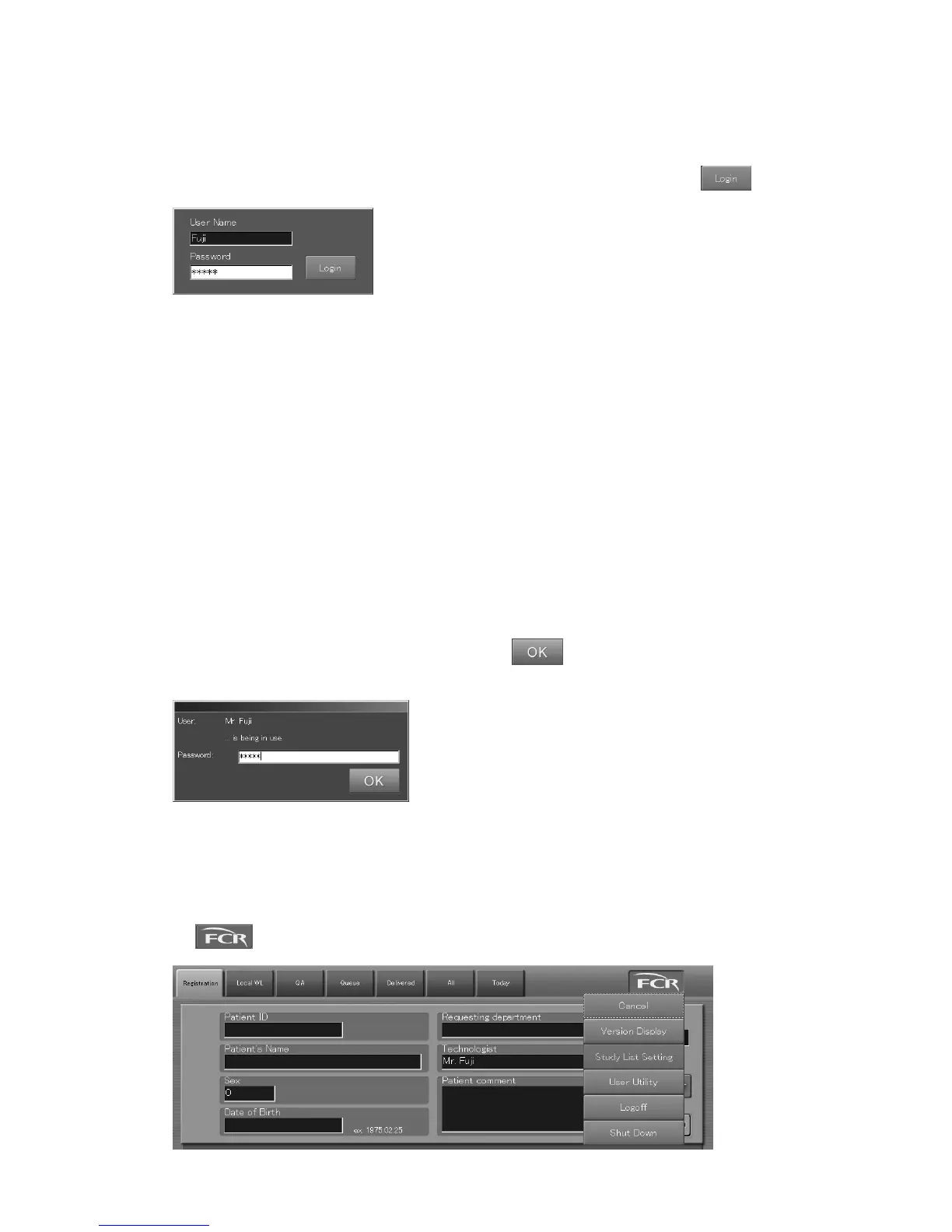
A login box like that shown below opens at CR Console startup and after the previous user has
logged off. The user name appearing in the login box that opens now is the one with which you were
logged in the system previously. Input “User Name” and “Password” and then select
.
“Login box”
When the user logged in the system, the “Patient Information Input Screen” opens. The user name
input in the “Login box” displays in the Technologist input box. (The technologist name may not be
displayed depending on the setting performed at installation.)
If the “login box” opens when the equipment is left inoperative for a certain period of time
The user logged in the system will be logged off automatically unless any manipulation is performed
over a certain period of time while no studies are being in process.
At this time, the “Login box” appears on the screen. To resume the operation, perform necessary
manipulations in the login box.
If the equipment is left inoperative for a certain period of time while a study is being performed (in
process of image reading on the study screen, for example), the screen will be locked automatically
causing then the “Password input box” to be displayed. This disables on-screen operations until the
screen is unlocked accordingly. (Background processing, such as image reading or image output, is
performed.)
To unlock the screen, input the password ad then select
. The system restores the previous
screen.
“Password input box”
(2) Logoff
Be sure to log off the system whenever you are terminating/suspending operations, excepting for
when shutting down the CR Console and disconnecting the power.
Select
to display the exposure menus, and then select the “Logoff” menu.



 To Next Page