CR Console Operation Manual
2 - 12 2009. 09 897N0519H
2.2.6 Patient Information Input Screen
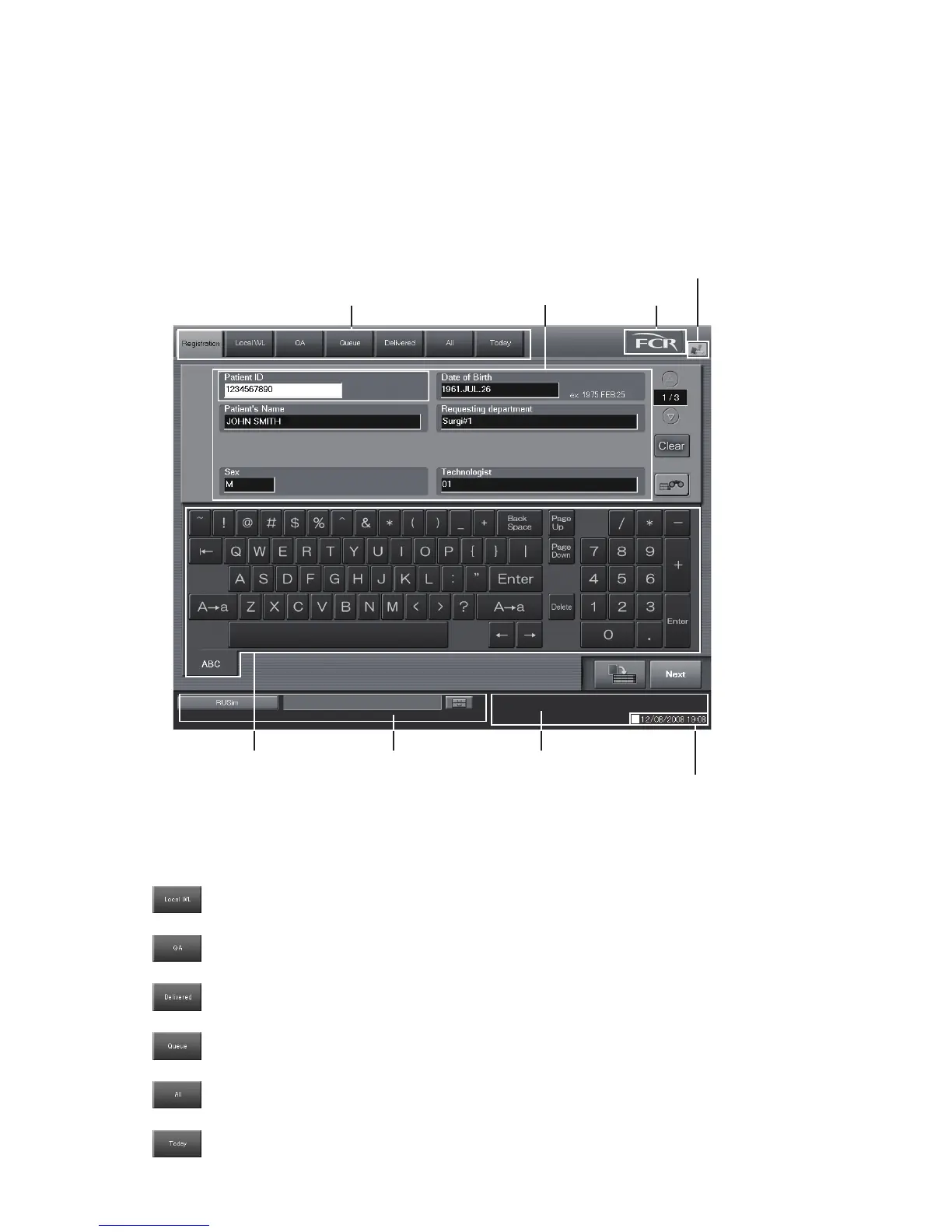
A screen for reception of studies. Performs patient information input.
By selecting the list tabs at the top of the screen, various lists can be displayed. (For more
information about lists, see [
Chapter 5. OPERATIONS - LIST
].)
Explained herein is how to operate the list tab, screen keyboard and other input fields on the “Patient
Information Input Screen”.
(1) List tab (3) Patient information input field
(2) Screen keyboard
(6) FCR button
(7) Output error icon
(5) Image Reader status
(8) Display of the current time and date
(4) Scroll view display area (option)
(1) List tab
Selecting the list tab on the screen top will allow you to display various kinds of lists.
: Displays the “Local WL” list. Studies that have already registered patient information,
containing yet-to-be-read images, will be added to this list.
: Displays the “QA” list. Studies containing images already read, but yet-to-be-subjected to
image editing (QA), will be added to this list.
: Displays the “Queue” list. Studies containing images already read, but yet-to-be-output
(printout or delivery), will be added to this list.
: Displays the “Delivered” list. Studies that contain images already read and output (printout
or delivery) will be added to this list.
: Displays the “All” list. All studies saved in the CR Console database will be displayed in
this list.
: Displays the “Today” list. All studies registered today will be displayed in this list.



 To Next Page