CR Console Operation Manual
2 - 20 2009. 09 897N0519H
2.2.8 Examination Order Issuance Screen
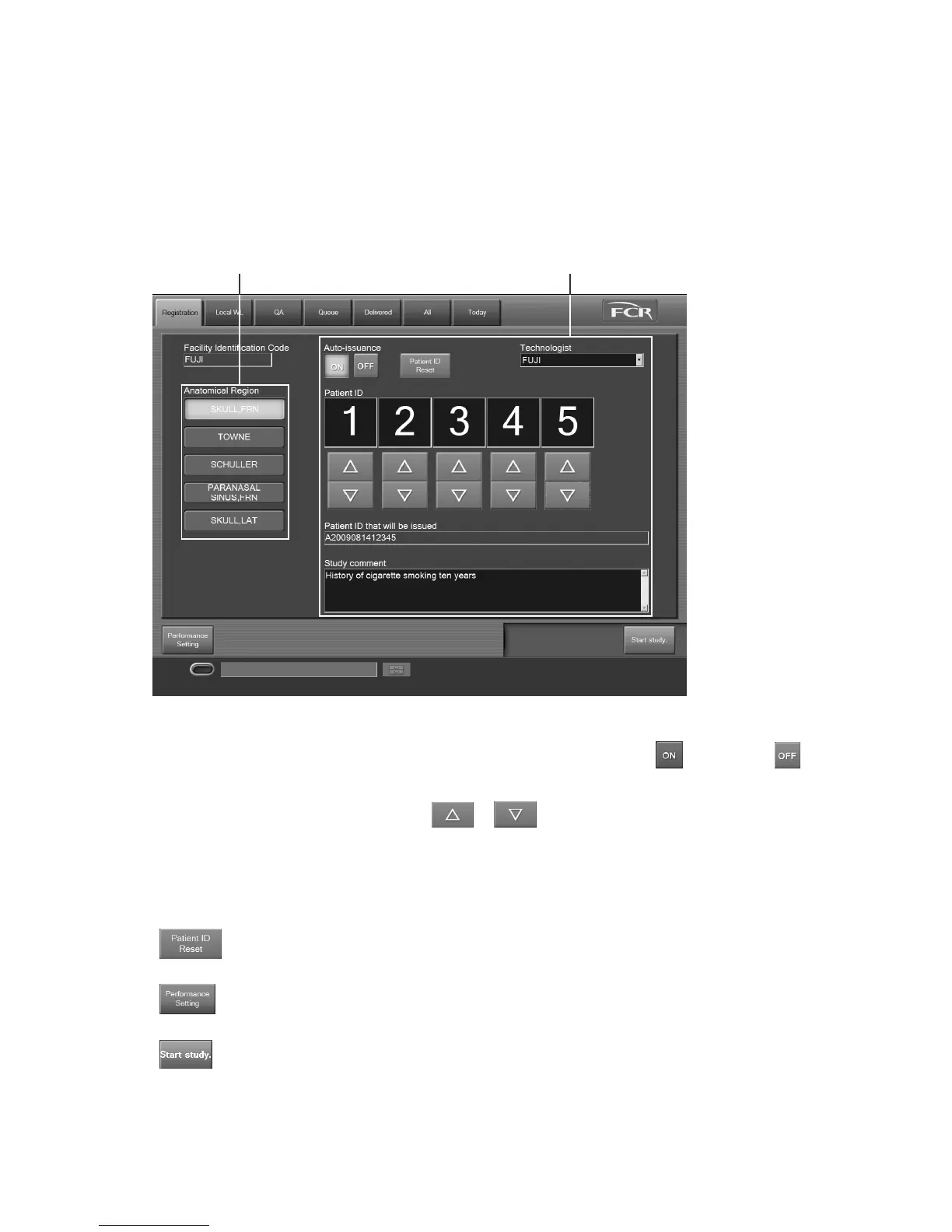
This is a screen for automatically issuing a patient ID with the examination order issuance function.
This function is useful for examining many people at a time such as group examination.
When using this function, the following screen is displayed instead of the “Patient Information Input
Screen”.
Presented below are samples and explanations of the screen.
Facility Identification Code : Displays a unique identification code to a facility.
Auto-issuance : To issue patient IDs automatically, select
. If not, select .
Technologist : Displays the name of the selected technologist.
Patient ID : Select or to set a patient ID.
Patient ID that will be issued : Displays the patient ID to be issued automatically.
Study comment : Input comments on study (a maximum of 10240 characters).
Anatomical Region : Displays the exposure menus selected on the “Performance
Setting Screen”.
: Deletes the history of all patient IDs issued under the code in the
“Facility Identification Code” field.
: Displays the “Performance Setting Screen”. For details, see [
3.3
Issuing Examination Orders
].
: Starts executing a study. When a study is started, the “Study
Execution Screen” is displayed. Prior to starting a study, make
sure that the selected exposure menu is correct.
Exposure menu list Examination order setting field



 To Next Page