CR Console Operation Manual
2 - 18 2009. 09 897N0519H
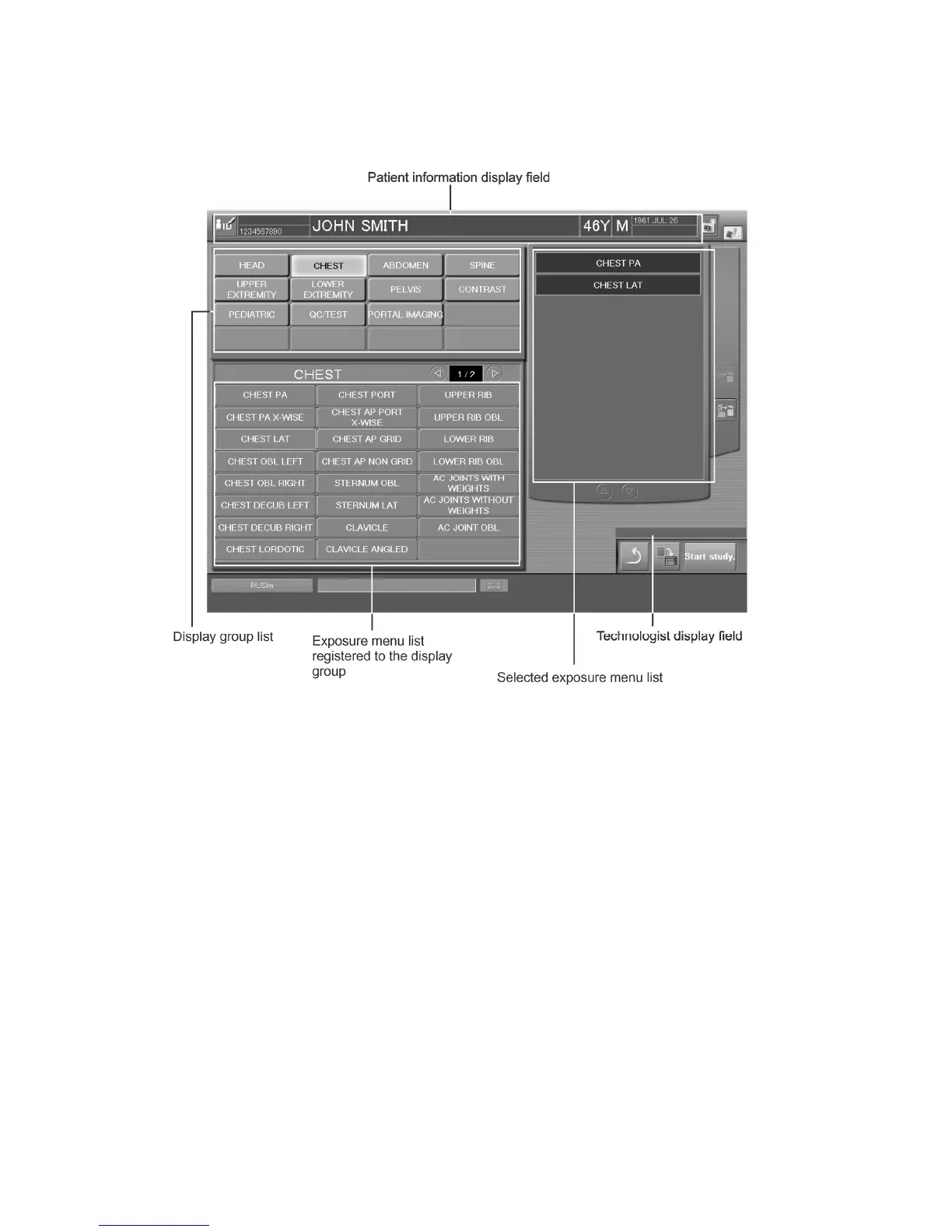
2.2.7 Exposure Menu Selection Screen
This is a screen for receiving studies. Performs operations of selection of exposure menus.
Patient information display field
: Displays patient information.
Technologist display field
: Displays the name of logged-in technologist.
Whether a technologist (user) name is displayed or not in the
“Technologist display field” depends on the setting performed at
installation.
Display group list
: Selects a display group.
Exposure menus registered to the display group selected here
will be shown in the “Exposure menu list registered to the
display group”. Exposure menus registered to the “Display
group list” can be edited as necessary using the User Utility. For
more information, see the [
CR Console OPERATION
MANUAL - THE USER UTILITY OPERATIONS
].
Exposure menu list registered
: Displays exposure menu of the selected exposure region.
to the display group
Select exposure menu(s).
Selected exposure menu list
: Exposure menus selected in the “Exposure menu list registered
to the display group” are displayed in this list. Moving up and
down the “Selected exposure menu list” with any exposure
menus selected accordingly will allow you to change order of
selected exposure menus.



 To Next Page