CR Console Operation Manual
3 - 16 2011. 06 897N0519M
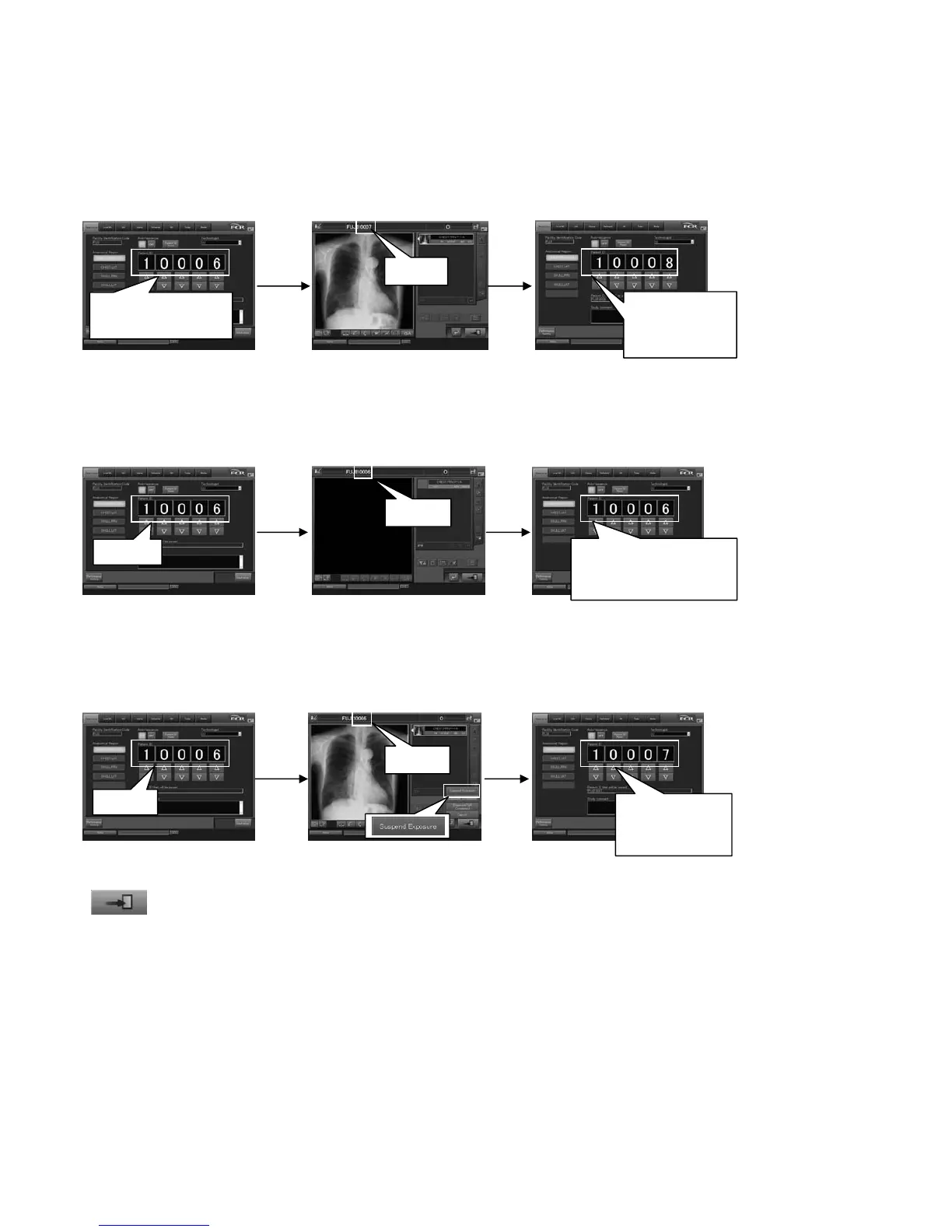
Examples of patient IDs to be issued are as follows.
Example 1: When the patient ID is changed from “10006” to “10007”
Example 2: When a study is finished without making an exposure (without changing the patient ID “10006”)
Example 3: When a study is suspended after making an exposure (without changing the patient ID “10006”)
“Setup for starting the next study using the study end button.” is set to “Start the study.”
When
is selected on the “Study Screen” after a study is completed, the patient ID is updated, and the next
study is started subsequently. At this time, the patient ID is checked for duplication with
the IDs already issued. If it is duplicated, the next available patient ID is assigned automatically.
Examples of patient IDs to be issued are as follows.
Starting a study after
changing a patient ID
Returning to the “Examination
Order Issuance Screen”
“10006” is changed
to “10007”.
“10008” to be
issued next is
displayed.
Starting a study without
changing a patient ID
Returning to the “Examination
Order Issuance Screen”
10006
The ID to be issued
next remains
unchan
.
“10007” to be
issued next is
displayed.
Suspending the study after
making an exposure
Finishing the study after
making an exposure
Finishing the study without
making an exposure
Starting a study without
changing a patient ID
Returning to the “Examination
Order Issuance Screen”
10007
10006
10006
10006



 To Next Page