CR Console Operation Manual
3 - 34 2011. 06 897N0519M
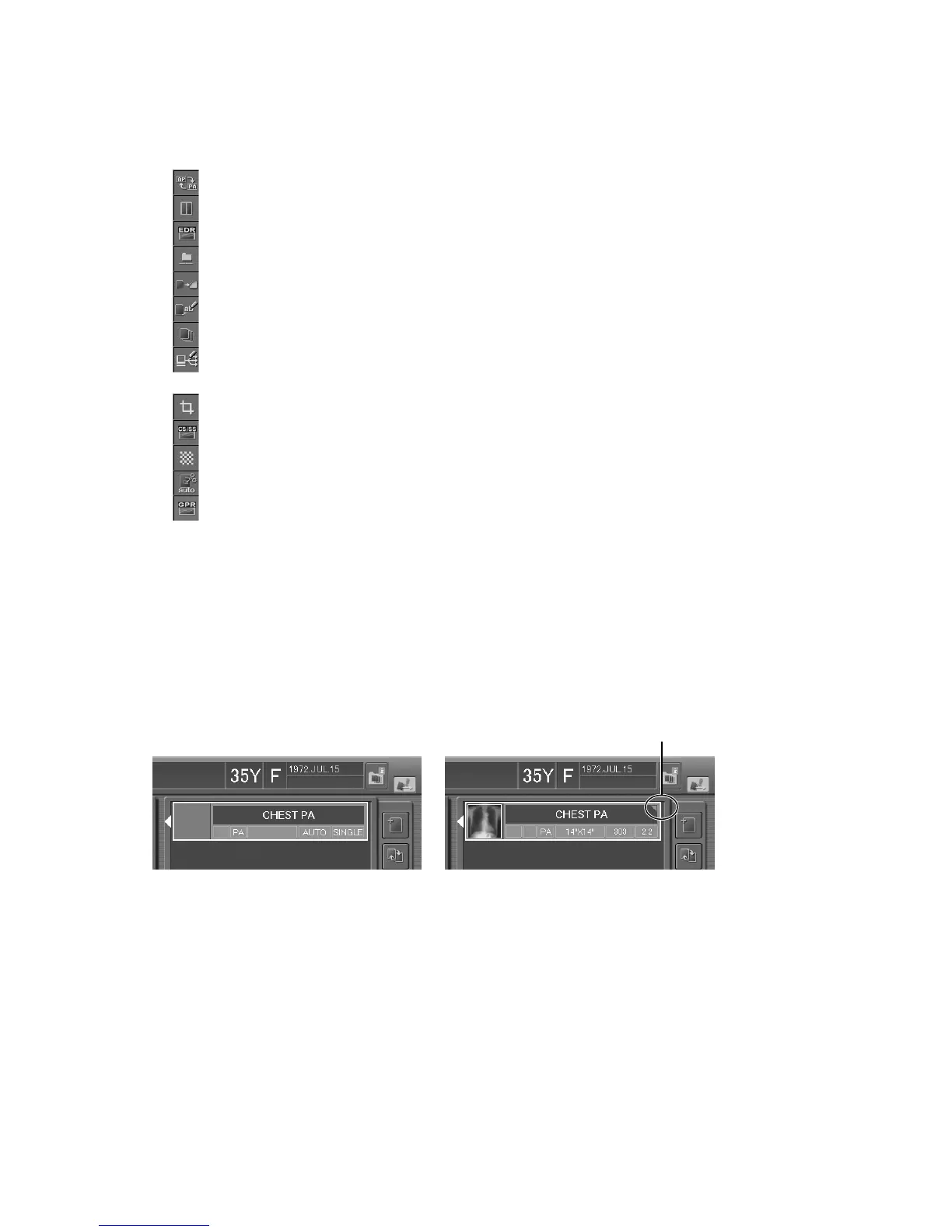
If you select the parameter display field next to an icon shown in the exposure parameter selection
box, the setting box for that parameter opens. Icons shown in the exposure parameter selection box
differ depending on the setting performed at installation.
: Sets image flip.
: Sets a film output format.
: Sets EDR (Exposure Data Recognizer) mode.
: Sets image filing mode to a filing device, such as ODF and other.
: Sets special functions.
: Sets film marks (characters to be displayed on film).
: Sets the number of films to be output.
: Sets an image distribution code.
(a code number that specifies a destination for image distribution).
: Sets the IP reading size.
: Sets image CS (Contrast Shift) and SS (Sensitivity Shift).
: Sets image density.
: Sets image trimming processing.
: Sets GPR (Grid Pattern Removal Processing) when the “GPR option” has been activated.
When one of the exposure parameter shortcut buttons is selected, the setting box that is for the
selected parameter will be displayed. Perform appropriate operations referring to the following
explanation.
Receipt of the X-ray exposure parameters (option)
When the CR Console receives such parameters from the X-ray control unit, a marking will be
indicated at the upper right corner of the exposure menu, as shown below.
Before receiving X-ray exposure
parameters
After X-ray exposure parameters
have been received
Marking indicating reception of
the X-ray exposure parameters



 To Next Page