EasyManua.ls Logo

Fujitsu M10-4 - Page 187

Fujitsu M10-4
342 pages
Print Icon
To Next Page IconTo Next Page
To Previous Page IconTo Previous Page
Loading...
Note
-
Record
the
positions
of
the
cables
before
removing
them
to
ensure
that
they
are
reinstalled
correctly.
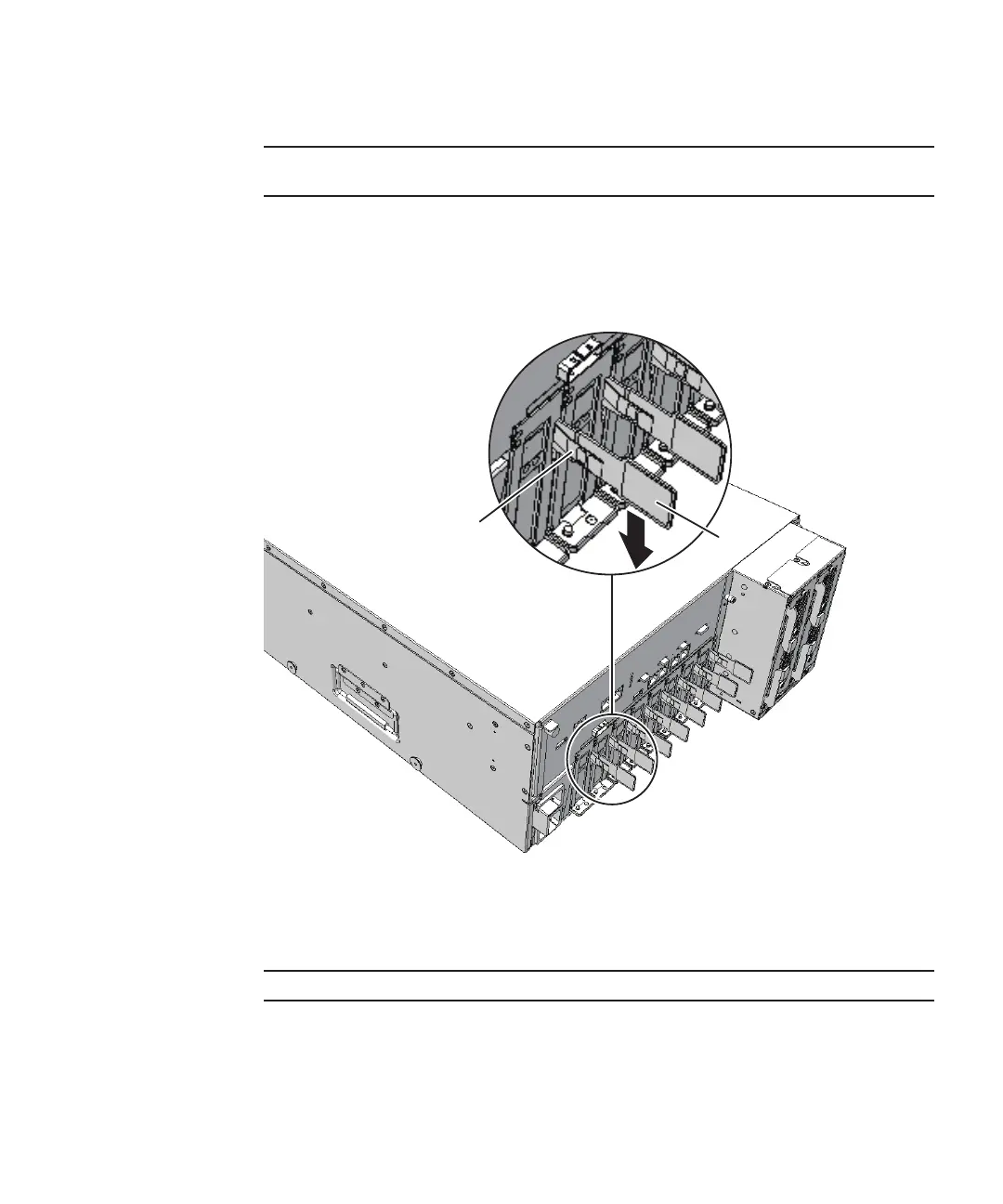
B
A
Note
-
Place
the
removed
PCIe
card
cassette
on
a
grounded
antistatic
ESD
mat.
1.
If
the
cros sbar
cables
are
fixed
to
the
cable
support
with
the
hook-and-loop
fast ener,
remove
the
hook-and-loop
fast ener.
2.
Remove
the
cables
connected
to
the
PCIe
card
cassette
requiring
maintenance.
3.
Lower
the
lever
(B
in
the
figure)
of
the
PCIe
card
cassette
while
pushing
the
latch
(A
in
the
figure).
Figure
8-4
  
Lever
of
PCIe
card
cassette
4.
Hold
the
lever
and
carefully
pull
the
PCIe
card
cassette
out
of
the
PCI
slot
to
remove
it.
Chapter
8
 
Maintaining
the
PCI
Express
Cards 173

Table of Contents

Related product manuals