EasyManua.ls Logo

Fujitsu M10-4 - Removing a PCI Express Card; Removing a PCI Express Card Cassette

Fujitsu M10-4
342 pages
Print Icon
To Next Page IconTo Next Page
To Previous Page IconTo Previous Page
Loading...
Table
8-3
  
Removal
workflow
and
procedures
Item
Replacement
work
procedure Reference
1 Removing
a
PCI
Express
card
cassette 8.3.1
Removing
a
PCI
Express
card
cassette
2 Installing
a
PCI
Express
card
filler 8.3.3
Installing
a
PCI
Express
card
filler
3 Installing
a
PCI
Express
card
cassette 8.4.3
Installing
a
PCI
Express
card
cassette
Caution
-
Before
you
handle
any
components,
wear
a
wrist
strap
to
ground
any
static
electricity.
If
you
perform
this
procedure
without
a
wrist
strap,
individual
components
or
the
overall
system
may
be
damaged.
For
details,
see
"1.5
Notes
Regarding
Static
Electricity."
B
A
B
A
Type-1 Type-2
8.3 Removing
a
PCI
Express
Card
This
section
describes
the
procedure
for
removing
a
PCIe
card.
Enable
removal
of
the
PCIe
card
before
attempting
to
remove
it.
For
details,
follow
the
procedure
in
"Chapter
7
Maintenance
Flow."
8.3.1 Removing
a
PCI
Express
card
cassette
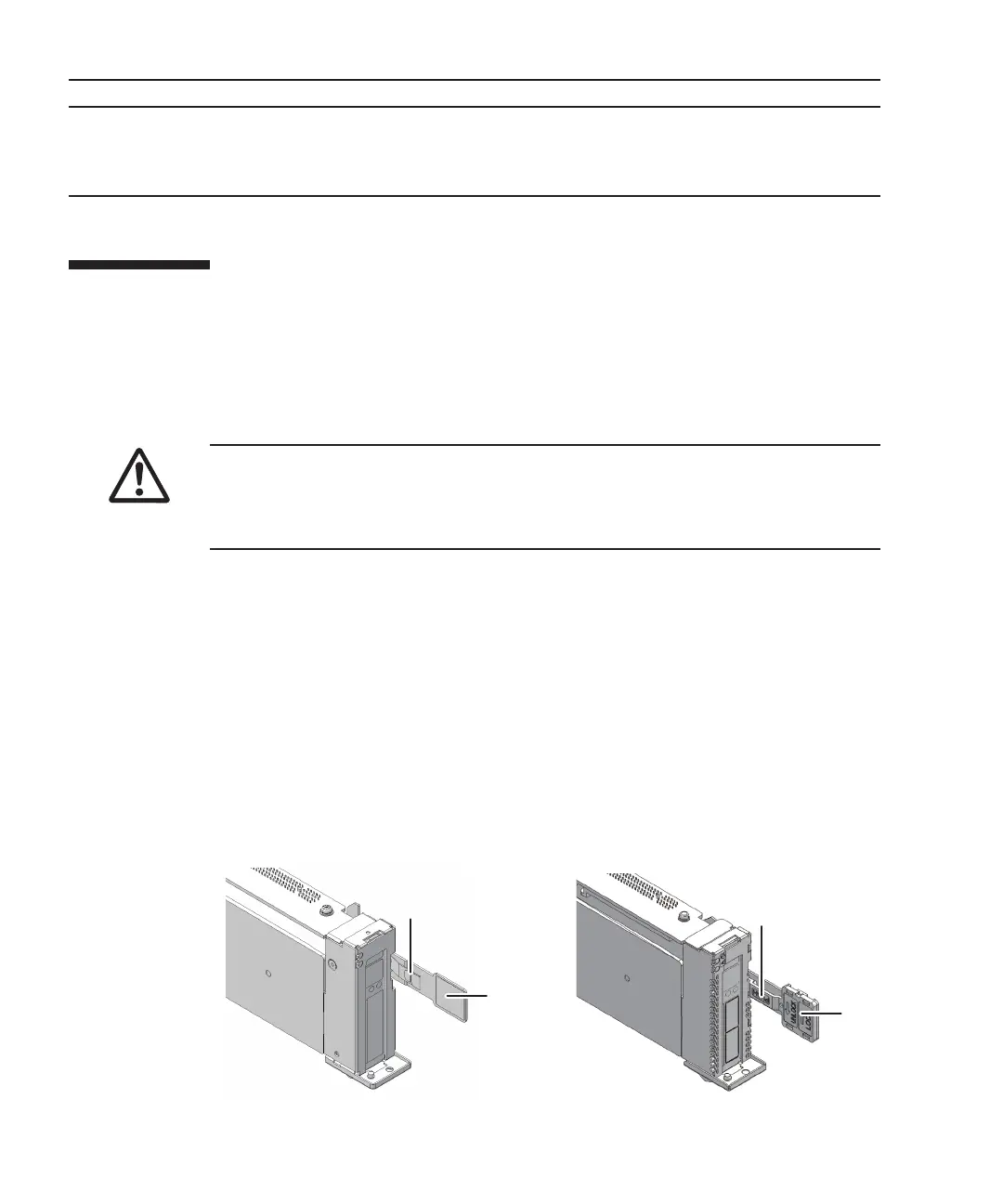
There
are
two
types
of
PCIe
card
cassette.
The
shapes
of
the
latch
(A
in
the
figure)
and
lever
(B
in
the
figure)
vary
depending
on
the
type
of
the
PCIe
card
cassette,
but
the
same
removal
procedure
applies.
For
the
types
of
PCIe
card
cassettes,
see
"."
Unless
otherwise
specified,
the
figures
explained
in
this
section
use
Type-1.
Figure
8-3
  
Types
of
PCIe
card
cassettes
Fujitsu
M10-4/Fujitsu
M10-4S/SPARC
M10-4/SPARC
M10-4S
Service
Manual
November
2014172

Table of Contents

Related product manuals