EasyManua.ls Logo

Fujitsu M10-4 - Lowering the Cable Support (if It Is a New Model)

Fujitsu M10-4
342 pages
Print Icon
To Next Page IconTo Next Page
To Previous Page IconTo Previous Page
Loading...
A
B
5.9.3 Lowering
the
cable
support
(if
it
is
a
new
model)
To
perform
maintenance
on
the
following
FRUs
from
the
rear
of
the
chassis,
lower
the
cable
support
before
starting
the
work:
-
PCI
Express
card
-
CPU
memory
unit
-
Memory
-
PSU
backplane
unit
-
Operation
panel
-
Crossbar
unit
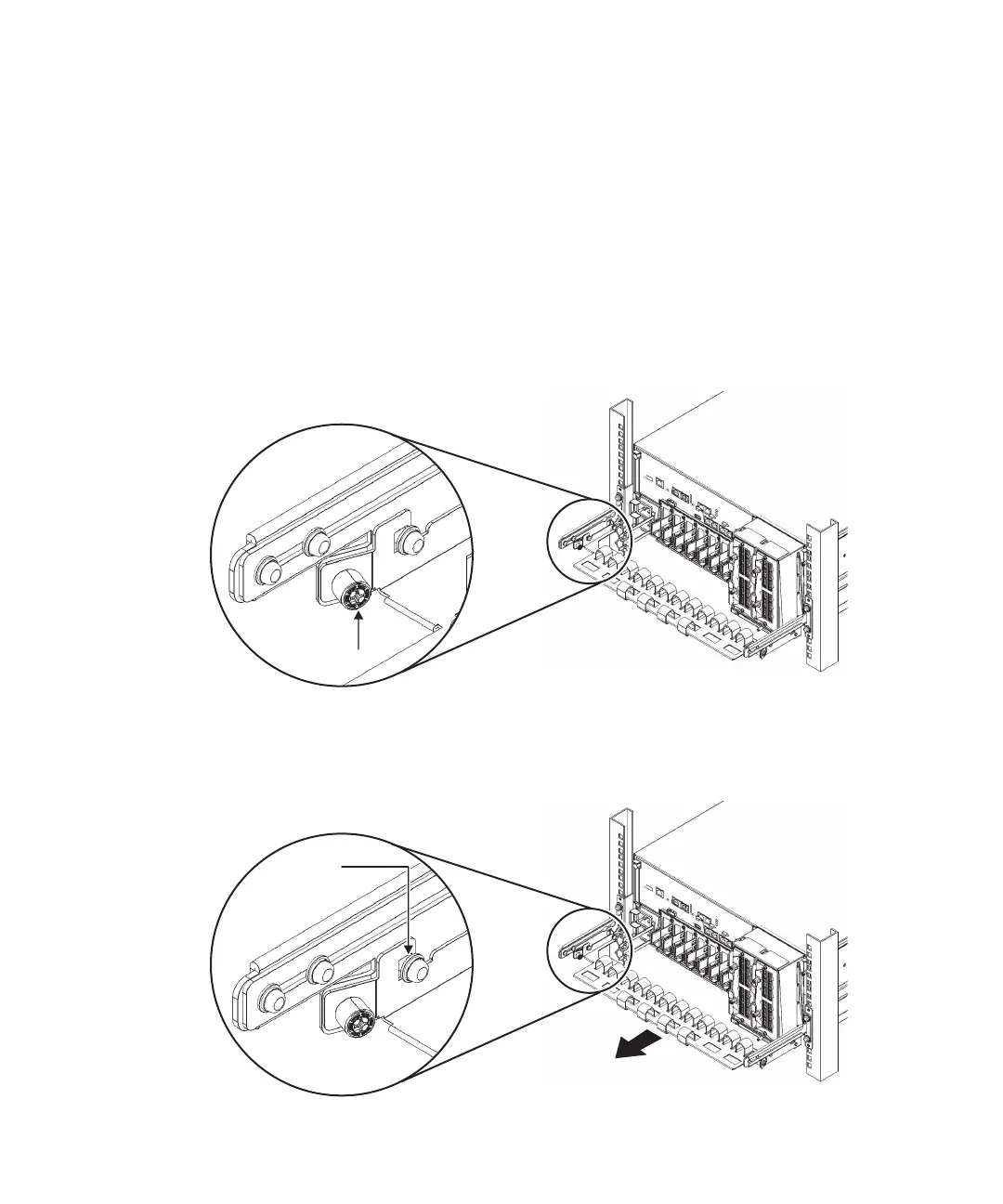
1.
Loosen
the
right
and
left
screws
(A
in
Figure
5-7)
fixing
the
cable
support.
Figure
5-7
  
Locations
of
screws
holding
the
cable
support
2.
Lift
the
cable
support
to
release
the
hooks
(B
in
Figure
5-8),
and
pull
it
out.
Figure
5-8
  
Releasing
the
cable
support
Fujitsu
M10-4/Fujitsu
M10-4S/SPARC
M10-4/SPARC
M10-4S
Service
Manual
November
201484

Table of Contents

Related product manuals