EasyManua.ls Logo

Fujitsu M10-4 - Page 209

Fujitsu M10-4
342 pages
Print Icon
To Next Page IconTo Next Page
To Previous Page IconTo Previous Page
Loading...
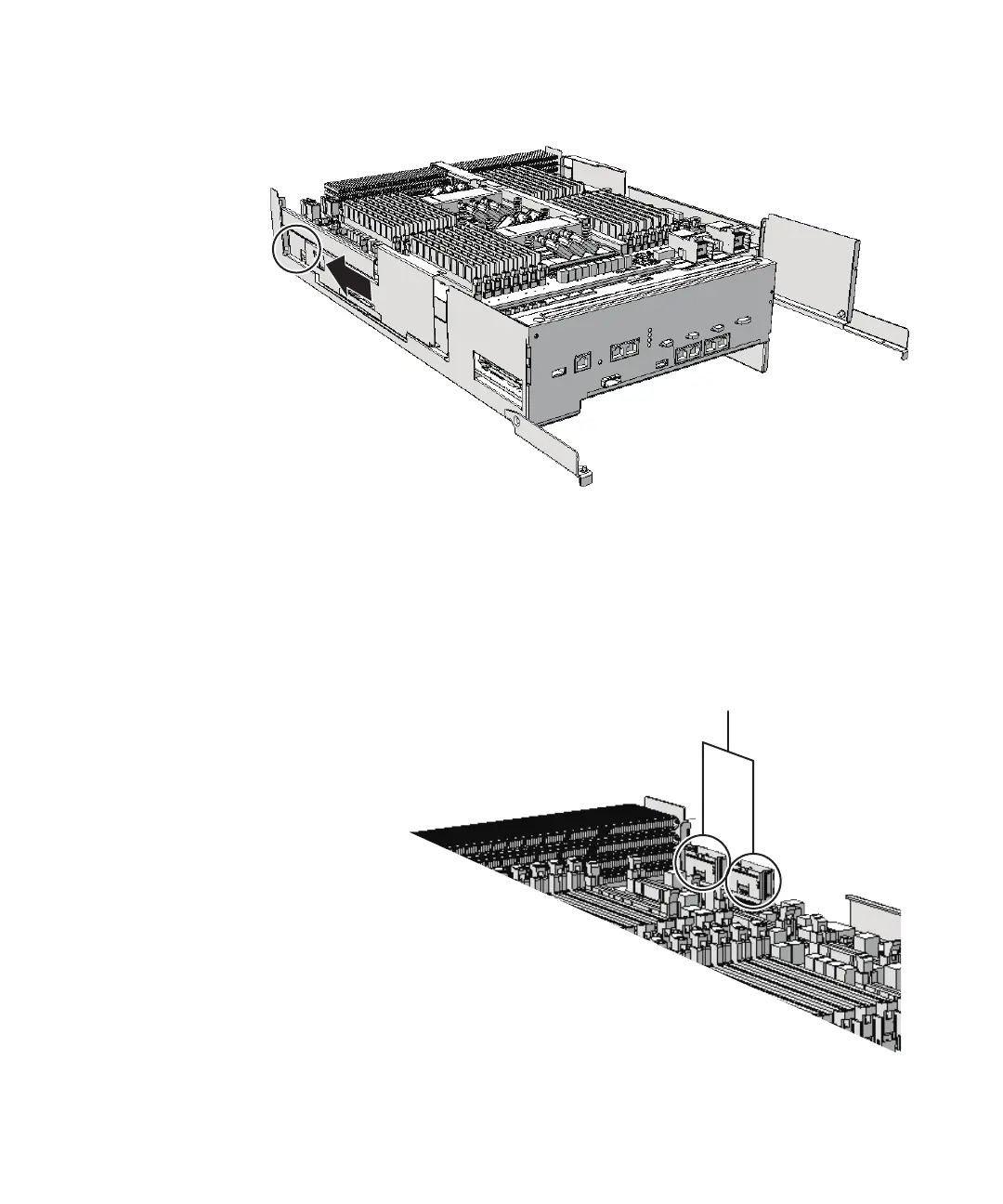
A
by
sliding
it
in
the
direction
of
the
arrow.
Figure
9-10
  
Removing
left-side
guide
4.
Remove
the
two
PCIe
cables
(A
in
the
figure)
on
the
right
side
that
connect
the
CPU
memory
units
upper
and
lower,
from
the
CPU
memory
unit
upper.
Then,
push
them
toward
the
outside
of
the
chassis.
When
removing
the
filler
unit
for
the
CPU
memory
unit
upper,
you
do
not
need
to
remove
the
PCIe
cables.
Proceed
to
step
10.
Figure
9-11
  
Removing
the
right-side
PCIe
cables
5.
Remove
the
two
PCIe
cables
(A
in
the
figure)
on
the
left
side
that
connect
the
CPU
memory
units
upper
and
lower,
from
the
CPU
memory
unit
upper.
Then,
Chapter
9
 
Maintaining
the
CPU
Memory
Unit/Memory 195

Table of Contents

Related product manuals