EasyManua.ls Logo

Fujitsu M10-4 - Page 253

Fujitsu M10-4
342 pages
Print Icon
To Next Page IconTo Next Page
To Previous Page IconTo Previous Page
Loading...
Caution
-
Before
you
handle
any
components,
wear
a
wrist
strap
to
ground
any
static
electricity.
If
you
perform
this
procedure
without
a
wrist
strap,
individual
components
or
the
overall
system
may
be
damaged.
For
details,
see
"1.5
Notes
Regarding
Static
Electricity."
Note
-
Place
the
removed
memory
on
a
grounded
static-removal
ESD
mat.
When
replacing
the
CPU
memory
unit,
you
need
to
remount
the
memory.
Mount
the
memory
in
the
same
mounting
locations
as
in
the
replaced
unit.
For
memory
removal,
see
"2.2
Checking
the
Memory
Configuration
Rules,"
and
remove
memory
accordingly.
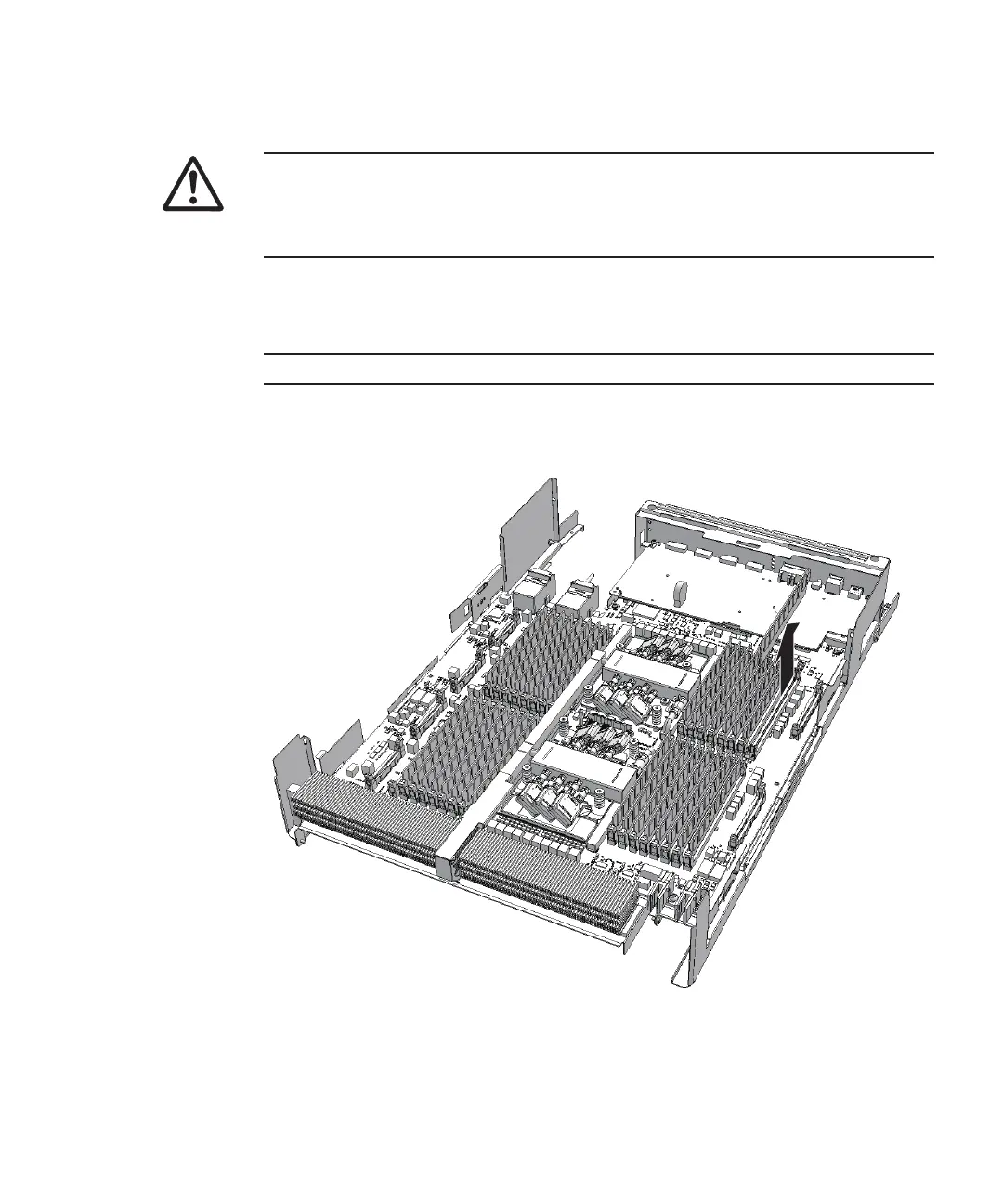
1.
Move
the
latch
of
the
memory
slot
outward,
and
then
remove
the
memory
by
pulling
it
straight
up.
Figure
9-60
  
Removing
memory
Chapter
9
 
Maintaining
the
CPU
Memory
Unit/Memory 239

Table of Contents

Related product manuals