CHAPTER 2
17
Product Overview
4/29/10 Rev G
CAUTION: 208V lines, while seemingly within the specification range, are not
as robust as 230 V lines and are also subject to +/- 10% current fluctuations. These
below specification fluctuations of 208V lines do not to provide the Gerber Solara
ion with adequate power to consistently cure ink. You must provide a 230 V line.
WARNING: Make sure to connect the power cable only after all of the steps of the
installation procedure have been completed.
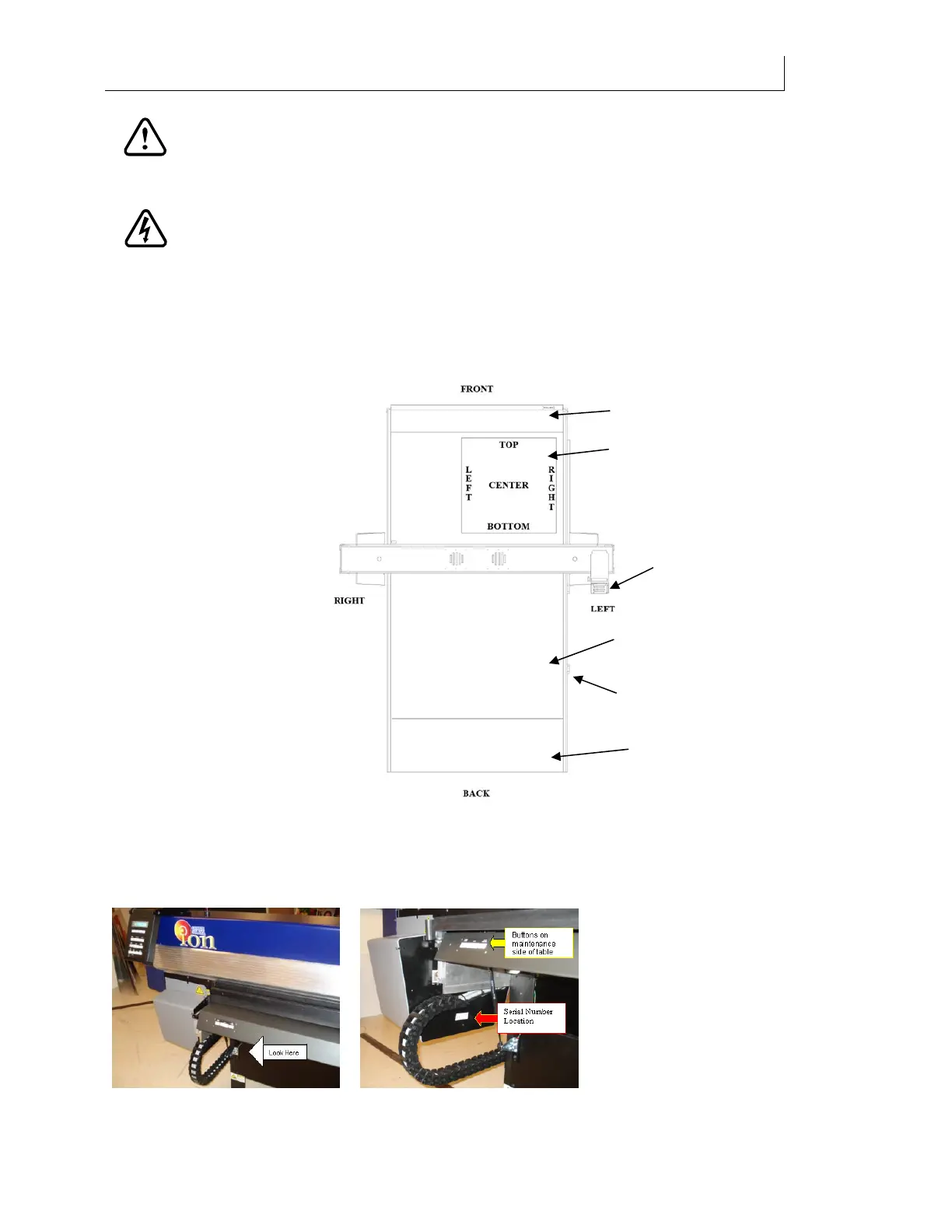
Printer orientation
Make note of the orientation of the printer. The end with the maintenance shelf is considered
the front of the printer and the control panel end of the gantry is the left side. Also note that the
right and left sides of the graphic file sent from the RIP software are reversed.
Locating the serial number
The printer serial number is located on the gantry. Slew the gantry all the way to the front
(maintenance shelf end) of the printer and look underneath and through the gantry track.
Maintenance shelf
Control panel
Orientation of
graphic sent
from RIP
software
Roll-to-Roll (if
so equipped)
Power switch
Ethernet
connections
under table



 To Next Page