CHAPTER 5
65
Printing Jobs on the GERBER SOLARA ION
4/29/10 Rev G
3 Press ENTER to display the
Lamp Delay screen.
4 Press the arrow keys until the
Step Blending screen displays and then press ENTER.
5 Use the arrow keys to select
On and then press ENTER. To disable Step Blending
mode, select
Off and then press ENTER.
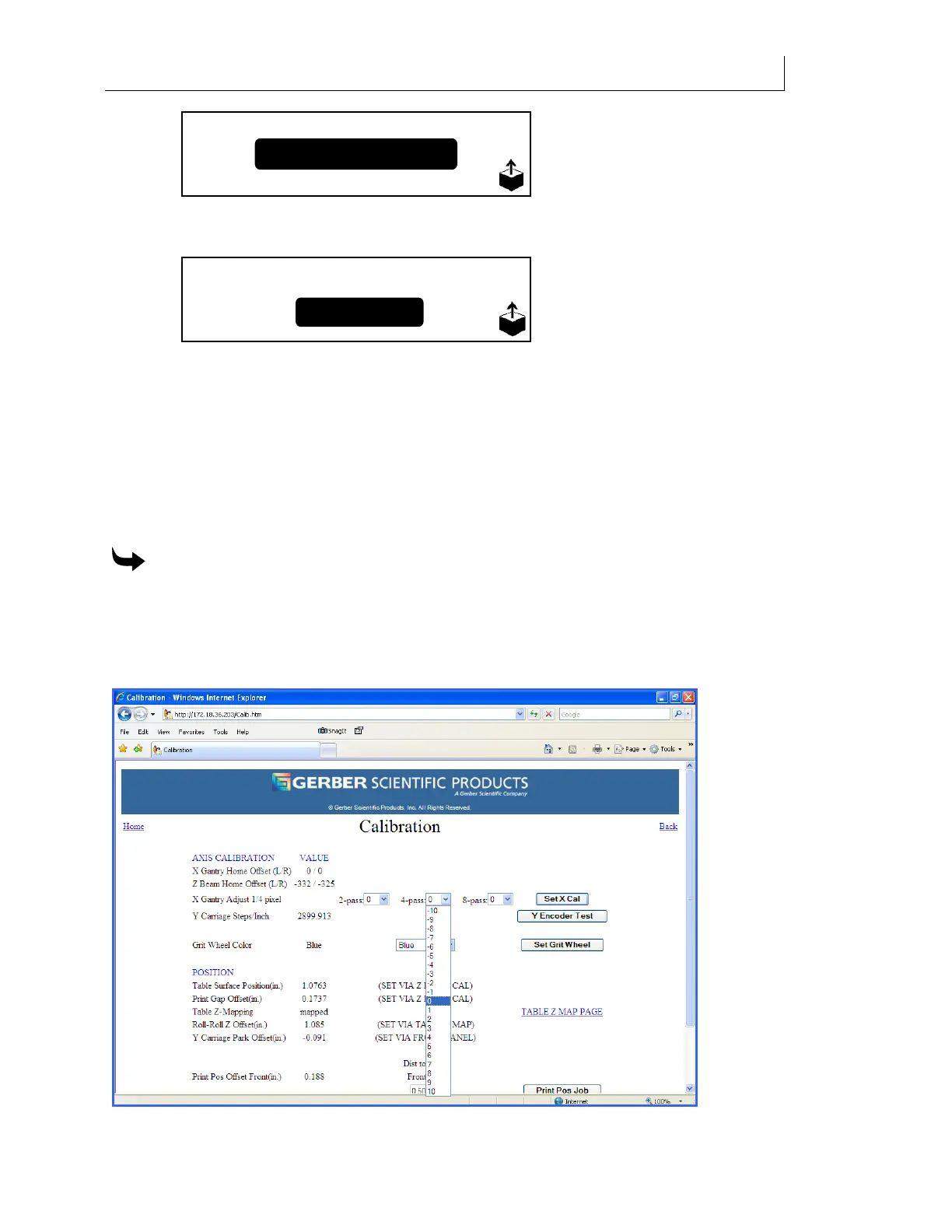
X Gantry Adjustment
X Gantry Adjustment is located on the Calibration web page and improves the print quality of
images and text for a specific mode (2Pass, 4Pass, 8Pass) when values are adjusted accordingly.
A drop-down box for each mode contains factors ranging from -10 to +10. Each whole number
represents ¼ pixel adjustment.
To utilize X Gantry Adjustment from the Calibration web page
1 From printer’s main web page, click on “Calibration.”
2 Locate the X Gantry Adjustment ¼ pixel dropdown boxes for 2-Pass, 4-Pass, and 8-
Pass modes. Click on the dropdown box arrow for the desired print mode and click on
the value required to properly adjust the X axis print output.
Setup
Step Blending:
On Off



 To Next Page