CHAPTER 5
74
Printing Jobs on the GERBER SOLARA ION
4/29/10 Rev G
4 Load the sign blank by aligning it to the table
alignment marks/holes. Press the
Load/Unload button on the printer when
finished.
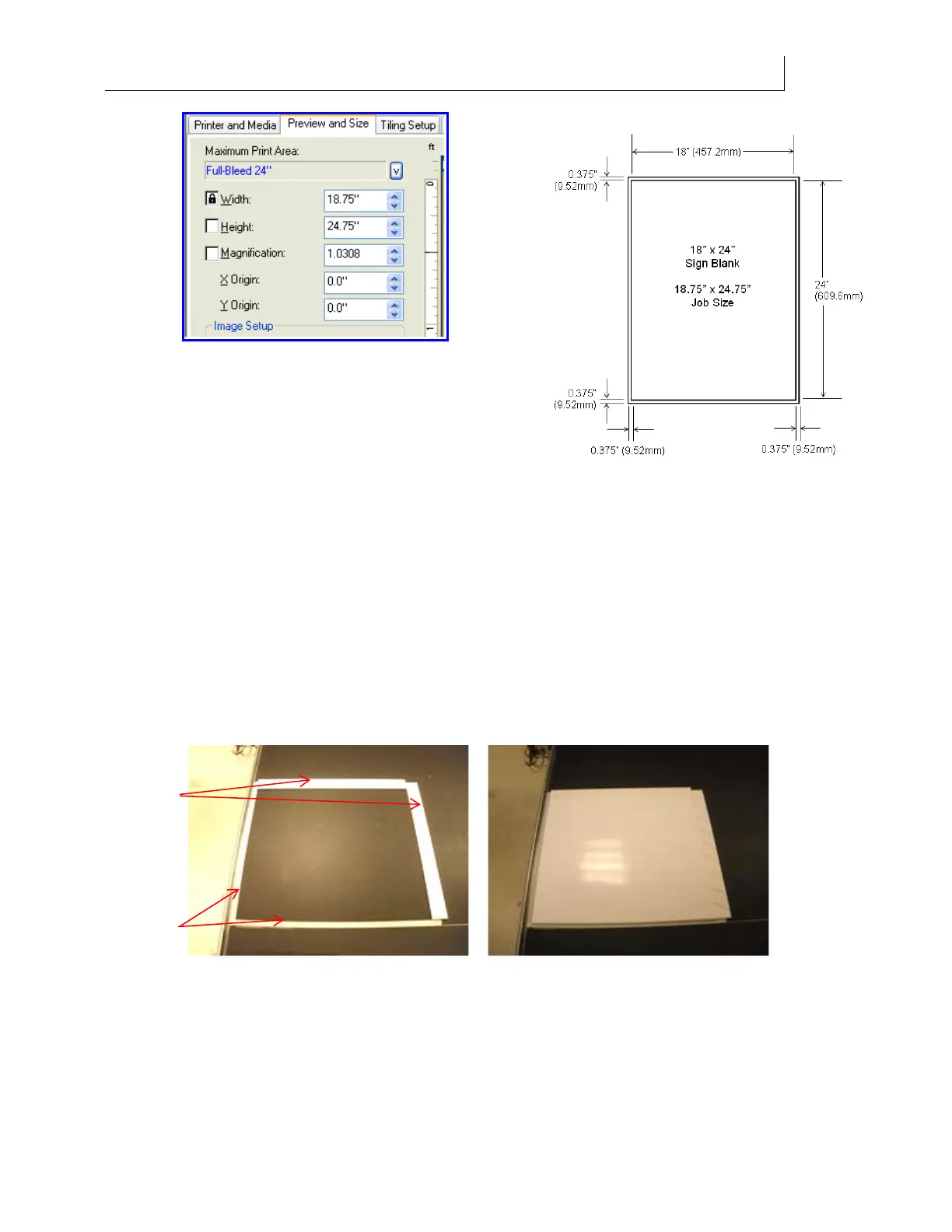
5 In order to protect the job from printing
directly on the table, you need to protect the printer’s flat bed with tape and scrap
material that is at least 1/2" (12.7mm) wide. Standing in front of the printer, apply
masking tape on the front and left side of the printer around the edges of the sign
blank. Use scrap material on the right and back sides. Note that the graphic
orientation sent from the RIP is opposite the printer orientation. See the illustration
on the following page.
The scrap material must cover the full width and length of the sign blank so that there
are no gaps between the sign blank and the masking tape or scrap material. The scrap
material used to protect the table on the sides of sign blank should be approximately
the same height as the substrate on which you are printing in order to properly protect
the print heads. Thicker scrap material will cause carriage strikes. Thinner scrap
material is acceptable as long as it is within 1/16" (1.6mm) of the substrate thickness.
Masking
tape
Scrap
material
Front of Printer
Front of Printer
Left
side of
Printer



 To Next Page