Specications
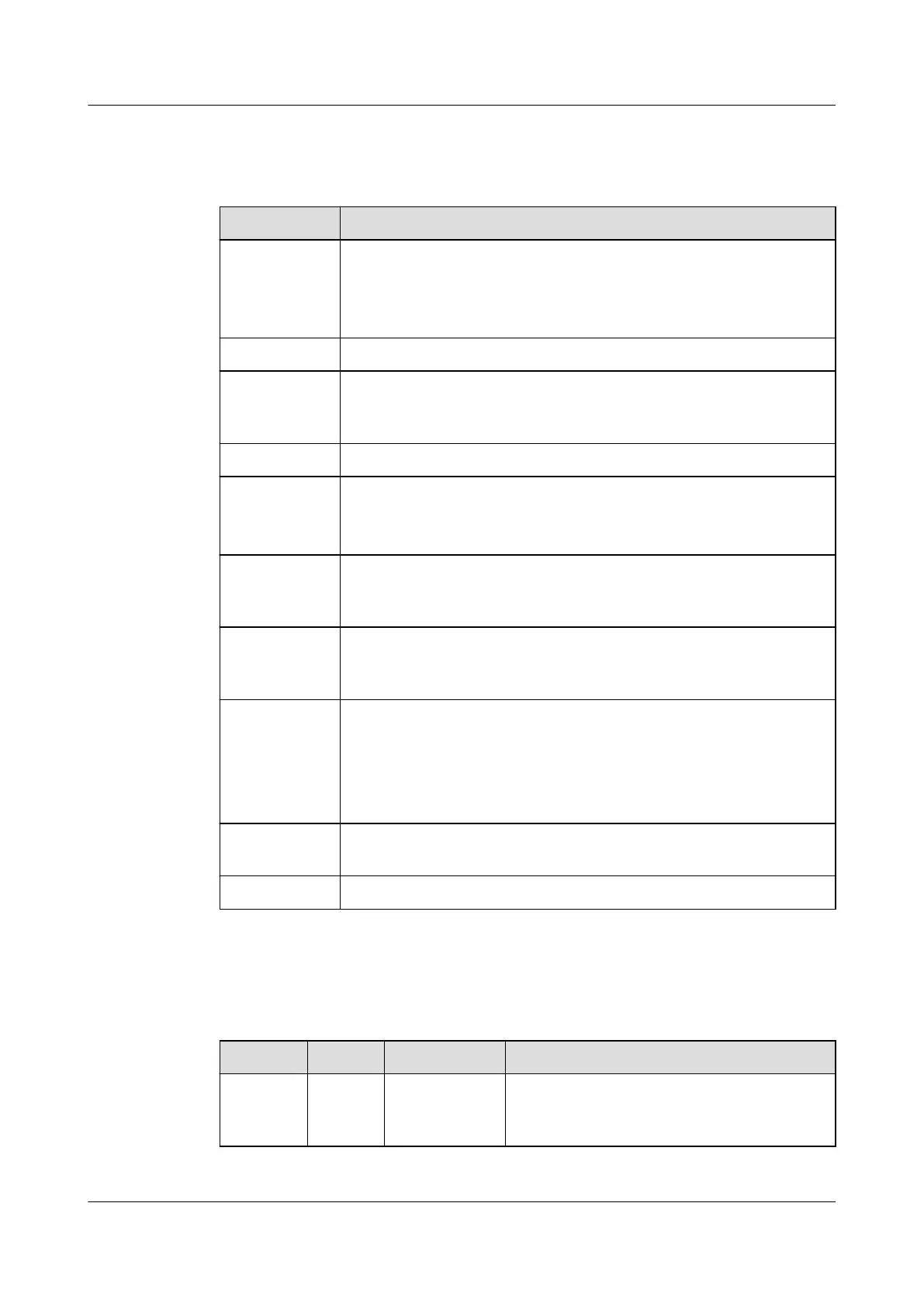
Table 3-28 Access actuator technical specications
Item Specications
Power input ● DC input: terminal, with an input voltage of 36 V DC–60 V
DC
● PoE power supply: one PoE port that complies with
IEEE802.3at
PoE port FE communication with the rate of 10/100 Mbit/s
Wireless
communicati
on
One wireless communication port that complies with IEEE
802.15.4, mutual backup with FE communication
AI/DI port Two AI/DI ports, can connect to the re alarm and exit button
DO/DI port ● One 12 V DC power output that controls magnetic locks,
terminal
● One DI input port for connecting to the door status switch
RS485 serial
port
expansion
Two RS485 ports (one route) with the default communication
rate of 9600 bit/s, physical port cascading supported (reserved
function)
Wiegand port Two Wiegand ports, 12 V DC card reader operating power
output; two routes of card readers can operate at the same
time.
BLINK button ● Press the button for less than 1 second to start blinking.
● Hold down the button for 1–5 seconds to search for a
network and start networking.
● Hold down the button for more than 10 seconds to clear
network parameters.
Address DIP
switch
4-pin address DIP switch
E-label Supported
Indicators
Table 3-29 Access actuator indicators
Indicator
Color Name Status
PWR Green Power input
status
indicator
● Steady on: The power input is normal.
● O: There is no power input.
ECC800 Data Center Controller
User Manual (for ECC800-Pro) 3 Device Description
Issue 02 (2020-09-07) Copyright © Huawei Technologies Co., Ltd. 34



 To Next Page