Appearance
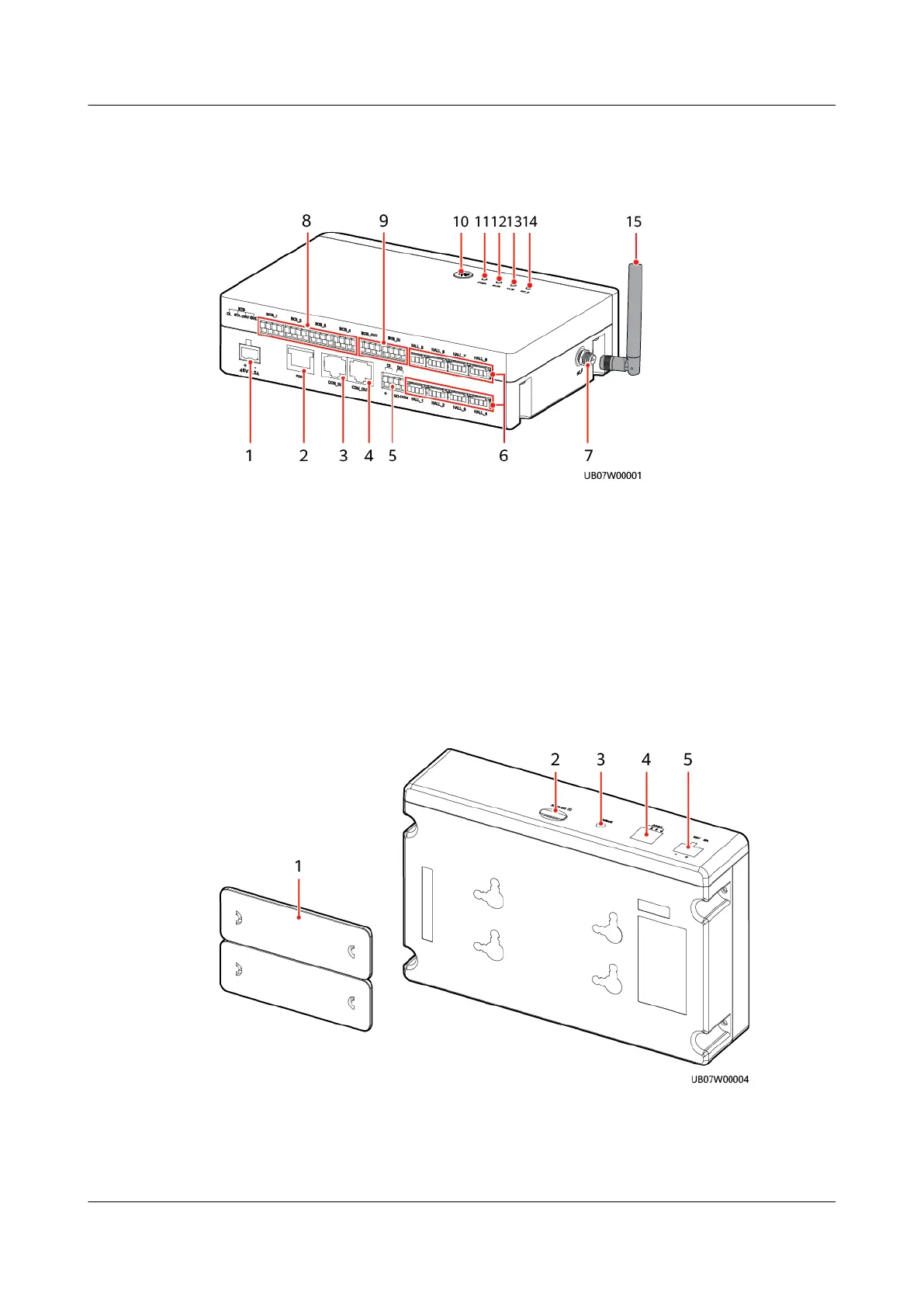
Figure 3-46 iBOX front view
(1) –48 V 0.5 A port (power input) (2) PoE port (3) COM_IN port (RS485
communication input)
(4) COM_OUT port (RS485
communication output)
(5) DI and DO ports (6) HALL_1–HALL_8 current
monitoring ports
(7) RF_Z antenna port (8) BCB_1–BCB_4 ports
(BCB_2–BCB_4 reserved)
(9) BCB_OUT and BCB_IN ports
(10) Networking switch (11) PWR indicator (12) RUN indicator
(13) ALM indicator (14) RF_Z indicator (15) Delivered antenna
Figure 3-47 iBOX bottom view
(1) Fastener
(2) Micro SD card slot
(3) Default button (IP reset) (4) ADDR dual in-line package (DIP) switch (RS485
communications address)
ECC800 Data Center Controller
User Manual (for ECC800-Pro) 3 Device Description
Issue 02 (2020-09-07) Copyright © Huawei Technologies Co., Ltd. 79



 To Next Page