KRONE ISOBUS-Terminal CCI 100
70
Pos: 22.35.21 /BA/I nfo-Center/CCI- ISOBUS-Terminal/CCI -BiG Pack/Grundbild Hand betrieb/Grundbild f ür die Funktionstasten Sei te 2/2 @ 99\mod_132989 1781016_78.docx @ 883639 @ @ 1
F1
F2
F3
F4
F5
F6
F7
F8
F9
F10
F11F11
F12
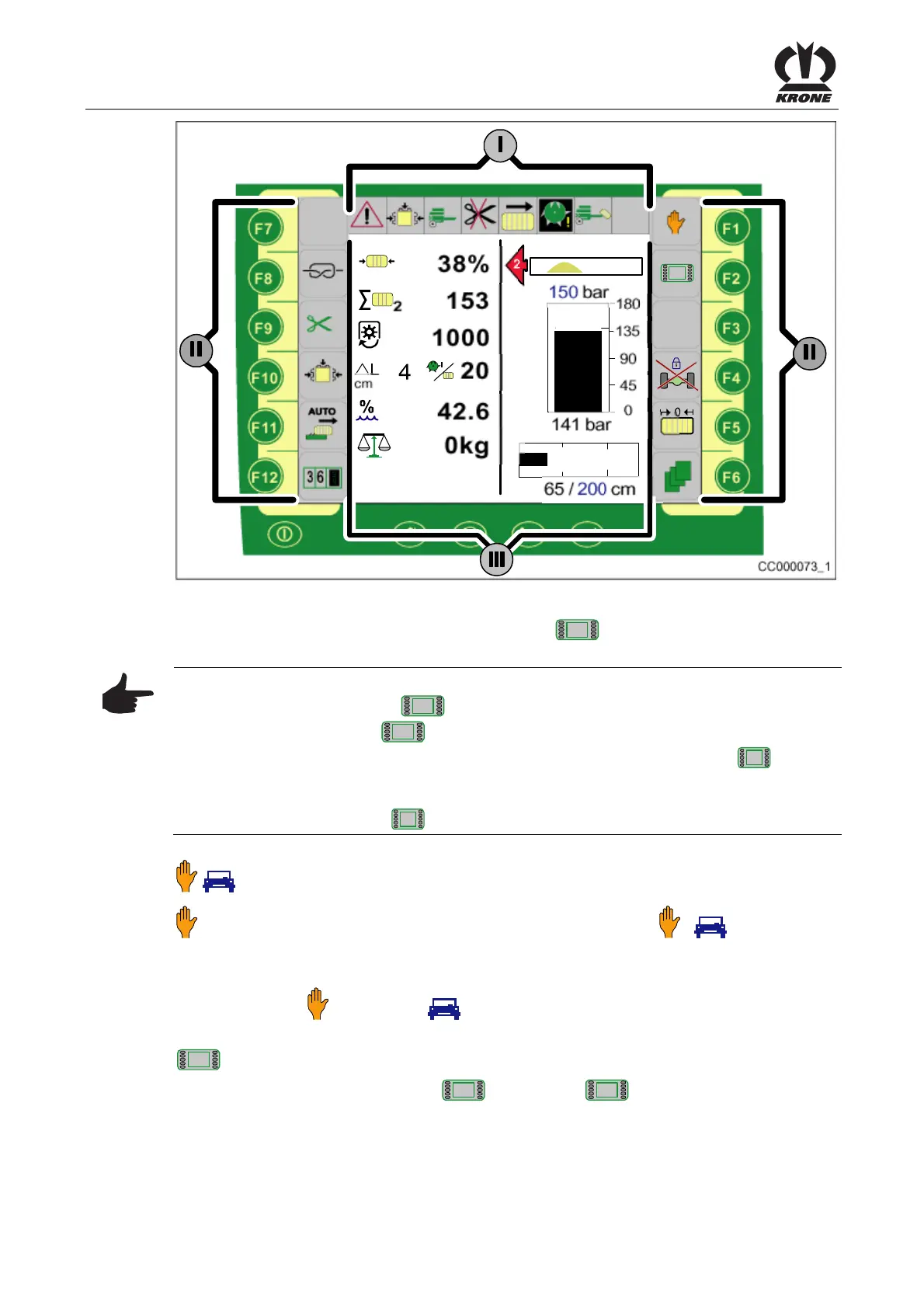
CC000073_1
1/2
Fig.39
Pos: 22.35.22 /BA/I nfo-Center/CCI- ISOBUS-Terminal/CCI -BiG Pack/Funktionstas ten F1 bis F 12/Beschrei bung der Grafiken (II ) für die zweite Seite der Funkti onstasten (F1 bis F6) @ 63\mod _1299853742960_78. docx @ 577176 @ @ 1
Description of the graphics (II) on the second page
2/2
of the function keys (F1 to F6)
Note
By pressing the function key for
1/2
, call up the second page to release the additional
functions (graphics) for page
2/2
.
When the PTO is running the display switches automatically to the second page (
2/2
) to make
the operational function keys available.
With the machine at a standstill (when the PTO is not running) the display switches
automatically to the first page (
1/2
) to make the maintenance function keys available.
Pos: 22.35.23 /BA/I nfo-Center/CCI- ISOBUS-Terminal/CCI -BiG Pack/Funktionstas ten F1 bis F 12/Seite 2/2 F1 W echseln zwischen Hand- Automa tikbetrieb @ 63\mod_1 299853664474_78.doc x @ 577149 @ @ 1
/ Manual / Automatic mode
Switching between manual/automatic mode (the activated mode
/ is
displayed).
Switching to automatic mode:
Press function key
. (The symbol (automatic mode) appears on the display.)
Pos: 22.35.24 /BA/I nfo-Center/CCI- ISOBUS-Terminal/CCI- BiG Pack/Funktionstas ten F1 bis F 12/Seite 2/2 F2 Seite 2/ 2 für die Funktionsta sten @ 63\mod_12998535884 95_78.docx @ 577122 @ @ 1
2/2
Page 2/2 for the function keys
• By pressing the function key for
2/2
the first page
1/2
of the function keys F1 to
F12 is enabled.
Pos: 22.35.25 /BA/---------------Seitenumbruch---------------- @ 0\mod_1196175311226_0.doc x @ 4165 @ @ 1









 To Next Page