KRONE ISOBUS-Terminal CCI 100
73
Pos: 22.37.5 /BA/I nfo-Center/CCI- ISOBUS-Terminal/CCI-Bi G Pack/Grundbild Handb etrieb/Anzeigen im Ha uptfenster (III) (Je nach Ausstattung der Maschi ne) @ 146\mod_136014445 5754_78.docx @ 1307775 @ @ 1
Displays in the main window (III) (depending on how the machine is equipped)
Pos: 22.37.6 /BA/I nfo-Center/CCI- ISOBUS-Terminal/CCI-B iG Pack/Grundbild Handb etrieb/Anzeigen im Ha uptfenster (III ) linke Spalte HS Baureihe @ 146\mod_1 360061307841_78.doc x @ 1306579 @ @ 1
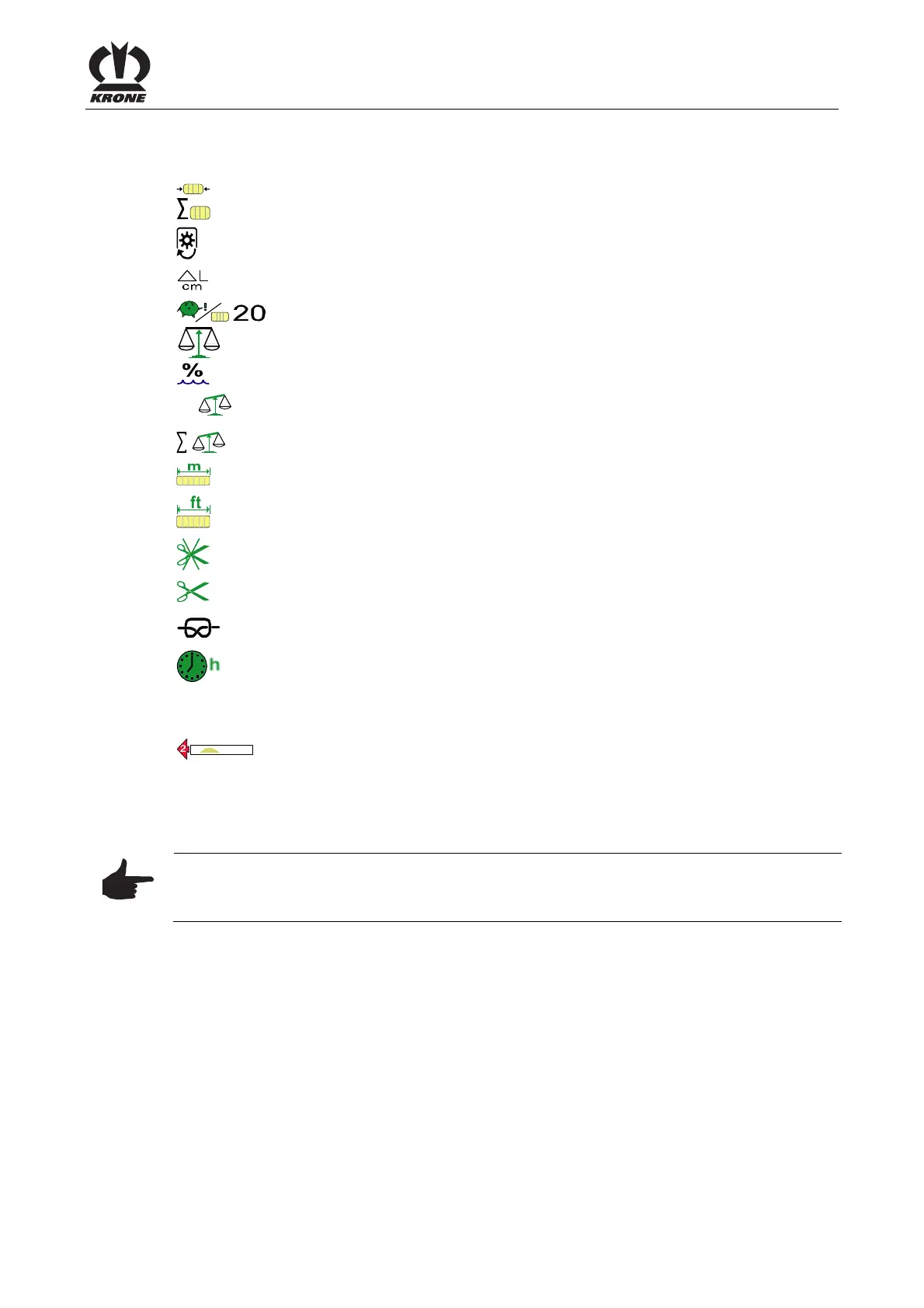
Left column (A):
Current baling force as a % (100% = max.)
2
Total number of bales, current customer counter
Current P.T.O. speed (min
-1
)
Current layer thickness in cm or inch (only for electrical bale length
adjustment)
Number of layers per bale
Bale weight (of the bale weighed at last)
Moisture degree of the crop
Ø
Average weight of the weighed bales
Total weight of all bales
Bale length counter (metric in metres)
Bale length counter (unit of measure US in feet)
Number of uncut bales
Number of cut bales (only for machines with X-Cut)
Appears briefly after a knot is tied; if activated (see chapter menu 1-2 “Knotter
Signal “), an audio signal is heard (horn sound for about 1 sec).
Operating hours counter (counts only when PTO is running)
Pos: 22.37.7 /BA/I nfo-Center/CCI- ISOBUS-Terminal/CCI-Bi G Pack/Grundbild Handb etrieb/Anzeigen im Ha uptfenster (III) rechte Spalte HS Baureihe @ 146\ mod_1360061291202_78. docx @ 1306550 @ @ 1
Right column:
Motion direction display
Arrows (1) left/right from the display. The arrows (1) have three different sizes,
numbered 1-3.
They show the driver to which side he must correct the direction and how far
when driving over a swath, to ensure the bale chamber is filled evenly.
Note
If the indications for the direction of motion are too strong or too weak, they can still be adjusted
(see chapter menu 1-3 “Sensitivity of direction display”).
Pos: 22.37.8 /BA/I nfo-Center/CCI- ISOBUS-Terminal/CCI-Bi G Pack/Grundbild Handb etrieb/Anzeigen im Ha uptfenster individuel l einrichten @ 99\ mod_1329898963530_78. docx @ 884259 @ @ 1
The displays in the main window (left column (A)) can be arranged individually. The procedure
is described in the chapter menu 9-3 “Configuration Main Window”.
Pos: 22.37.9 /BA/- -------------- Seitenumbruch---- ------------ @ 0\mod_119 6175311226_0.docx @ 416 5 @ @ 1









 To Next Page