Page 12 of 182 TP1A002–1 English
Aug 2015
Linx 8900 Operating Manual —
Printer user interface
Linx 8900
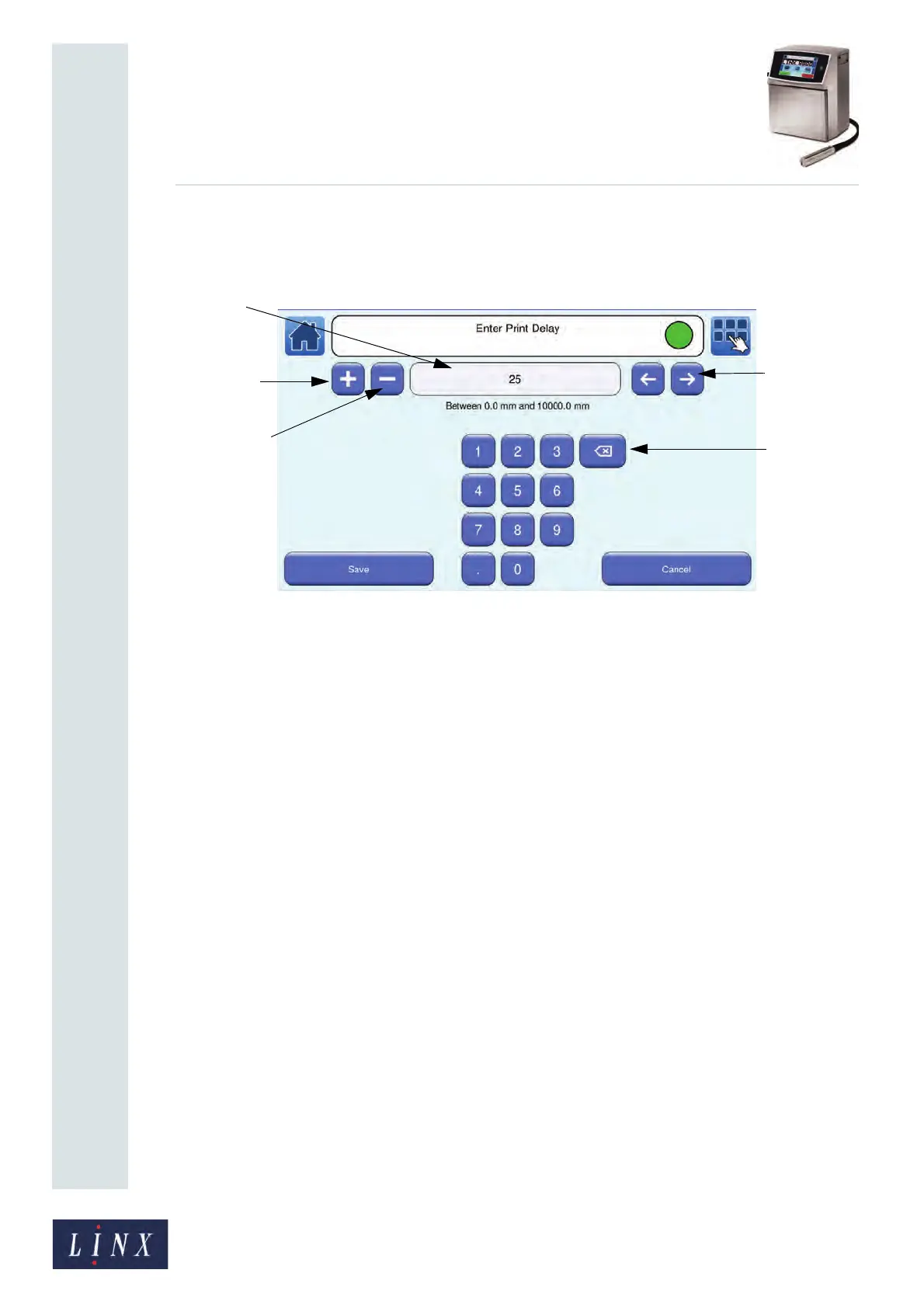
2.1.4 Numeric entry screens
You use the numeric entry screens to enter numeric values (for example, in the Line
Settings and Message Settings options).
Figure 9. Numeric entry screen
The name of the screen is shown in the printer status bar.
You can use the numeric keypad to enter a value in the numeric entry box. The following
options are available:
• Plus button—you can use this button to increase the value in the numeric entry box.
• Minus button—you can use this button to decrease the value in the numeric entry box.
• Backspace (Delete) button—you can use this button to delete digits in the numeric entry
box.
• Scroll buttons—you can use the Scroll buttons to move through the digits in the
numeric entry box.
Touch the Save button to apply your changes. Touch the Cancel button to discard your
changes.
NOTE: Most numeric entry screens indicate the range of values that you can enter. The
printer does not allow you to enter invalid values. Invalid values are highlighted in
red.
Scroll
Plus button
Minus button
Numeric
Backspace
button
(Delete)
entry box
buttons



 To Next Page