Page 62 of 182 TP1A002–1 English
Aug 2015
Linx 8900 Operating Manual —
Line and message settings
Linx 8900
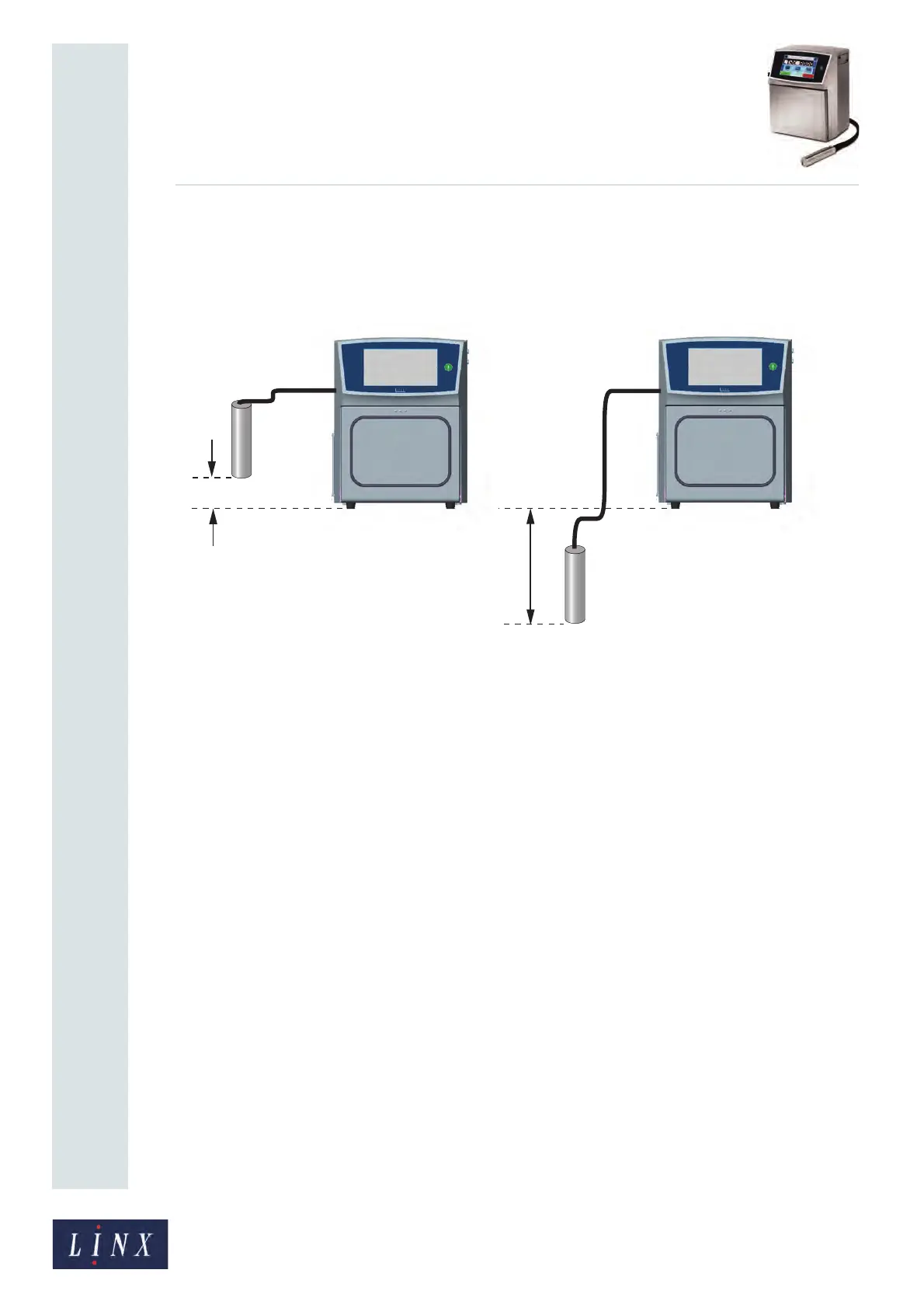
5.2.13 Printhead Height
The printhead height is the height difference between the printhead and the cabinet. The
difference is measured from the base of the feet of the printer to the end of the printhead, as
shown below.
Figure 61. Printhead height measurement
Touch the Printhead Height button and enter the required printhead height. Touch the
Save button to save the changes.
Enter a negative height if the printhead is lower than the base of the printer. The range for
the height difference is –2 metres to +2 metres. It is not necessary to enter the ‘+’ sign for
positive numbers. Always make sure that the printhead height setting is correct because the
printer uses this value to calculate the correct internal pressures.
5.2.14 Encoder Voltage
If you use a shaft encoder, this option allows you to select the voltage used by the encoder.
Touch either the 5 Volts or 24 Volts option to select that voltage.
5.2.15 Dynamic Orientation
This option allows you to set up dynamic message orientation for traversing operations.
Dynamic orientation means that the orientation of the message changes automatically in
response to a trigger event.
If this option is set to Enabled, the Dynamic Orientation Settings option becomes available
(see page 64).



 To Next Page