P/N 9-500-0255 6-31
Service Manual
Chapter 6: Maintenance—Remove and Replace Procedures
C-Arm Components—Remove and Replace
C-arm Lower Rear Cover
1. Remove the patient handle, the C-arm bottom cover, and the left and ride side
covers as per Steps above.
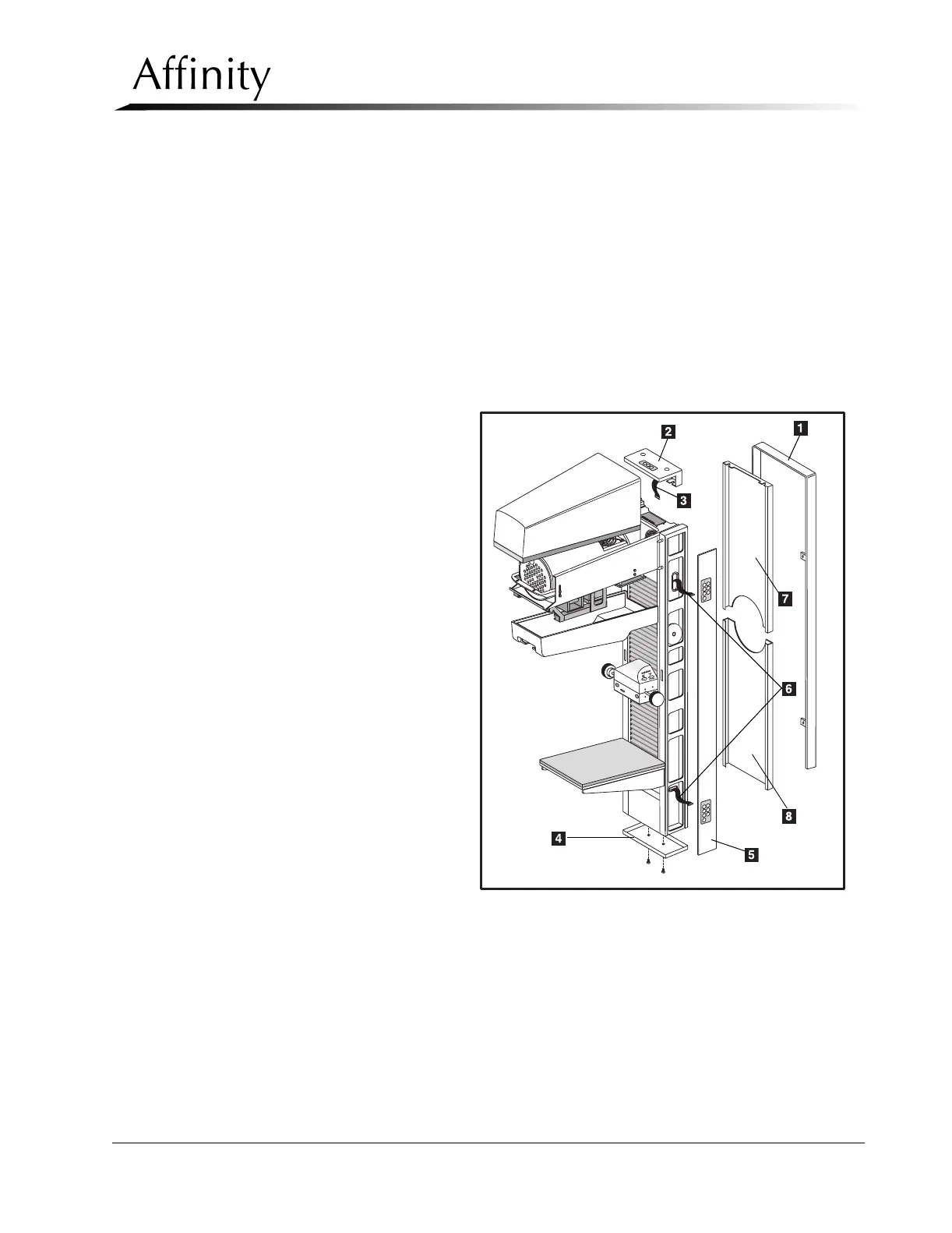
2. Remove two screws securing the C-arm Lower Rear Panel (Figure 6-20, Item 7)
to the C-arm frame.
3. Disconnect the ground wire from the lower rear cover.
4. Pull the lower rear cover down approximately one inch until the spring clips
disengage.
5. Pull cover away from the unit frame.
Legend for Figure 6-20
1. Patient Handle
2. C-Arm Top Cover
3. 3-Position Switch Wiring
Harness
4. C-Arm Bottom Cover
5. C-Arm Side Covers (2, Left
and Right)
6. 7-Position Switch Wiring
Harness (4, 2 Left and 2 Right)
7. C-Arm Upper Rear Cover
8. C-Arm Lower Rear Cover
Figure 6-20: C-arm Frame Covers



 To Next Page