3-8 P/N 9-500-0255
Service Manual
Chapter 3: Functional Checks/Setting Defaults
The Affinity Series Control Panel
3.0 The Affinity Series Control Panel
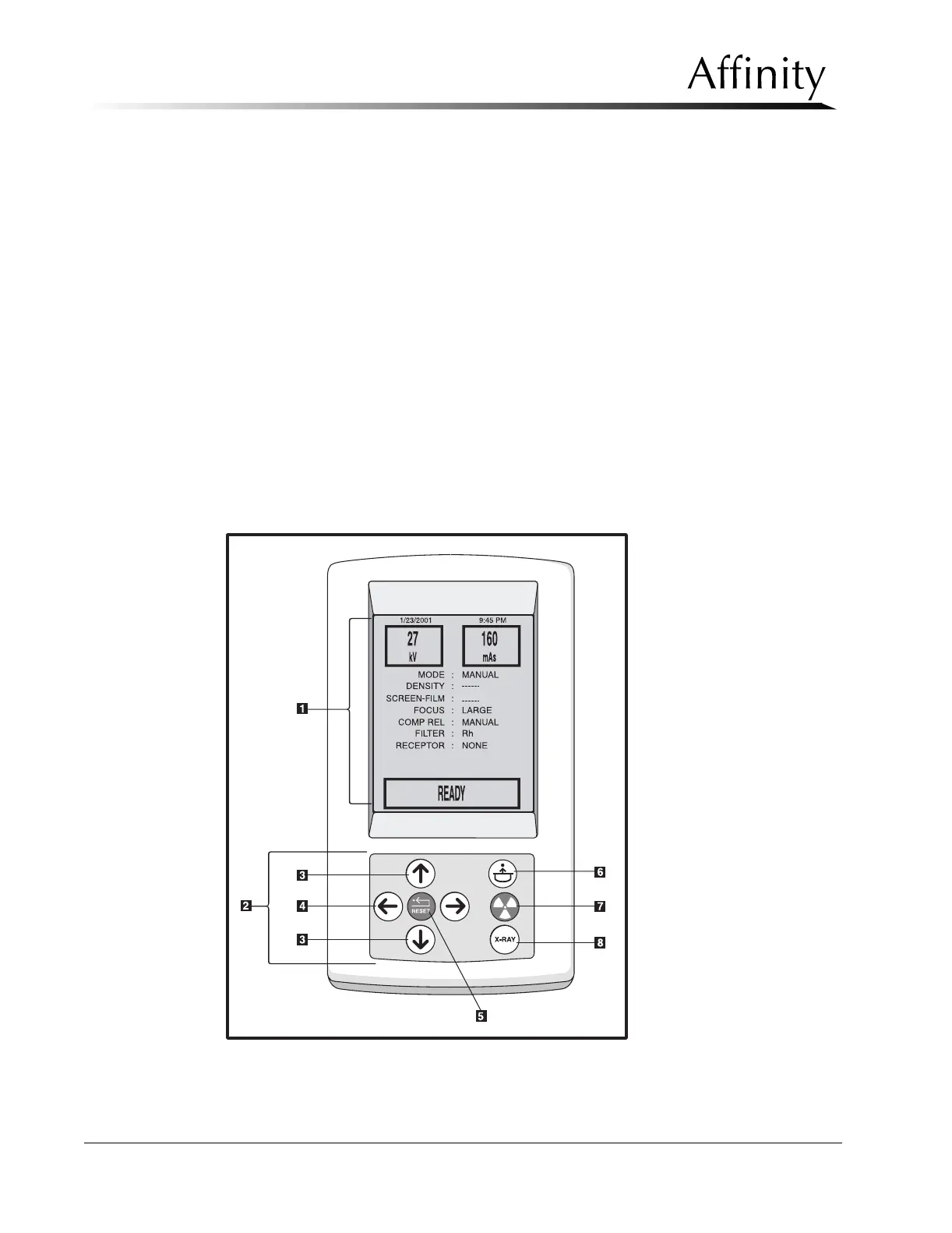
The Affinity Series Control Panel (Figure 3-6) is the user interface which provides the operator
with the ability to set exposure parameters and change system settings. The Control Panel is
equipped with the following:
Legend for Figure 3-6
1. Display Screen - Displays the current exposure techniques and system settings.
2. Function Keypad - Contains the following controls/keys:
3. Scroll Keys - Up/Down arrow keys used to move the on-screen highlight (cursor).
4. Change Keys - Left/Right arrow keys used to select options on highlighted field.
5. Reset Key - Used to acknowledge and clear an alert message. When used with Change
keys, it allows user to change screens. When used with Scroll keys, it adjusts the contrast
of the Control panel LCD display.
6. Compression Release Key - Used to release the compression brake and raise the
compression device approximately 10 cm.
7. Exposure Indicator - Illuminates when the system is generating x-rays.
8. X-ray Exposure Key - Used to initiate an exposure.
Figure 3-6: The Affinity Series Control Panel



 To Next Page