P/N 9-500-0255 1-7
Service Manual
Chapter 1: General Information
Unit Description
3.2 Control Panel
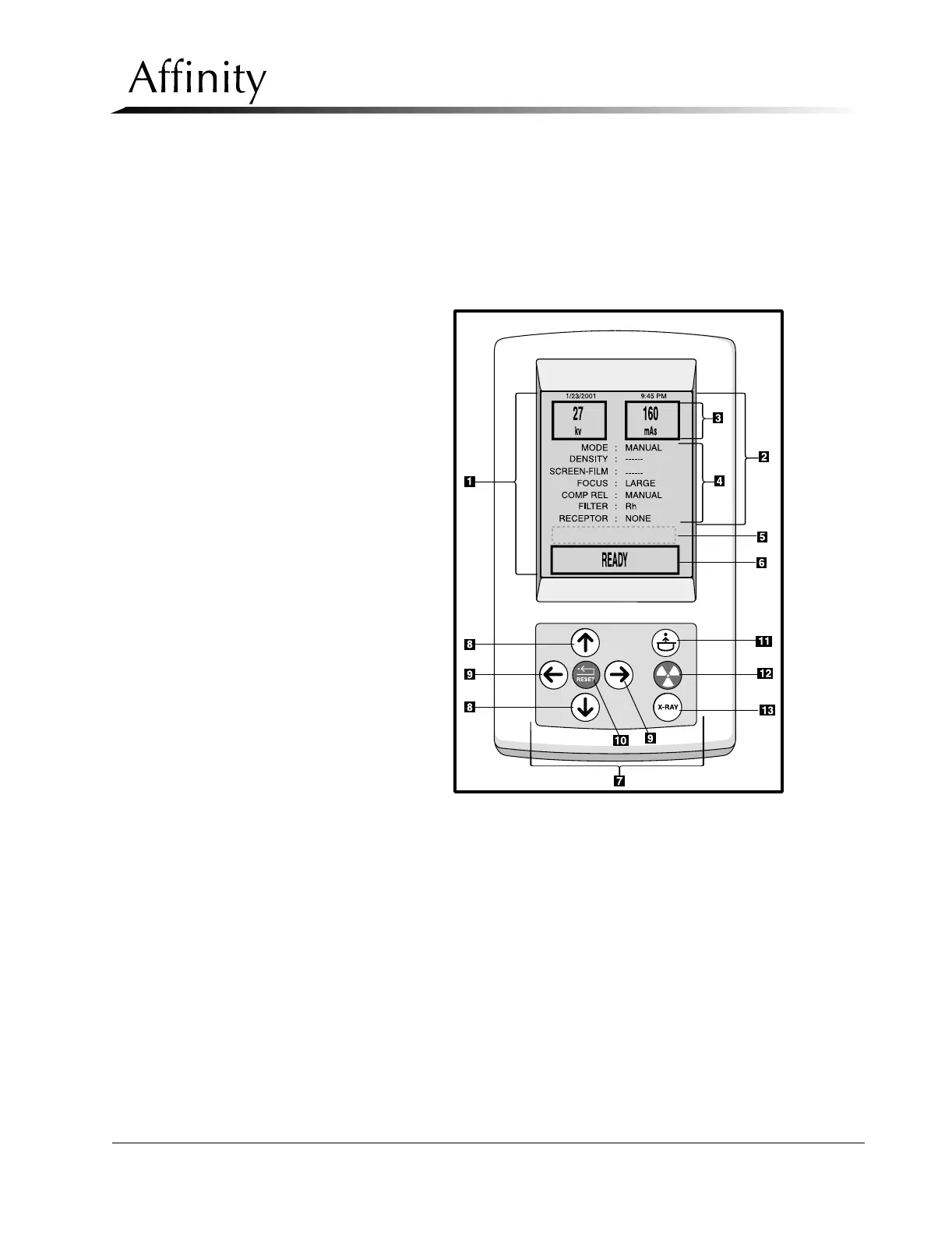
The Control Panel (Figure 1-3) is a compact user interface that mounts to the side of the
Gantry, or at a remote location. The control panel is an interactive device consisting of a
Function Keypad and an LCD Display Window. It is used to set exposure techniques and
parameters, provide operator instructions, display alert and system status messages, and
initiate x-rays.
Legend for Figure 1-3
1. LCD Display Window
2. Exposure Parameters Area
3. Exposure Factor Selection Area
4. Exposure Parameter Selection
Area
5. Message Area
6. Status Area
7. Function Keypad
8. Scroll Keys
9. Change Keys
10. Reset Key
11. Compression Release Key
12. Exposure Indicator
13. Exposure Enable Key
Figure 1-3: Affinity Series Control Panel



 To Next Page