0850/0850-T1 User Manual
Matrix Machine Tool (Coventry) Limited 105 / 231
19.2 Work piece Manager
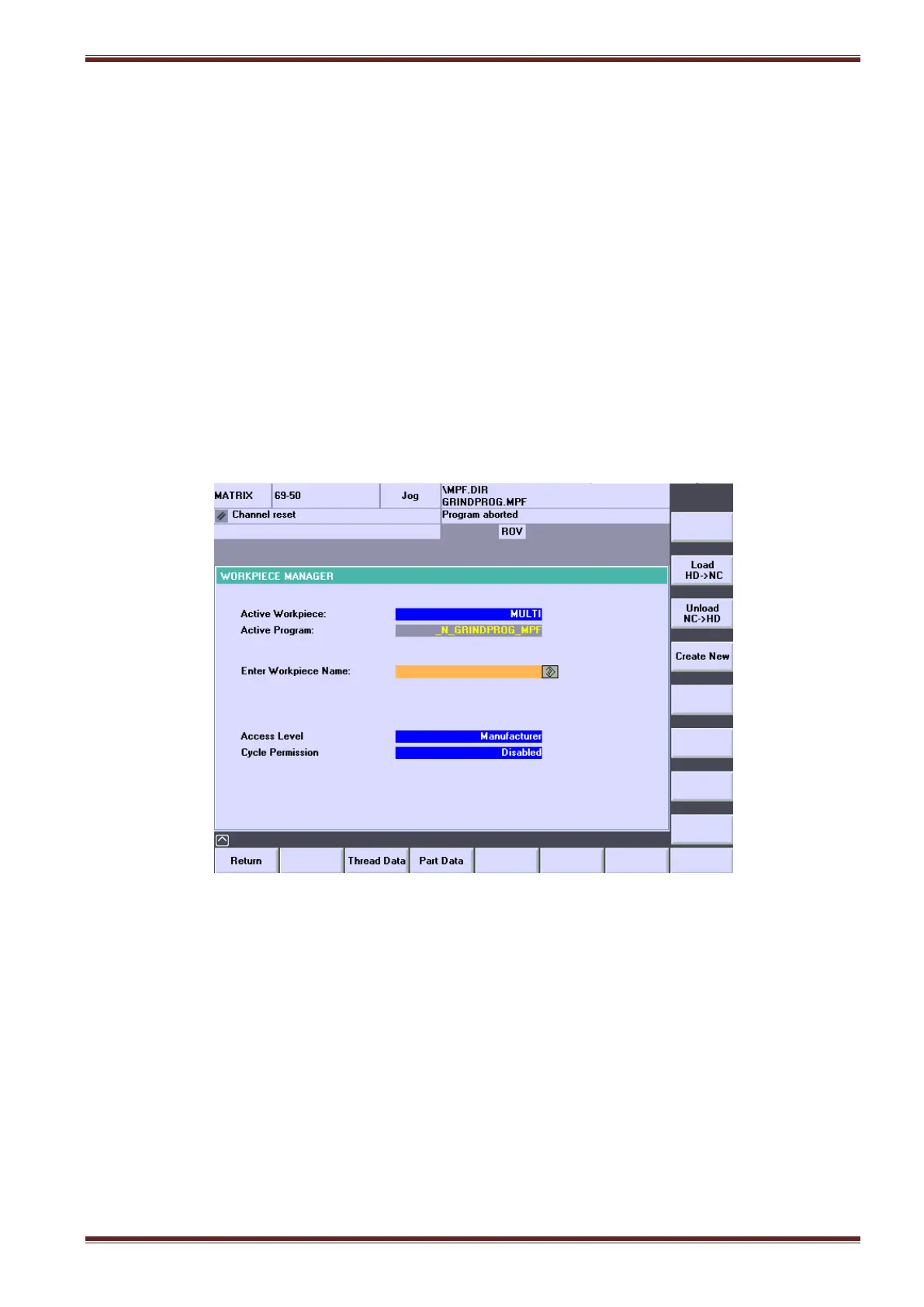
[Custom > Matrix > Workpiece Manager]
Before you can run any setup cycle or start to do any grinding on the machine you must load a
workpiece (sometimes called a job file) to the NC. If there are no existing workpieces listed in the
workpiece folder (Machine > Programs > Workpiece) available to use then you must create a new
one.
19.2.1 Create and Load a new workpiece
5. Set the ORANGE Siemens Key to position 3 on the MCP.
6. Select [AUTO] and [SETUP] mode.
7. Select [Workpiece Manager] softkey from the main menu.
8. Enter a name (max 8 of characters) for a workpiece that you want to grind in the Enter
Workpiece Name input field followed by pressing the yellow [INPUT] key on the HMI panel.
9. Select the [Create New] softkey to generate the workpiece data files and populate the Part
Data fields with default data that you can edit.
10. Select the [Load HD >NC] softkey to load the workpiece data into the NC memory.
11. Select the [Return] softkey to return to the main menu screen.



 To Next Page