0850/0850-T1 User Manual
Matrix Machine Tool (Coventry) Limited 62 / 231
10.2 Enabling the probe system signal interface
By default the probe system interface signals are switched off. Therefore, to prepare the probe
system interface for use on the machine you must first enable the following signals:
Control Unit MD p680[1] bit 1
PLC signal DB10.DBX107.0 (probe fine)
PLC signal DB10.DBX107.1 (probe coarse)
10.3 Setting the probe offsets
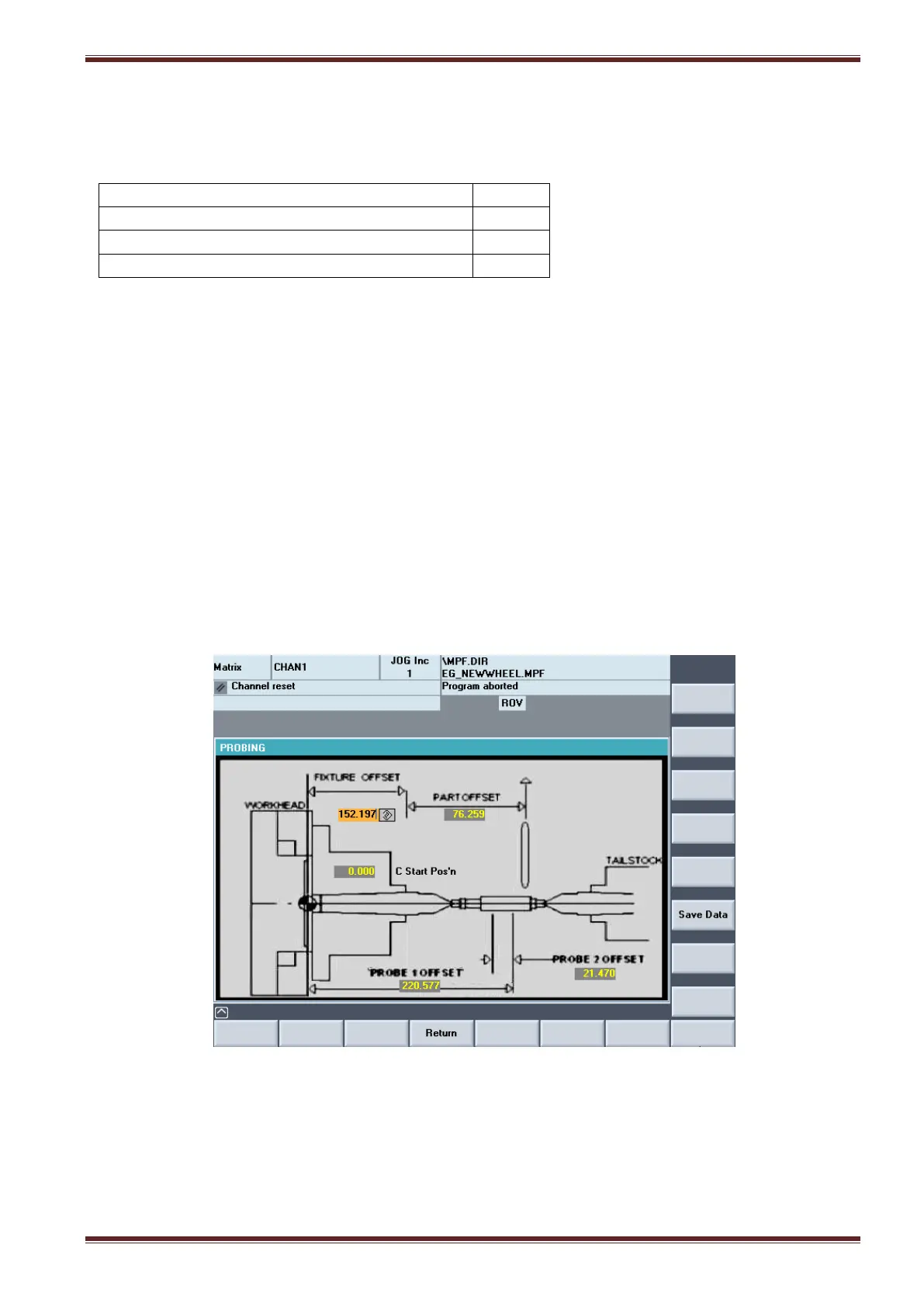
Before you can use the probe system as an integral function of the machine cycle you need to
establish five fundamental probe offset parameters. The five parameters are:
Fixture Offset
Part Offset
Probe 1 Offset
Probe 2 Offset
C axis start position
10.3.1 Probe Offsets screen
Matrix > Main Menu > Setting Cycles> Set Work Datum > Probe Cycle
Editing Probe Offset parameters:
1. Set the ORANGE Siemens Key to position 3 on the MCP.
2. Select [AUTO] and [SETUP] mode.
3. Select the Probe screen [Matrix] > [Main Menu] > [Setting Cycles] > [Set Work Datum] >
[Probe Cycle]
4. Select the [Save Data] softkey to store the probe offset values to internal an system file.



 To Next Page