Panel setup menu VJ-1617H OPERATION MANUAL
5-52
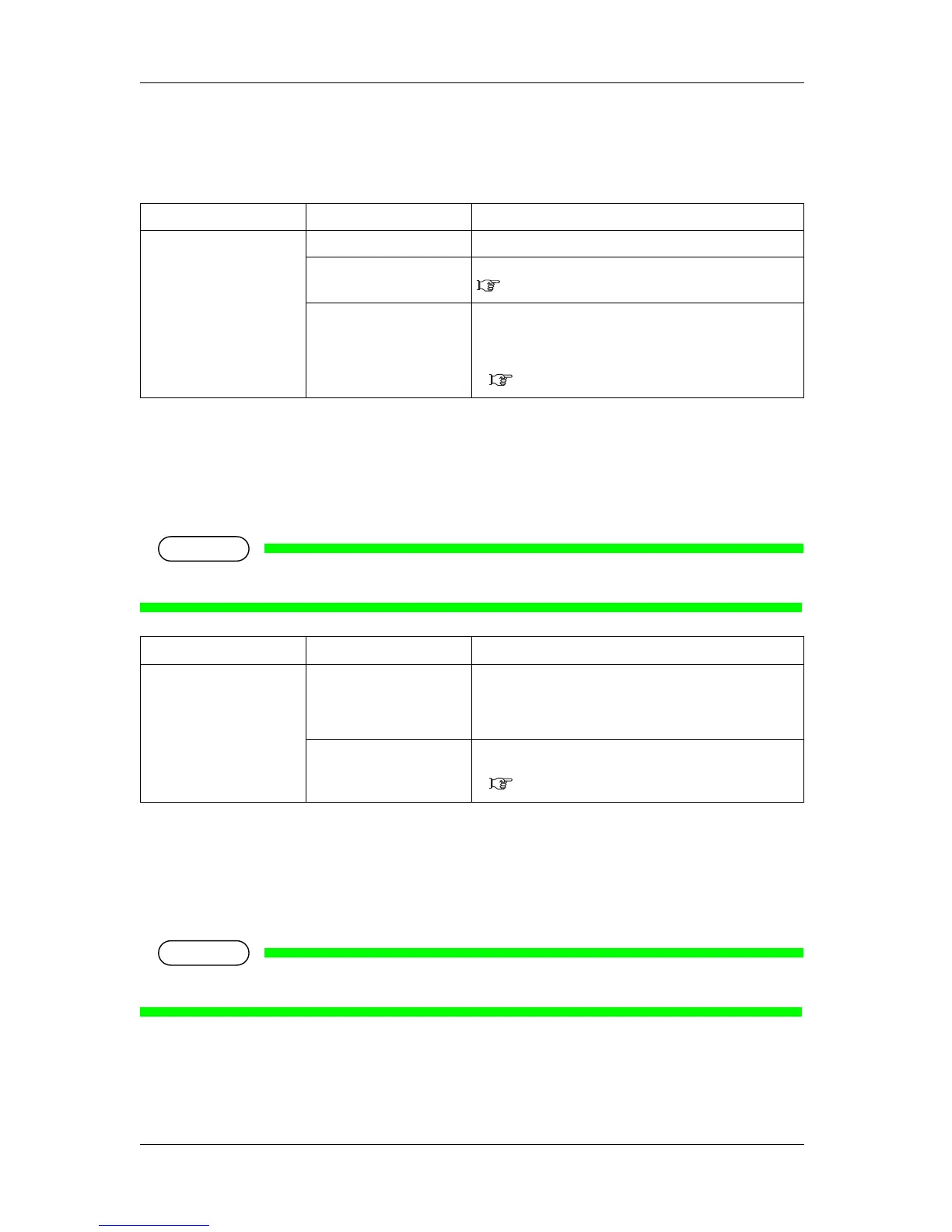
5.9.2 Length menu
Sets the unit to display the length.
5.9.3 IP Address menu
Sets the IP address of the printer.
Use this menu when using printer connecting the network.
• Be sure to set the IP address after consulting the network administrator.
5.9.4 Subnet Mask menu
Sets the subnet mask of the printer.
Use this menu when using printer connecting the network.
• Be sure to set the subnet mask after consulting the network administrator.
Setup item Setting Description
Length <mm> Displays the length in millimeters (mm).
inch Displays the length in inches (inch).
— • [Enter] key: saves the setting and shifts to the previous
menu.
• [Cancel] key: cancels the setting and shifts to the previous
menu.
5.3 Setup menu
Setup item Setting Description
IP Address 0.0.0.0 to
<192.168.1.253> to
255.255.255.255
Change the IP address by operating the following keys.
• [+] key: increases the setting value.
• [–] key: decreases the setting value.
• [Enter] key: changes the setting for the next segment.
— • [Cancel] key: cancels the setting and shifts to the previous
menu.
5.3 Setup menu






 To Next Page