6.3 When Suspecting a Fault
BP4610
6-8
6.3 When Suspecting a Fault
When suspecting a fault, perform the following handling. If this fails to achieve recovery, contact NF
Corporation or an NF Corporation sales representative.
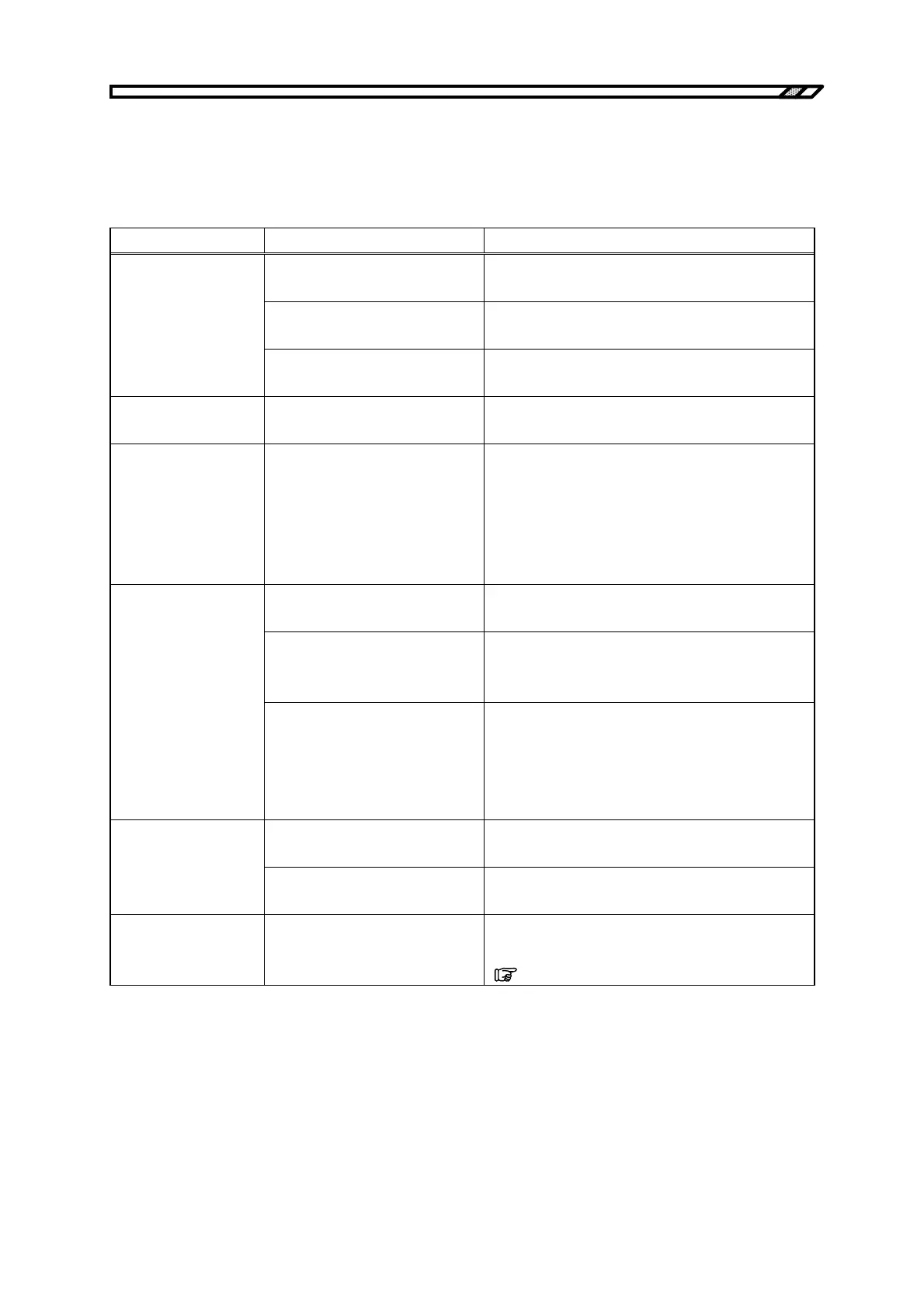
Problem Possible Cause Handling
A power supply that exceeds the
rated range is used.
Use a power supply within the rated range.
The power supply fuse is broken.
Request repair from NF Corporation or an NF
Corporation sales representative.
The power won’t go on
A malfunction occurred due to
external noise.
Place the BP4610 in a location with favorable
environmental conditions.
Panel operation is not
possible.
The keys or MODIFY dial are
defective.
Request repair from NF Corporation or an NF
Corporation sales representative.
Nothing is displayed on
the LCD.
The LCD contrast is too low.
Raise the contrast of the LCD.
Even in an operating environment where the LCD
display cannot be made out, the contrast can be adjusted
by simultaneously pressing the ENTER key and
CANCEL key. At this time, the digit cursor is on the
decimal position.
The BP4610 has not been sufficiently
warmed up.
Warm up the BP4610 for 30 minutes or longer after
power on.
The ambient temperature and
ambient humidity are not within the
guaranteed operation range.
Use the BP4610 in an environment that matches
the specification ranges.
The output value differs
from the set value.
You want to output only AC, but
the DC setting is not “0”. Or, you
want to output only AC, but the
superimposed AC setting is not
“0”.
Make the settings of outputs that are not needed
“0”.
The USB ID differs from the
program.
Set a USB ID that matches the program.
External control via USB
is not possible.
The USB ID is the same as that
of another device.
Set an USB ID that is unique.
I don’t get the result as
described in the user’s
manual.
Execute setting initialization.
The explanations in the user’s manual assume the default
settings. Initialize the settings.
(
Refer to “4.9.8 Reset function”.)



 To Next Page