U.4.39
Date Code 20090715 User’s Guide SEL-421 Relay
Basic Relay Operations
Examining Metering Quantities
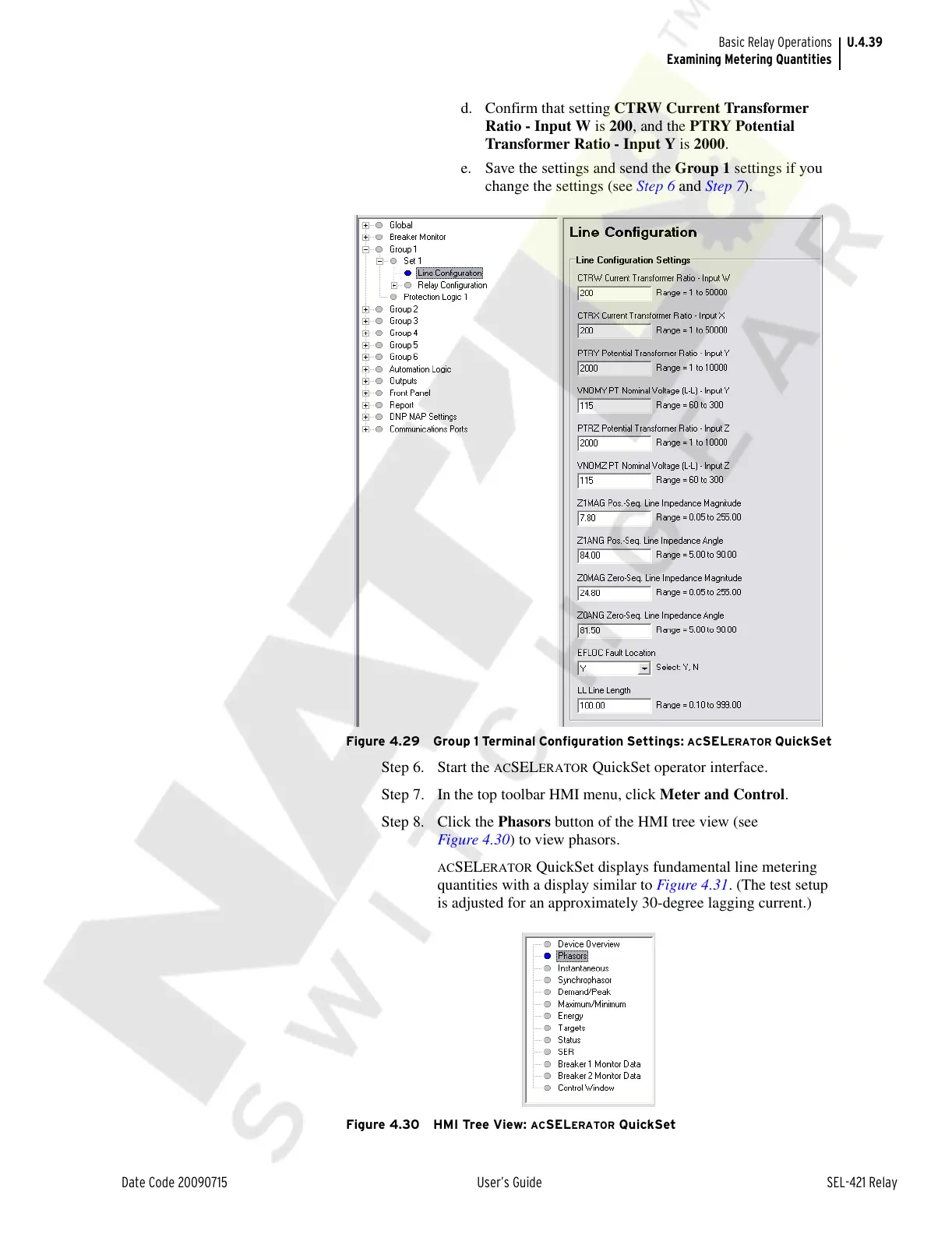
d. Confirm that setting CTRW Current Transformer
Ratio - Input W is 200, and the PTRY Potential
Transformer Ratio - Input Y is 2000.
e. Save the settings and send the Group 1 settings if you
change the settings (see Step 6 and Step 7).
Figure 4.29 Group 1 Terminal Configuration Settings: ACSELERATOR QuickSet
Step 6. Start the ACSELERATOR QuickSet operator interface.
Step 7. In the top toolbar HMI menu, click Meter and Control.
Step 8. Click the Phasors button of the HMI tree view (see
Figure 4.30) to view phasors.
ACSELERATOR QuickSet displays fundamental line metering
quantities with a display similar to Figure 4.31. (The test setup
is adjusted for an approximately 30-degree lagging current.)
Figure 4.30 HMI Tree View: ACSELERATOR QuickSet
Courtesy of NationalSwitchgear.com



 To Next Page