U.4.78
SEL-421 Relay User’s Guide Date Code 20090715
Basic Relay Operations
Configuring High-Accuracy Timekeeping
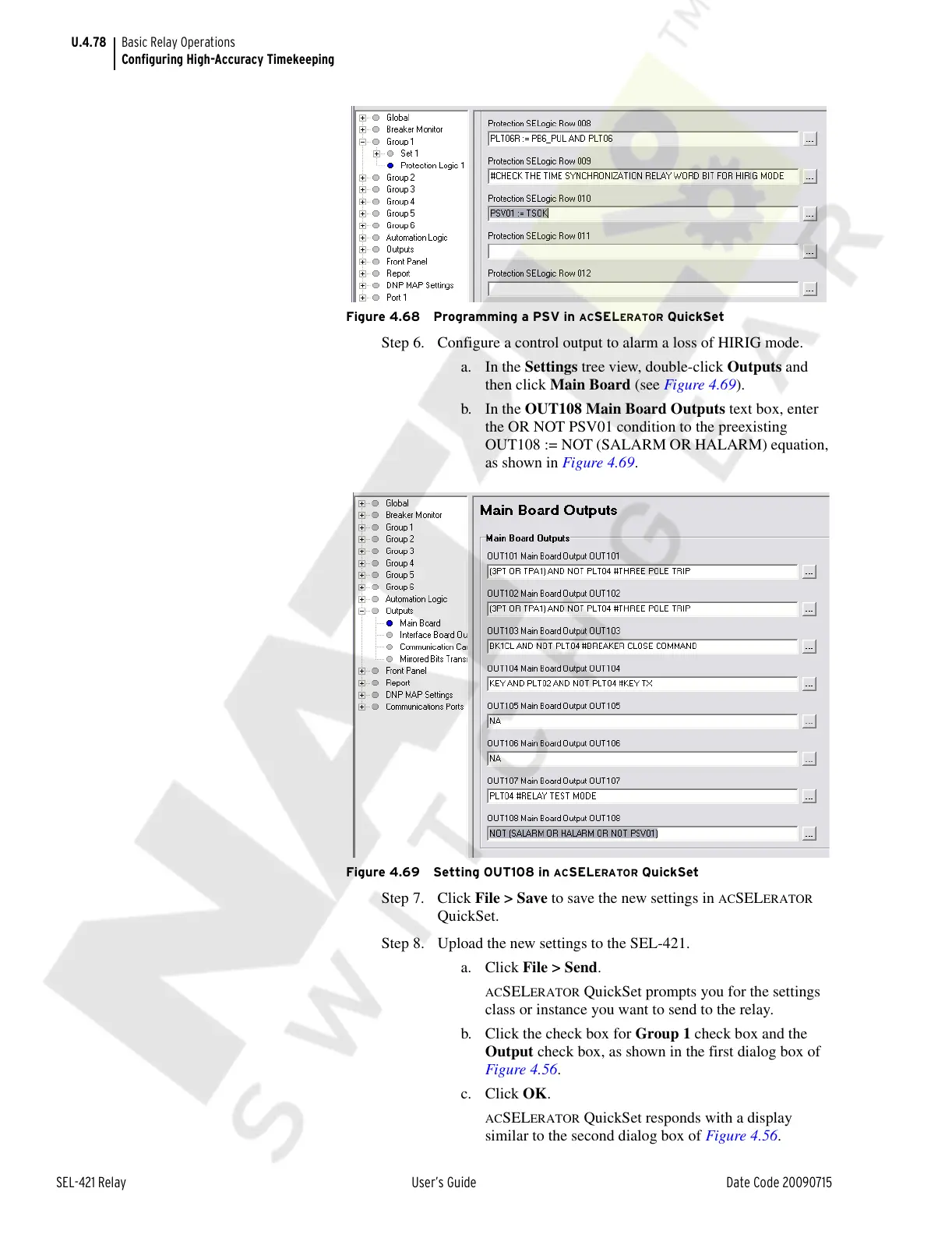
Figure 4.68 Programming a PSV in ACSELERATOR QuickSet
Step 6. Configure a control output to alarm a loss of HIRIG mode.
a. In the Settings tree view, double-click Outputs and
then click Main Board (see Figure 4.69).
b. In the OUT108 Main Board Outputs text box, enter
the OR NOT PSV01 condition to the preexisting
OUT108 := NOT (SALARM OR HALARM) equation,
as shown in Figure 4.69.
Figure 4.69 Setting OUT108 in ACSELERATOR QuickSet
Step 7. Click File > Save to save the new settings in ACSELERATOR
QuickSet.
Step 8. Upload the new settings to the SEL-421.
a. Click File > Send.
ACSELERATOR QuickSet prompts you for the settings
class or instance you want to send to the relay.
b. Click the check box for Group 1 check box and the
Output check box, as shown in the first dialog box of
Figure 4.56.
c. Click OK.
ACSELERATOR QuickSet responds with a display
similar to the second dialog box of Figure 4.56.
Courtesy of NationalSwitchgear.com



 To Next Page