U.6.24
SEL-421 Relay User’s Guide Date Code 20090715
Testing and Troubleshooting
Checking Relay Operation
Step 9. Select the HMI menu (top toolbar) and then click Meter and
Control to start the
ACSELERATOR QuickSet HMI interface.
Step 10. View the SER report.
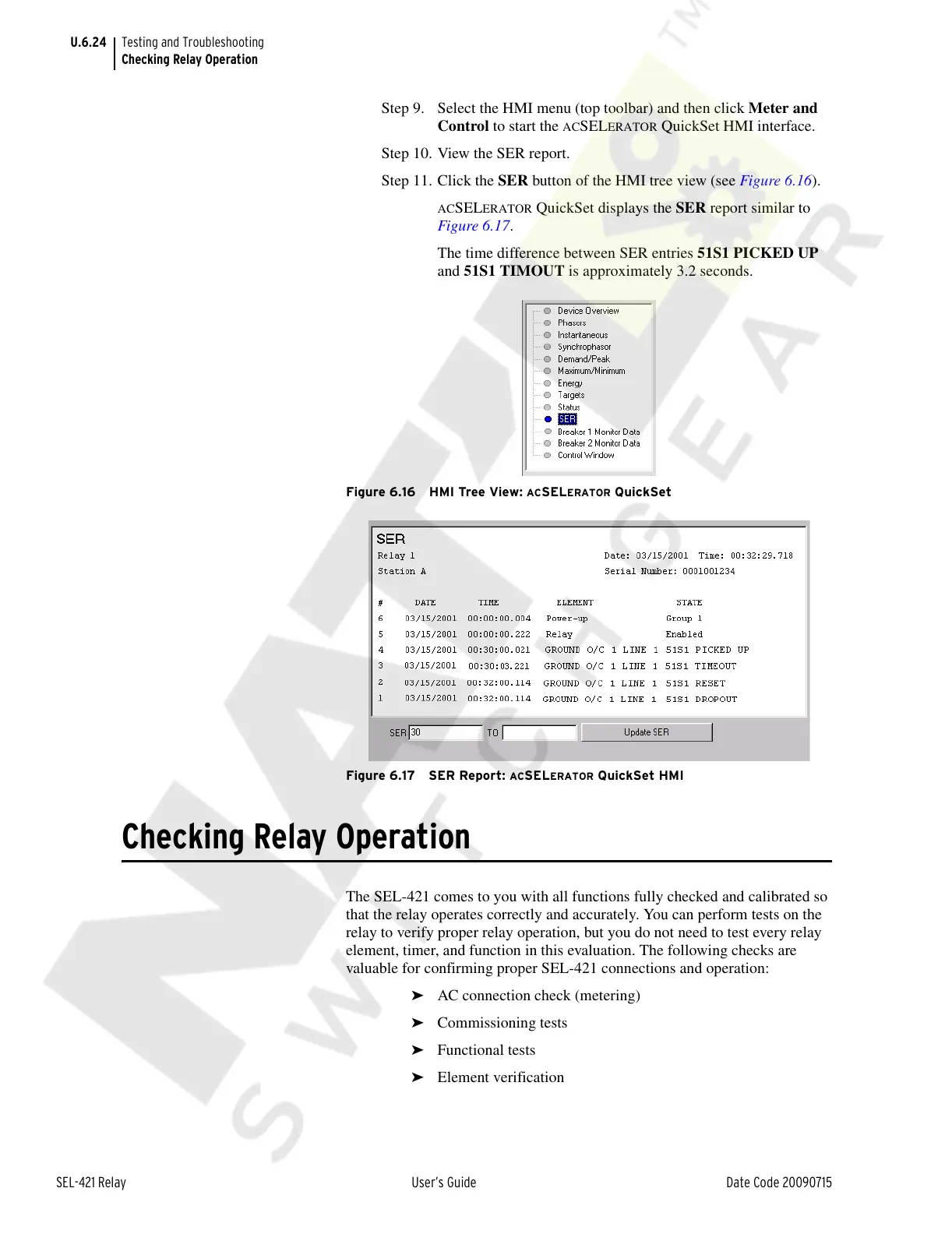
Step 11. Click the SER button of the HMI tree view (see Figure 6.16).
ACSELERATOR QuickSet displays the SER report similar to
Figure 6.17.
The time difference between SER entries 51S1 PICKED UP
and 51S1 TIMOUT is approximately 3.2 seconds.
Figure 6.16 HMI Tree View: ACSELERATOR QuickSet
Figure 6.17 SER Report:
ACSELERATOR QuickSet HMI
Checking Relay Operation
The SEL-421 comes to you with all functions fully checked and calibrated so
that the relay operates correctly and accurately. You can perform tests on the
relay to verify proper relay operation, but you do not need to test every relay
element, timer, and function in this evaluation. The following checks are
valuable for confirming proper SEL-421 connections and operation:
➤ AC connection check (metering)
➤ Commissioning tests
➤ Functional tests
➤ Element verification
Courtesy of NationalSwitchgear.com



 To Next Page