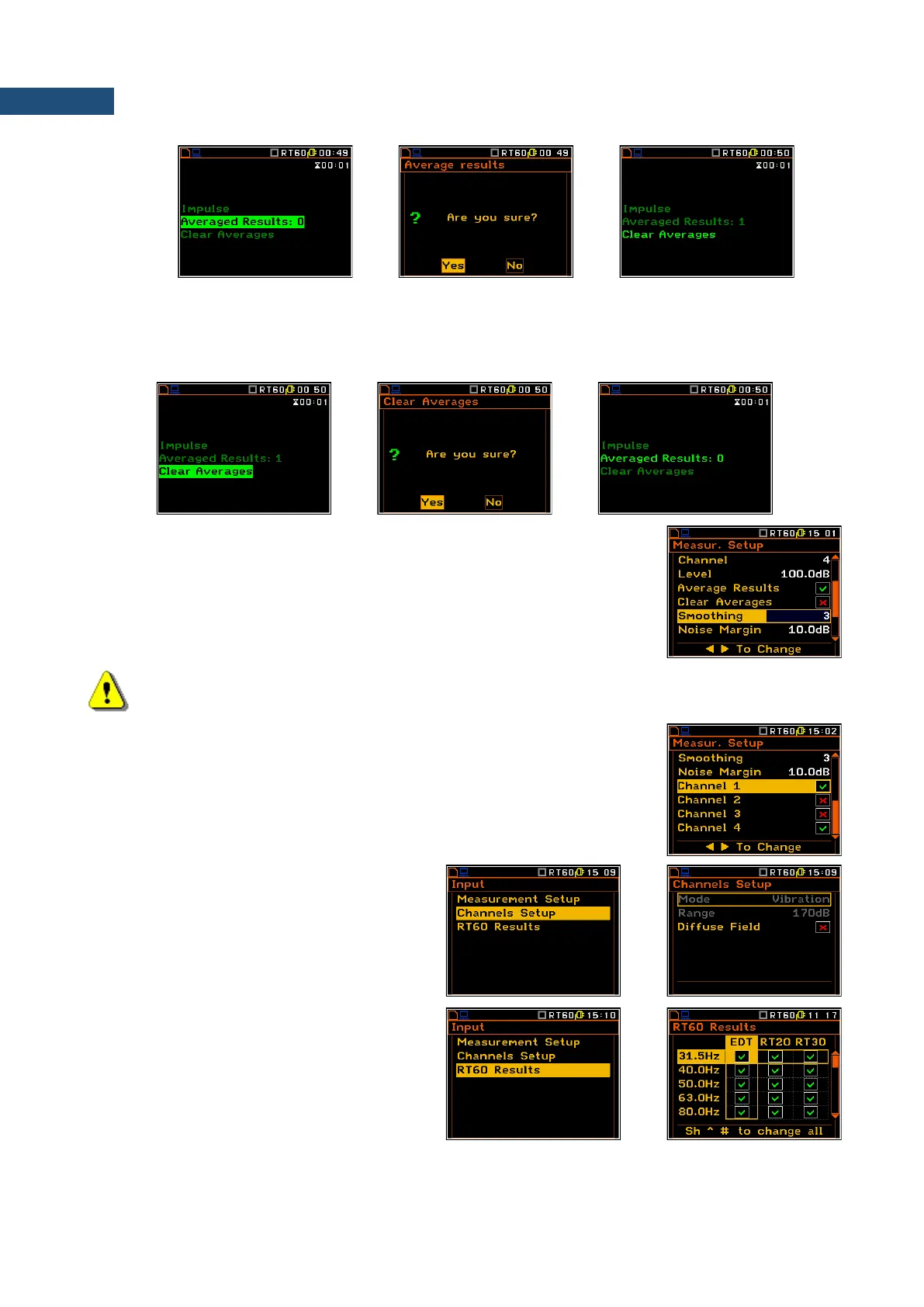
The Clear Averages position enables the user to clear all previous averages and the averaging will start from
next measurement.
To clear averaging the user should select the field Clear Averages: x and press the <ENTER> key, select in
the confirmation window Yes and press <ENTER> again.
The Smoothing position enables the user to set the number of samples, which
are taken to averaging process of the sound pressure level decay curve. Note:
this parameter influences the reverberation time results. The parameter can
be set in the range 0 ÷ 15 with 1 sample step (default value is 3 samples).
The Noise Margin position enables the user to set the margin value to the
calculated noise level. This parameter can be set in the range 0 ÷ 20 dB with
0.1 dB step (default value is 10 dB).
Note: If the measurement have to fulfilled the ISO 3382 standard requirements the noise margin
is required to be set to 10 dB (or greater value).
The Channel positions activate channels for RT60 analysis.
The Channels Setup list enables the user to
swith the Diffuse Field correction filter.
The RT60 Results list enables the user to
select which reverberation time results: EDT,
RT20 or RT30 and to which 1/3 octave bands
will be calculated and presented on the display
after measurement.



 To Next Page