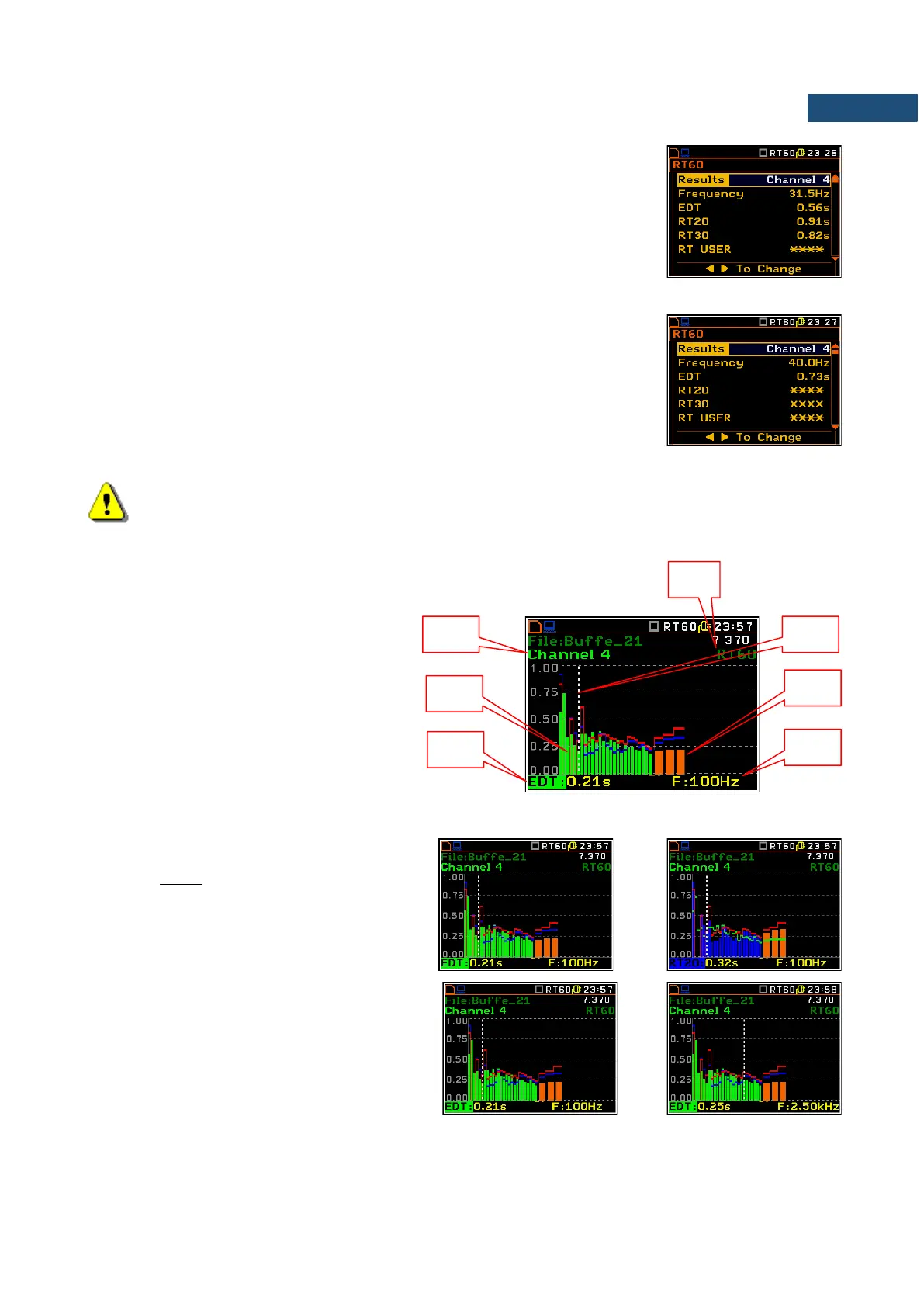
Table of RT60 results
The table presents the results of reverberation time for different RT60 results:
- EDT - early decay time;
- RT 20 - reverberation time calculated with 20 dB dynamics;
- RT 30 - reverberation time calculated with 30 dB dynamics;
- User - reverberation time, calculated with the user defined dinamics.
The user may scroll all results of the RT60 analysis with the use of ▲ / ▼ key.
Note: If “* * *” text appears in the RT indicator field it means that for this 1/3 octave band with the
selected parameters (Noise Mar.) the required measurement conditions were not fulfilled to
obtain the results.
Bar plot of RT60 results
1. Number of channel
2. RT 1/3 octave plot
3. Name of the RT result and its value
4. Used RT60 calculation method
5. Cursor position
6. RT results for Total values
7. Cursor position value (central 1/3 octave
band frequency)
Changing the RT result
When the field 3 is active the RT60 analisys
result can be changed after pressing the ◄
and ► keys together with <Alt>.
Changing the cursor position
The user may change the cursor position by
means of the ◄ / ► key.



 To Next Page