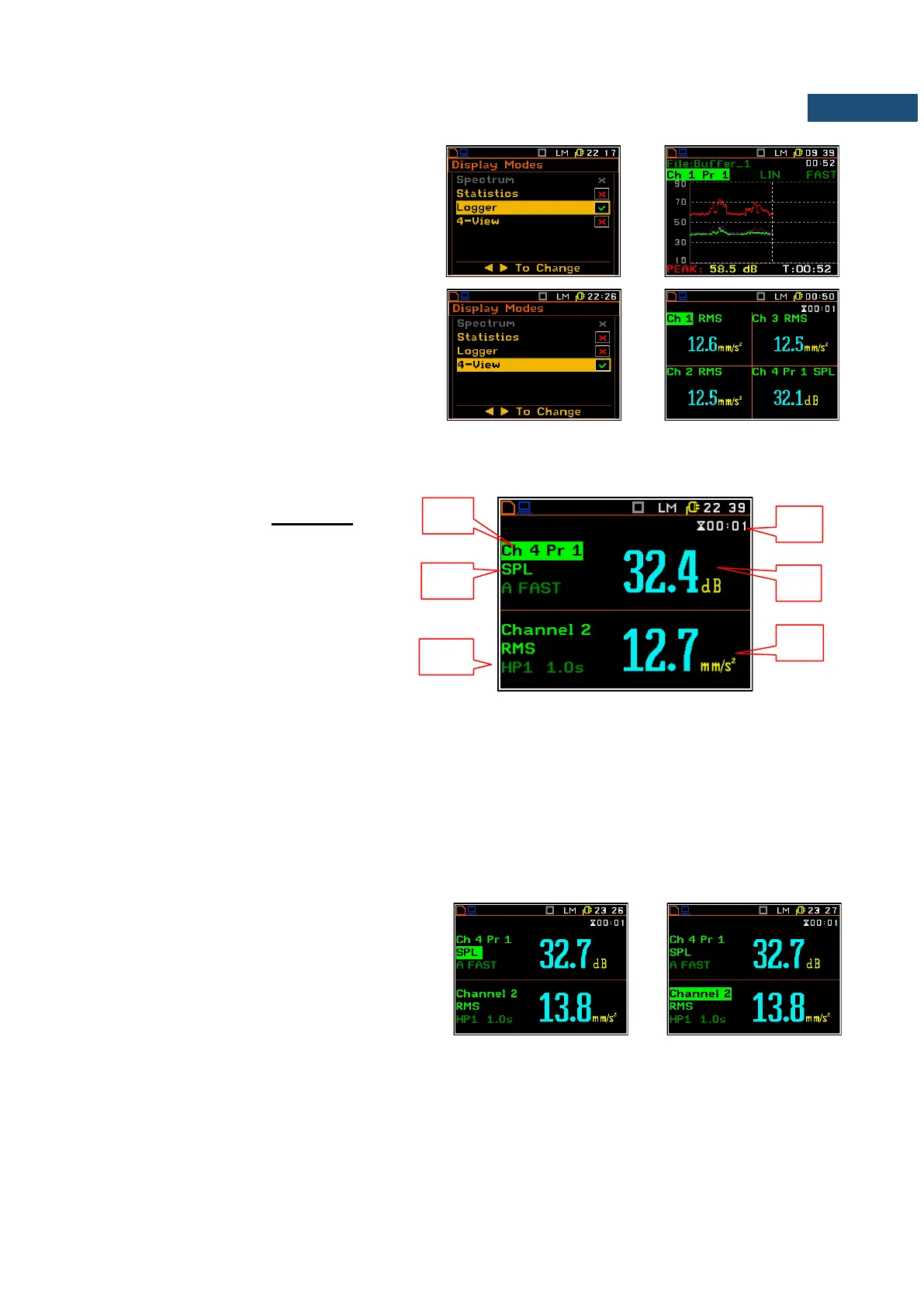
The Logger presentation mode shows the time
history of selected results.
The 4-View presentation mode shows
simultaneously results for all four channels.
When all display modes in the Display Modes list are switched on they all are available and can be selected
by means of the <Alt> and ▲ / ▼ key.
Fields description of the two results view
1. Channel and Profile number.
2. Function name: RMS, VDV, CRF, OVL,
PEAK, P–P, MTVV for vibration input;
SPL, LEQ, SEL, Ln, Ltm3, Ltm5, L01,
OVL, PEAK, MAX, MIN for sound input.
3. The name of the implemented filter and detector time constant:
- for vibration input the used filters are: HP1, HP3, HP10, Vel1, Vel3, Vel10, VelMF, Dil1, Dil3, Dil10, W-Bxy,
W-Bz, H-A, W-Bc, KB, Wk, Wd, Wc, Wj, Wm, Wg, Wh, Wg, Wb, Wv;
- for sound input the used filters are: LIN, A, C, G.
4. Elapsed time shows the current second of the measurement. The value presented there belongs to the
range [1, Int. Period].
5. The value of measured function.
6. Units of measured value.
Changing the active fields
Jumping between positions is made by means
of the ▲ or ▼ key.



 To Next Page