Quadra 4 Operator Manual
Tomtec
108
5.9 Current File Settings Options
5.9.1 Logging Options
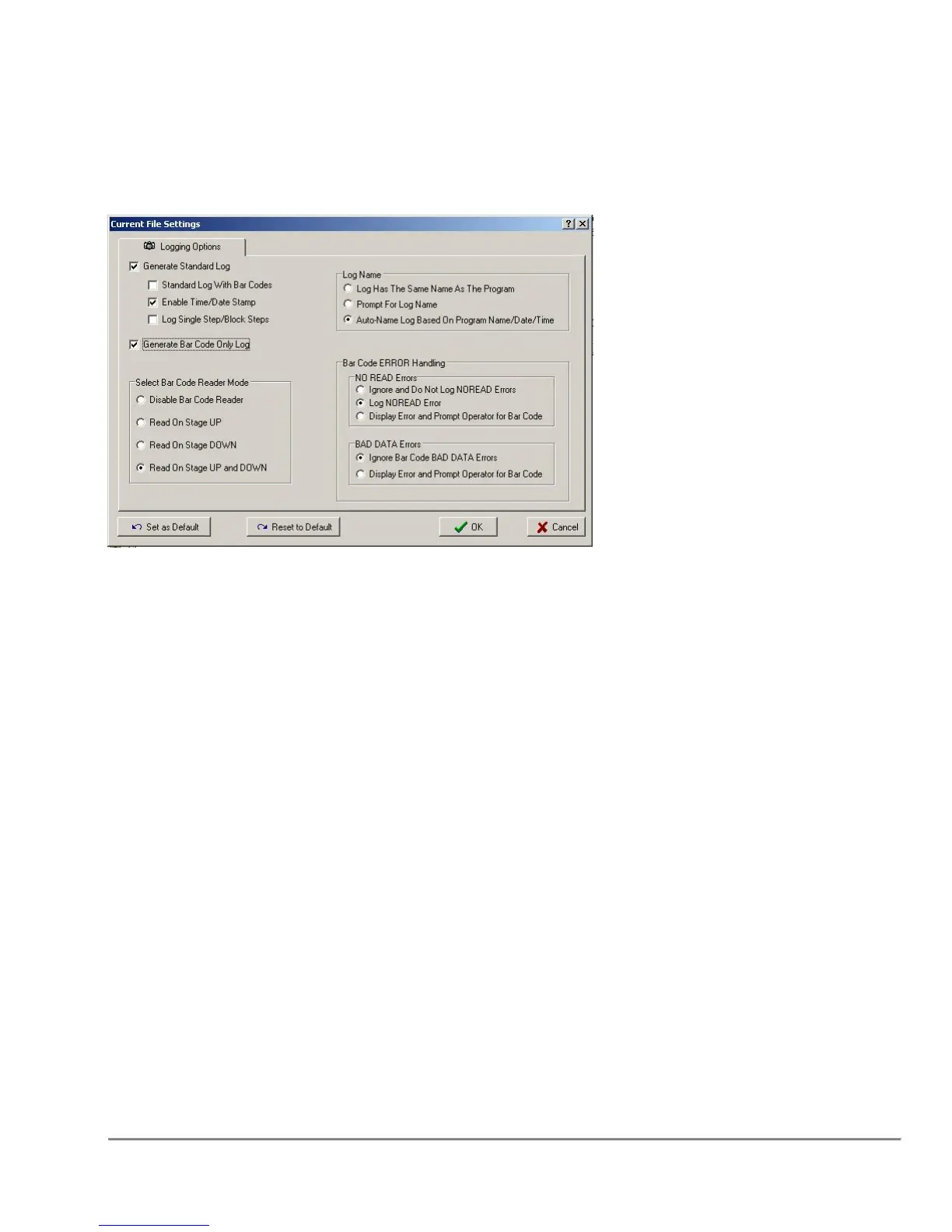
Log Type Check Boxes
The log type is set by checking the box. The Standard Log defaults with the Time/Date
Stamp feature enabled. Bar Codes can be recorded in the Standard Log, or in a Bar
Code Only log. When the "Log Single/Block Steps" is checked, partial program runs are
also logged.
Log Name
The log generated can have the same name as the program, the operator can
be prompted for a log name at the start of the program, and the log file name can
be generated automatically based on the program name, time and date.
Select Bar Code Reader Mode
When a bar code type log is selected, the "Select Bar Code Reader Mode"
group is enabled. In this group the operator can select when bar codes should be
scanned. In an Aspirate function, for example, " UP" would cause the bar code scan to
occur while the stage is raising the plate, before aspirating.
Bar Code Error Handling
"NO READ Errors" occur when the reader is unable to properly scan the bar code on
the applicable plate. Some conditions that would generate this error include a missing
bar code label or bar code label is on the wrong side.



 To Next Page