Quadra 4 Operator Manual
Tomtec
96
The Edit Menu
The Edit Menu allows you to add new records, Copy items, delete items, and also open
the Quadra Utility screen when required.
The View Menu
The View Menu gives you the option for customizing the view of the screen by
either including the small images next to their relative item, or negating them.
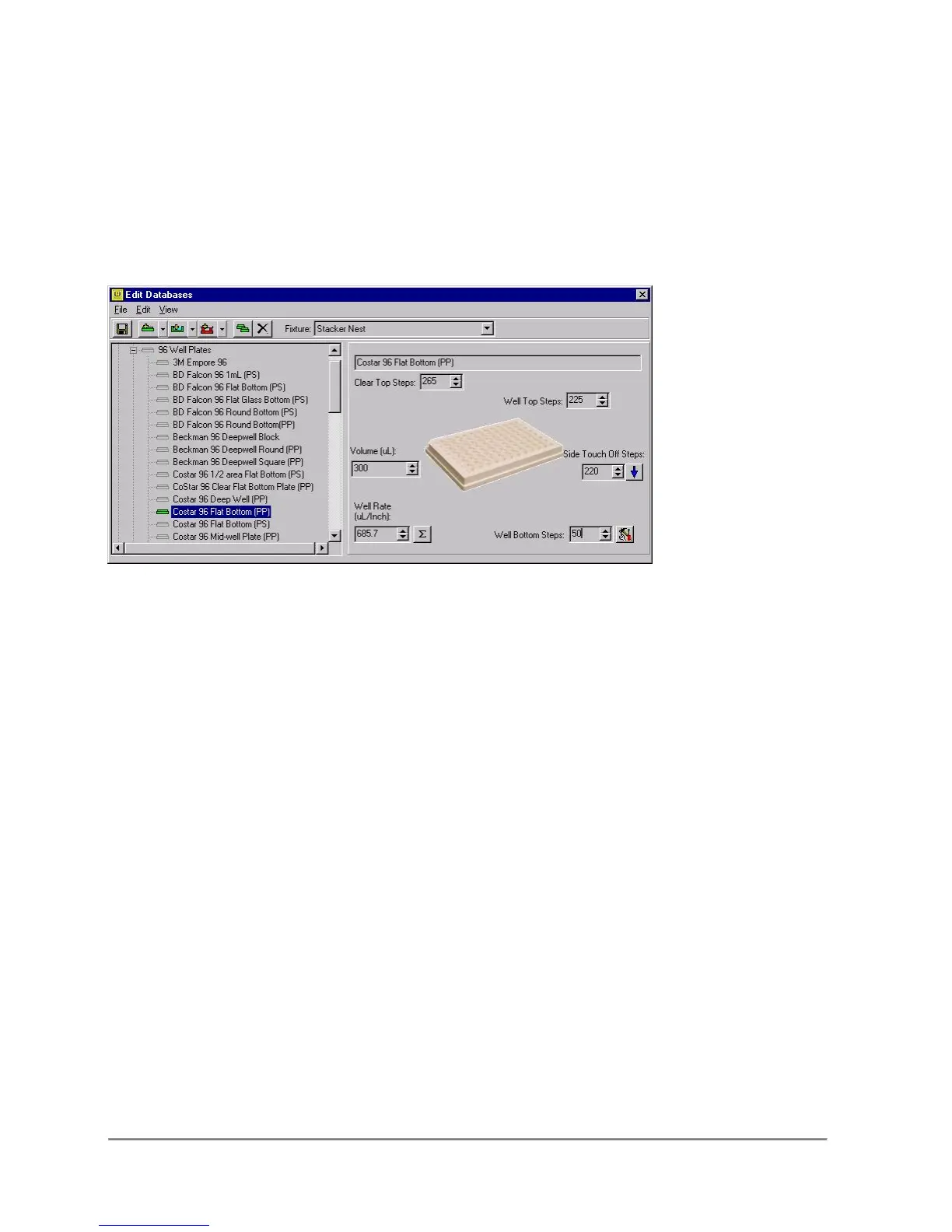
4.2 The Plate Panel
When setting the parameters for a plate or reservoir, the Plate Panel will appear on the
right hand side of the form. This form will allow the user to add/change the plate name,
Clear Steps, Top Steps, Bottom Steps, the Volume, the touch off steps, and also
calculate the well-rate, a feature that controls the liquid follow function.
Clear Top Steps
Clear Top Steps is the number of steps the stage has to travel beyond the fixture in
order to clear the plate/reservoir entirely for serial dilution or quadrant moves.
Top Steps
Top Steps is the number of steps the stage has to travel beyond the fixture in order to
set f the tips at the top of the plate.
Side Touch Off Steps
Side Touch Off Steps is the number of steps the stage indexes in the horizontal
direction, in order for the side of the tips to touch the side of the well.
Bottom Steps
Bottom Steps is the number of steps the stage has to travel beyond the fixture
in order for the tips to touch the bottom of the wells. (Not necessarily the bottom
of the plate or reservoir.)



 To Next Page