Quadra 4 Operator Manual
Tomtec
115
6.4 Pump
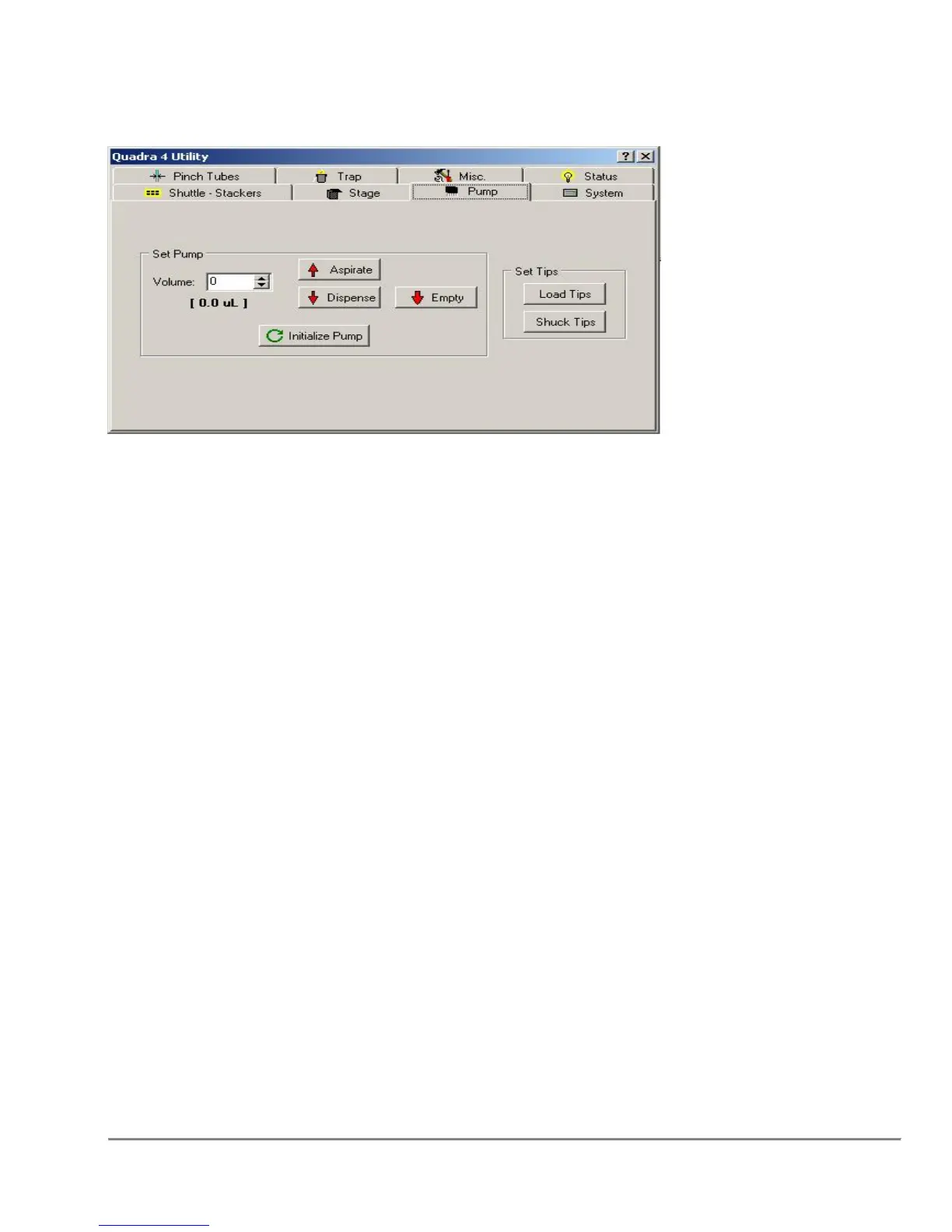
Set Pump
Aspirate will aspirate the volume (in µL Liters) specified in the adjacent edit box.
Dispense will dispense the volume (µL Liters) specified in the adjacent edit box.
Empty will dispense all volume in the tips.
Initialize Pump will reset all tips to the zero volume position.
Volume
Displays or sets the volume to aspirate or dispense. The value(s) in the brackets are
the current pump volume and the expected pump volume. If both values are the
same, only one value will be shown, but if the values are different both will
be displayed.
The values above are showing the actual pump volume (8.5µL) verses the expected
pump volume (10.0µL).
Set Tips
Load Tips will load tips onto the pump from the current shuttle position. When a
"DMV" head is detected, the tip volume can be set. The tip volume limits the aspirate
and dispense function's maximum volume.
Shuck Tips will shuck tips from the pump to the current shuttle position. Make sure
the appropriate tip jig is present.



 To Next Page