Quadra 4 Operator’s Manual TOMTEC
214
If you should find that the small orifice at the bottom end of a tip remains clogged
after careful cleaning, you may use the tip orifice cleaner equipped with a specially
designed bit to remove the clog. One holder and two bits are provided with each
device. To avoid breaking the bit, we suggest it be placed in the holder so that no
more than 1/2 inch is exposed. Never insert anything into the top of the tip assembly
or damage to the pipetting seal will result.
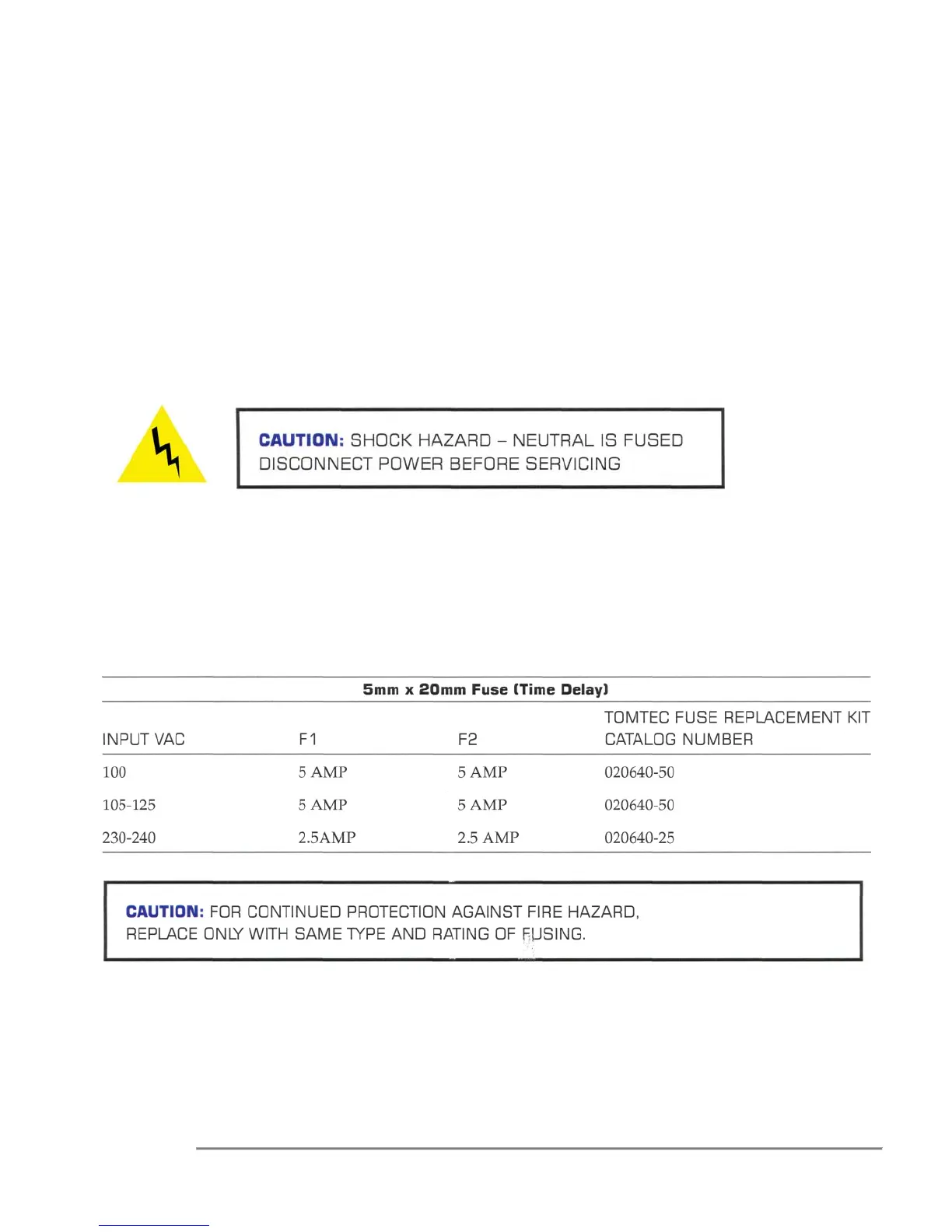
3.0 Fuse Replacement
Turn Main Power switch off. Disconnect power cord from the power entry module located on
the back of the Quadra. Remove the fuse holder located at the top of the power entry module
by pulling outward on the fuse holder's lower tab. With the fuse holder out of the power entry
module, remove the fuses.
Replace fuses according to the following chart:
Return the fuse holder to its position in the power entry module by pushing in until it is seated.
Re-connect the power cord to the power entry module. Turn Main Power switch on.



 To Next Page