Service Manual – Corrective maintenance
SERVICE MANUAL • X-MIND prime 3D • (19) • 11/2019 • NXMPEN080A
6.
Press the X-ray button to perform the acquisition.
7.
Open the files located in C:\ProgramData\Acteon Imaging\Panoramic X-Mind
Prime Ceph\Centring with an image viewer: the name of these files contains
two values: OFFSET_HORIZONTAL_Z and OFFSET_HORIZONTAL_UM.
8.
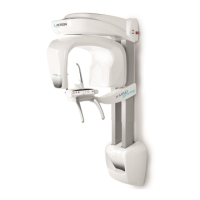
Among the files named OFFSET_HORIZONTAL_Z=000 look for the file in which
the reconstructed circle is the most continuous (see right image) and write
down the corresponding value OFFSET_HORIZONTAL_UM contained in the
name of the file.
e.g.: OFFSET_HORIZONTAL_Z=000 - OFFSET_HORIZONTAL_UM=
600
.bmp
9.
Repeat the operation for the files named OFFSET_HORIZONTAL_Z=300 and take
note of the OFFSET_HORIZONTAL_UM value.
e.g.: OFFSET_HORIZONTAL_Z=000 - OFFSET_HORIZONTAL_UM=
800
.bmp
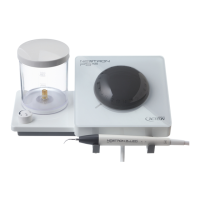
10.
In "PhD_C_Test" program go to menu "Settings" and select "Flat panel
position".



 To Next Page